Please give Poses & Expressions Names!
 Ron Knights
Posts: 2,472
Ron Knights
Posts: 2,472
I buy many "canned" pose and expression sets. Most are really helpful. I can't use the sets that have numbers instead of words. Here is an example. Please, DAZ get rid of the "number curse!
"***Edit, I found a better example:
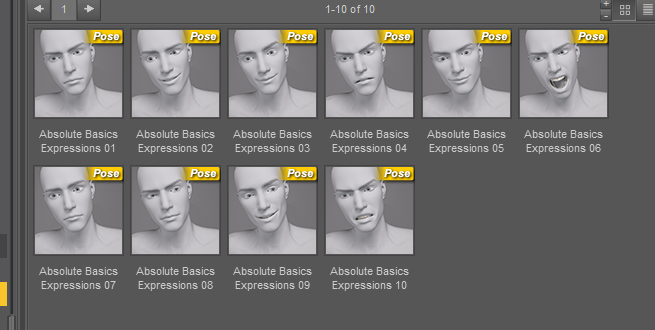
Post edited by Ron Knights on

Daz 3D is part of 
Connect
DAZ Productions, Inc.
7533 S Center View Ct #4664
West Jordan, UT 84084
Licensing Agreement | Terms of Service | Privacy Policy | EULA
© 2026 Daz Productions Inc. All Rights Reserved.
Comments
just return the ones you don't like and say why
it doesn't worry me to be honest but then I don't buy many either
I use dials a lot so I'm always super grateful when they have descriptive names. I have a memory like an ever-expanding black hole and the minute I click away from a reference window I will definitely forget which one I was trying to apply.
It might be that I'm just super tired and need some coffee, but I'm not following what the issue is.
With so many of them,that would irritate me to no end having to either rely on tiny thumbnail images to deduce what they were and/or having to actually apply & undo each one until I find the correct one. I think one possibility as to why this happens is the PA is from a foreign country and doesn't have enough of an english vocabulary to properly name all of them, so for consistency's sake, they simply number them. I think what they should do in a case like that is perhaps use a bigger image that appears when you hover over the thumbnail so you can better see what the expression/pose is.
I want descriptive names for Poses and Expressions. I want to know if someone is smiling, not "doing a number two!" The same goes for Poses.
Oh, I see. I think most of the products in the Daz3D store come with TIP files, so that once you hover the icon a larger icon appears so that you can better see what the preset looks like. :)
To enable this it's: Edit >> Preferences >> Interface >> Tool Tips On :)
But yeah, I can see why a description would also be helpful. Though expressions can sometimes be complex and difficult to name descriptively. Like a kind-kind-of-sort-of-smile, but not really, mouth side up a little. Eyes relaxed. Brow up. What, to me, could look like a smirk it could look like a sweet smile to someone else. lol Naming it "Va-Voom Expressions 04" keeps it open to interpretations, I guess. :) But yeah, descriptions could be helpful too. So I can see both sides.
numbers on parameter sliders would really irk me and yes if not in a bundle would never buy such a set.
but presets you load I do look at the pictures more, those are usually combined sliders
I totally hate tool tips. Most of the time they just get in the way of whatever I'm doing. I prefer to click on a thumbnail with a proper description. I don't like sliders all that much. It seems I spend most of my time trying to find things, or understand what I'm seeing.
for the poses that are presets, just right click and use the rename option. I can see why those expressions don't have names. They could mean anything.
VERY few vendors who make poses, or anything, for that matter, add larger tip files.
Related: It's annoying when you have to click on items made for multiple generations to see in the "Additional Information" window what generation the preset is for.
Well if we are to believe science and the empirical data science gathers in it's research then those expressions can all be properly classified & named using the FACS system. LOL, FACS needs to add a new one though for people wearing face masks. They can continue argueing back & forth between themselves over the effectiveness of masks against viral aerosols but they'd all agree they make FACS mostly useless.
OK. Hey, I wonder if we have any "COVID" facemasks for our DAZ characters.
You could always download the promos and make your own.
Personally speaking, I prefer numbering instead of names. Its makes production go faster and its keeps the name short in DS when viewing the thumbs. Especially since we are not allowed to use G8F in place of Genesis 8 Female.
+1
Seriously, this has been available in DS for a long time, and there are still quite a few vendors who either don't know about it, or maybe just find the extra work not worth it. I have started making mental notes on who provides them and who doesn't so I can avoid buying from those that don't. Often there just isn't enough definition/detail in the tiny thumbs to figure out exactly what you are looking at.
My problem as a non-native english speaker is that these "descriptive" names and poses often use phrases like "adorbs", "oooh goody" or "bruh" - - which don't have any meaning for me and let me find their meaning only after some searching in the internet.
So for me the diffence between numbers and "adobs" etc. is neglectable...
I would like hair colours, in particular, named so I don't give someone green hair by mistake. Make up too, though that can be trickier.
+1
And for poses and hair intended for multiple generations (typically G3 and G8), put the generation in the name and/or the thumbnail. Compatibility base for hair or poses is almost never set, so Smart Content filtering simply does not work
Actually it would be nice once eveything could be properly named including:
- Expression and Poses as stated
- G3 and G8 variants
- Iray/3DL textures (sometimes although those can be identified with RSL/MDL batches if properly defined)
- Hair and shader colors
And don't get me started on proper directories. Using mainly metadata nowadays and absolutely hate it once I got a bunch of mixed icons not saying what they are and which figure they're for.
There is also pantone colors they could assign to these presets that deal with color. I find an 'average DAZ Original female character's skin can run anywhere from grey to yellow to orange to green to brown depending on the white point used by the PA during development of the skin. Same problem with the hair. Can't DAZ provide a standard lit environment and a standard pantone palette of colors to PAs and customers along with the RGB profiles to match for an assortment of monitors as part of the DAZ Studio Essentials?
maikdecker, I don't even recognize any of the words you use as examples. For expressions, I'd look for words like "smile, grin, laugh, cry." For poses, I'd look for words like "stand, sit, run, walk," etc. Sorry I just ran out of other ideas for words. But I think you get the idea.
Richard, yes I agree that hair color should also be labelled correctly. Also, I've seen some pose/expression names that are very long, but don't even really give you any helpful info!
Mattymanx, are you really not able to use "G8F" instead of Genesis 8 Female?! I use abbreviations like that for all my content.
I agree with the OP Ron....
I usually create my own custom categories, and often put all the similar poses together... So I might have a folder for Standing-Hands-on Hips. You'd be surprised at how many PA just name their items "Pose 01". If you try to put more than one in a folder, it is a mess.
how does one do that
That only works with real human faces or at least faces where the muscle movement responds the way a real human face does. If you have a whole bunch of face parts that can just be moved independently of each other, not so much. Since the tell-tale signs that clearly identify one subtle expression vs a different subtle expression on a human face lies in the movement of the other parts of the face and other muscles that would respond when a human being is making those expressions. If you can just move different parts of the face willy nilly without surrounding facial muscles being effected or muscles connected to different expressions being "activated" when those emotions are being expressed, then that can leave the expression more open to interpretation. Which is why, I think, some of the expressions we see in character art aren't really clear on what emotion is being portrayed.
Some vendors manage with things like "Happy 01", "Angry 27", ect. Even attempting to use broad categories helps you know where to start. And things like "Sitting" "Standing" "Running" are great as well. I'm not against numbered poses, I don't like ONLY numbers. I do buy pose sets, but the numbered only ones are usually in bundles, and they get overlooked when I am searching for starter poses. If the product/folder is something like "Running Poses", then yes, the numbers are ok to me because I can still find it when I'm looking for running poses.
I know I can create my own folder, I do that for most content. It's just annoying to have yet another level of work I have to do if I want to find a pose when I need it.
Its Daz-Law to not use abriviations within the product in regards to the figures. Shortening the PA name and product name is good to do as it makes for much shorter file names.
Well if those creating poses, expressions ect., want to use numbers instead of names, probably would be a good idea to always use a folder for each bundle sold named differently then the last one, to avoid overwriting one's you aleady have installed. I have lost stuff because they use the same folder names and files names and things get overwritten, with no warning that I need to be careful with this.
Which is why I frequently waste time renameing expression dials using abbreviations so I can see them without having my viewport shrunk to a 5 inch square ( okay so that is a bit of an exaggeration but you know what I mean) I also tend to add PA's names to their product and get rid of vanity folders , But I don't use Smart Content soooomaybe that makes a difference