Ghost Lights 3 set looks amazing, but one quick question...

CybersoxCybersox Posts: 9,578

The speed of ghostlights with godrays and voulumetrics?  Instant buy.  But one question - in the text it says "The latest iteration of simple ghost lights are also included, which no longer requires setup materials and utilizes blank maps which avoid artifacts". I'm assuming that this replaces the old freebie set, not Ghost Lights 1, right? 

Comments

  • KindredArtsKindredArts Posts: 1,337

    Hi sox - i'm not replacing anything with this set. The original ghost light kit is available at a cheaper price than GLK3, and my free tutorial is still applicable for people who want to do ghost lights themselves (although i might update it with some newer tips). Aside from the volumetric props, the lights included in GLK3 are just a bit more up to date and easy to use. If people just want ghost lights with no volumetrics, IGLK1 or my tutorial thread are still valid. Enjoy!

  • GoggerGogger Posts: 2,509

    Hi sox - i'm not replacing anything with this set. The original ghost light kit is available at a cheaper price than GLK3, and my free tutorial is still applicable for people who want to do ghost lights themselves (although i might update it with some newer tips). Aside from the volumetric props, the lights included in GLK3 are just a bit more up to date and easy to use. If people just want ghost lights with no volumetrics, IGLK1 or my tutorial thread are still valid. Enjoy!

    I have GL 1&2 and bought this as much for the joy of using the GL products as supprorting you and urging you to keep making awesome stuff! GL has helped me out of many a lighting predicament! THANK YOU, Kindred Arts!!!

  • sunnyjeisunnyjei Posts: 502

    @KindredArts I second @Gogger on the compliments. Your sets are some of the easiest for me to get setup the way I want. Not naming any names but I purchased some others and despite following the directions (correctly??) I didn't end up with what I wanted and using the parameters tab with lights in the scene took a lot of time and didn't always give me what I wanted but yours was pretty much step 1, step 2, step 3- perfectly lit. THANK YOU :D The new ghost lights look great and I definitely plan on picking them up too.

  • NovicaNovica Posts: 23,925

    Instant buy! Congrats KA! 

  • vagansvagans Posts: 422

    Volumetrics look amazing. Can't wait to pick this one up.

  • barbultbarbult Posts: 26,590

    I did buy it, but the results are not what I expected. For example, the God Rays Light shines right through solid walls. I expected that if I shined it through a window, it would only come through the window glass area, and not through the surrounding wall or the dividers between window glass panes. 

    God Rays Light.jpg
    1000 x 1000 - 153K
  • Richard HaseltineRichard Haseltine Posts: 109,502
    barbult said:

    I did buy it, but the results are not what I expected. For example, the God Rays Light shines right through solid walls. I expected that if I shined it through a window, it would only come through the window glass area, and not through the surrounding wall or the dividers between window glass panes. 

    That's how they work - they are "ghost light" beams and glows, which have to be positioned to come from the right place but are much quicker than the real thing as they aren't using a real volume to produce the look.

  • SevrinSevrin Posts: 6,314
    barbult said:

    I did buy it, but the results are not what I expected. For example, the God Rays Light shines right through solid walls. I expected that if I shined it through a window, it would only come through the window glass area, and not through the surrounding wall or the dividers between window glass panes. 

    Thanks for posting this.  

  • barbultbarbult Posts: 26,590

    Before I saw Richard's reply above, I went off and tried another idea. I thought maybe I was supposed to use a regualr ghost light outside the window and use the Atmo Grid inside to create the rays. That experiment didn't work either. All I got were horizontal and vertical "bars" that don't look like volume. I think this is probably because the Atmo Grid is made up of horizontal and vertical planes. Perhaps if I had changed the angle of the grid or the camera or the light, it would have worked better.

    I see I need more practice or better instructions for using this product successfully. Does anyone have examples they've rendered and some tips for success?


    Atmo Grid IGLK3 Square.jpg
    1000 x 1000 - 105K
  • barbultbarbult Posts: 26,590
    edited March 2020

    I think I might be using the Atmo Grid incorrectly. The manual says it is to be used in conjunction with other Volumetric Ghost Lights. I used it with the IGLK3 Square Ghost Light. Even though IGLK3 Square Ghost Light is part of this product, maybe it is not a volumetric light. Maybe the Atmo Grid is only supposed to be used with the other prop lights in the kit?????

    Post edited by barbult on
  • barbultbarbult Posts: 26,590
    edited March 2020

    I'm making a little progress, although I am still not sure what the magic is. created a scene with the Atmo Grid and the Glowball. This time I turned on both Dome and Scene instead of just Scene Only. Maybe the extra dome light helped (it was at low intensity). The crosshatching of the Atmo Grid is only barely visible upon close scrutiny on the floor of the scene.

    Edit: I added another render with the HDRI at a higher intensity and three chairs at various distances from the camera.

    Atmo Grid IGLK3 Glowball and HDRI light.jpg
    1000 x 1000 - 342K
    Atmo Grid IGLK3 Glowball and HDRi light_001.jpg
    1000 x 1000 - 366K
    Post edited by barbult on
  • AsariAsari Posts: 703
    edited April 2020
    Generally I love these. Versatile, easy to use, good results. One thing is bothering me - are these supposed to take so long to render? I don't use the atmo grid only the rectangle light with a severely reduced volumetric prop. I understand volumetric effects are going to slow Iray considerably so I expect renders to take long. However this is taking a 1800x1200 render approximately 30 minutes and is still grainy ... is that how it's supposed to be that slow or am I doing something wrong?
    Post edited by Asari on
  • scorpioscorpio Posts: 8,533
    Asari said:
    Generally I love these. Versatile, easy to use, good results. One thing is bothering me - are these supposed to take so long to render? I don't use the atmo grid only the rectangle light with a severely reduced volumetric prop. I understand volumetric effects are going to slow Iray considerably so I expect renders to take long. However this is taking a 1800x1200 render approximately 30 minutes and is still grainy ... is that how it's supposed to be that slow or am I doing something wrong?

    I'm finding that yes they do take a long long time to render.

  • KindredArtsKindredArts Posts: 1,337
    Asari said:
    Generally I love these. Versatile, easy to use, good results. One thing is bothering me - are these supposed to take so long to render? I don't use the atmo grid only the rectangle light with a severely reduced volumetric prop. I understand volumetric effects are going to slow Iray considerably so I expect renders to take long. However this is taking a 1800x1200 render approximately 30 minutes and is still grainy ... is that how it's supposed to be that slow or am I doing something wrong?

    There's a lot of factors to take into account here including hardware, scene lighting/complexity and a myriad of other stuff. They're going to be generally quicker than SSS volumes but not nearly as quick as standard ghost lights, or even mesh lights for that matter. I don't think you can get this kind of effect any quicker, but there are things you can do to clear things up quicker.

    Are you using the post denoiser in the filter menu? It's pretty great if you're struggling with noise, and i use it for most renders now. 

  • AsariAsari Posts: 703
    Thx @scorpio and @KindredArts for the quick answers!

    Scene isn't overly complicated but not too simple either since it involves glass with refraction settings so it's slower by design. Also, lots and Los of polys but in other scenes the same props didn't slow the render down so much. I don't use the denoiser because my scene involves a person and I don't like the effect of the denoiser on skin details. It's not a big close up but close enough to the figure that I want to preserve certain details. Guess I have to live with that. Otherwise it's great.

  • KindredArtsKindredArts Posts: 1,337
    Asari said:
    Thx @scorpio and @KindredArts for the quick answers!


    Scene isn't overly complicated but not too simple either since it involves glass with refraction settings so it's slower by design. Also, lots and Los of polys but in other scenes the same props didn't slow the render down so much. I don't use the denoiser because my scene involves a person and I don't like the effect of the denoiser on skin details. It's not a big close up but close enough to the figure that I want to preserve certain details. Guess I have to live with that. Otherwise it's great.

    You could try doing two renders and compositing in photoshop/gimp i usually do a few different renders anyway so i have different plates to work with. One with background and one without. One denoised, one regular. One with volume lights, and one without. Perhaps a DOF canvas or an AO pass. I don't think it's necessary to run all of these for a significant amount of time either. You're likely going to use an image editor in post anyway so you might as well have plenty of source material.

  • AsariAsari Posts: 703
    If I set utout opacity of particle and volume in surface settings, will it deactivate the volumetric part?
  • KindredArtsKindredArts Posts: 1,337
    Asari said:
    If I set utout opacity of particle and volume in surface settings, will it deactivate the volumetric part?

    Yes if you set the "particle" and "volume" surfaces to zero on the cutout section, you can disable them.

  • AsariAsari Posts: 703
    Asari said:
    If I set utout opacity of particle and volume in surface settings, will it deactivate the volumetric part?

    Yes if you set the "particle" and "volume" surfaces to zero on the cutout section, you can disable them.

    Thx for the quick reply and great support, really appreciate it.
  • KindredArtsKindredArts Posts: 1,337
    Asari said:
    Asari said:
    If I set utout opacity of particle and volume in surface settings, will it deactivate the volumetric part?

    Yes if you set the "particle" and "volume" surfaces to zero on the cutout section, you can disable them.


    Thx for the quick reply and great support, really appreciate it.

    No problem yes

  • 3Diva3Diva Posts: 12,022
    Asari said:
    Asari said:
    If I set utout opacity of particle and volume in surface settings, will it deactivate the volumetric part?

    Yes if you set the "particle" and "volume" surfaces to zero on the cutout section, you can disable them.


    Thx for the quick reply and great support, really appreciate it.

    No problem yes

    The Ghost Light Kit 3 is a great product, thank you so much for continuing to put out products that help us achieve more and more realism with our renders. :) 

  • KindredArtsKindredArts Posts: 1,337
    Asari said:
    Asari said:
    If I set utout opacity of particle and volume in surface settings, will it deactivate the volumetric part?

    Yes if you set the "particle" and "volume" surfaces to zero on the cutout section, you can disable them.


    Thx for the quick reply and great support, really appreciate it.

    No problem yes

    The Ghost Light Kit 3 is a great product, thank you so much for continuing to put out products that help us achieve more and more realism with our renders. :) 

    Your welcome! smiley

  • marblemarble Posts: 7,500

    I have kits one and two and have used them extensively. I like the look of this new set and am tempted to buy it too. However, I have recently noticed a kind of clash between photometric lights and Ghost Lights. This takes the form of excessive grain which takes a long time to clear. The same scene lit with two spotlights renders In one third of the time that the scene lit with a spotlight and a Ghost Light takes. 

    I am running the beta version of Daz Studio so it might be a "feature" of that as I don't recall having this issue in the past. I am just wondering whether anyone else has noticed this or whether @KindredArts has any thoughts on it. 

  • KindredArtsKindredArts Posts: 1,337
    marble said:

    I have kits one and two and have used them extensively. I like the look of this new set and am tempted to buy it too. However, I have recently noticed a kind of clash between photometric lights and Ghost Lights. This takes the form of excessive grain which takes a long time to clear. The same scene lit with two spotlights renders In one third of the time that the scene lit with a spotlight and a Ghost Light takes. 

    I am running the beta version of Daz Studio so it might be a "feature" of that as I don't recall having this issue in the past. I am just wondering whether anyone else has noticed this or whether @KindredArts has any thoughts on it. 

    I can't really comment on this, i haven't used photometrics much since 3DL. Does the same thing happen with normal mesh lights? I'm using a beta build and i haven't noticed any stark changes yet.

  • marblemarble Posts: 7,500
    marble said:

    I have kits one and two and have used them extensively. I like the look of this new set and am tempted to buy it too. However, I have recently noticed a kind of clash between photometric lights and Ghost Lights. This takes the form of excessive grain which takes a long time to clear. The same scene lit with two spotlights renders In one third of the time that the scene lit with a spotlight and a Ghost Light takes. 

    I am running the beta version of Daz Studio so it might be a "feature" of that as I don't recall having this issue in the past. I am just wondering whether anyone else has noticed this or whether @KindredArts has any thoughts on it. 

    I can't really comment on this, i haven't used photometrics much since 3DL. Does the same thing happen with normal mesh lights? I'm using a beta build and i haven't noticed any stark changes yet.

    I understand - there's not much to go on so I'll have to keep an eye on it and see if anything else catches my eye. The only mesh lights I use are yours. Otherwise I use Photometric spotlights and, when possible, HDRi. Lighting can make such a difference to render times and it is not as straightforward as saying "use this one but not that one". Sometimes photometric lights produce fast renders and Ghost Lights don't (and vice-versa). 

  • TheKDTheKD Posts: 2,711

    I think photometrics means just regular old vanilla iray spotlights.

  • marblemarble Posts: 7,500
    edited April 2020
    TheKD said:

    I think photometrics means just regular old vanilla iray spotlights.

    The DAZ lights are photometric(Spot, Point, Distant, etc.) when I use them in Iray. 

    spotlight.jpg
    592 x 715 - 69K
    Post edited by marble on
  • GoggerGogger Posts: 2,509
    edited April 2020

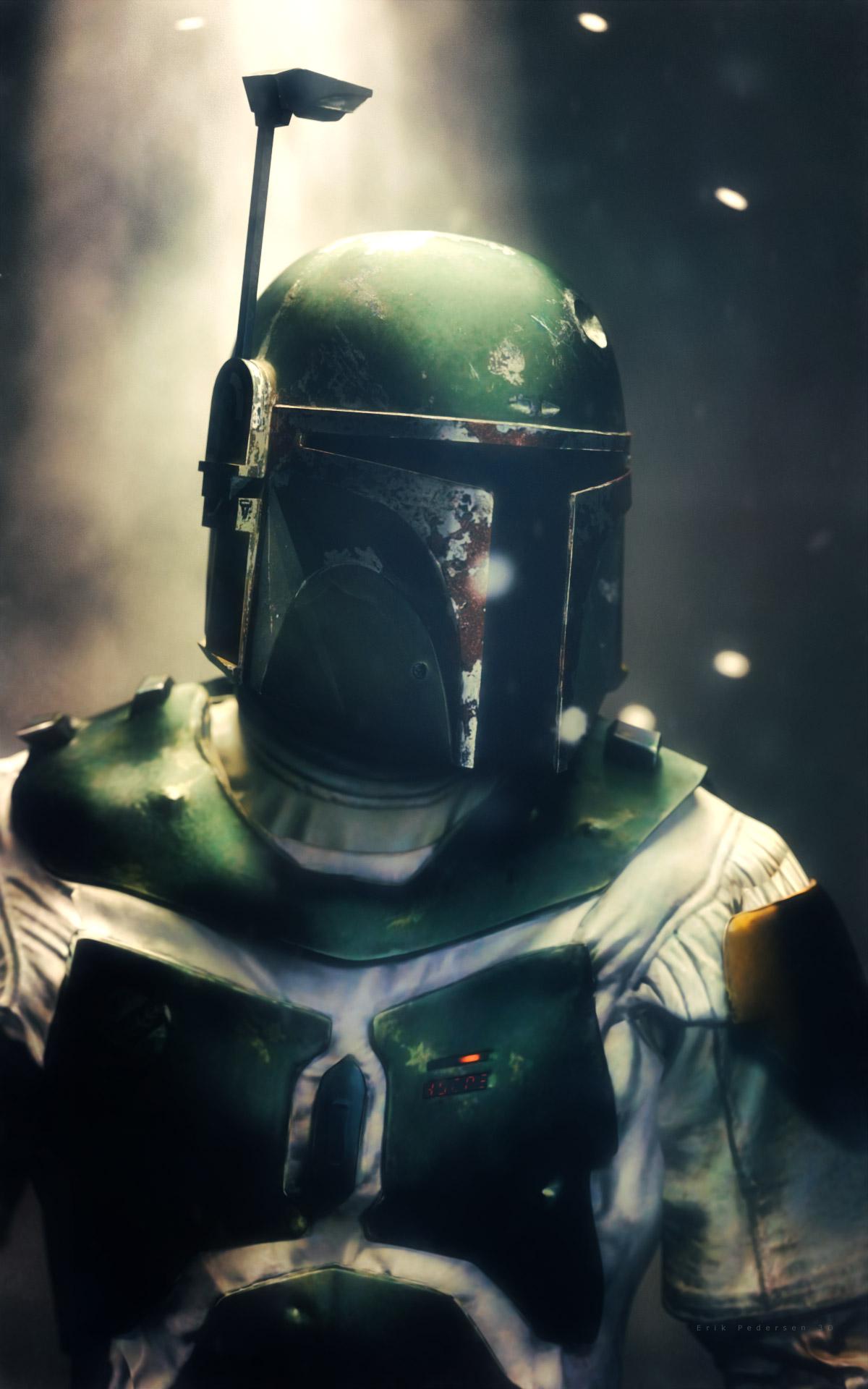
    Thanks to Ghost Light 3 I was able to get some extra dramatic lighting in this render.  Lovin' it!
    __VT_Boba_Fetta_3D_Erik_Pedersen.jpg
    1200 x 1920 - 269K
    Post edited by Gogger on
  • Eggs ActlyEggs Actly Posts: 168

    Awesome product - use it in a vast majority of my renders. Easy to set up lights, that looks good. Keep up your fantastic work,  @KindredArts

  • barbultbarbult Posts: 26,590
    Gogger said:

    Thanks to Ghost Light 3 I was able to get some extra dramatic lighting in this render.  Lovin' it!

    Wow, you did a great job!

Sign In or Register to comment.
