"TheAntFarm" painterly Robert McCall look in his Anti-Gravity promotion renders
 Retro Lad
Posts: 472
Retro Lad
Posts: 472
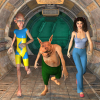
Do any of you know how the "TheAntFarm" created his painterly Robert McCall look in his Anti-Gravity promotion renders?
https://www.daz3d.com/anti-gravity-office-space
http://www.mccallstudios.com/floating-worlds/
I attached a copy of a render by "TheAntFarm". Has a Robert McCall look to it in my opinion. Very interesting and well done.
Post edited by Retro Lad on

Daz 3D is part of 
Connect
DAZ Productions, Inc.
7533 S Center View Ct #4664
West Jordan, UT 84084
Licensing Agreement | Terms of Service | Privacy Policy | EULA
© 2026 Daz Productions Inc. All Rights Reserved.
Comments
a number of ways yiu could
Topaz Labs Topaz Studio is free and has painterly filters
G'MIC can online, with Philemo's Carrara plugin or the GIMP plugin
https://gmic.eu/download.shtml
https://gmicol.greyc.fr/
other programs include
Fotosketcher which is free
Dynamic Auto Painter which has a useable demo you could crop
a quick go with G'MIC online and a filter I thought was closeish
Render
G'MIC filter
Wendy,
I have the G'MIC plugin for Gimp, and isn't there a version of it for Carrara. I may have installed that already.
I couldn't find a straight download for Topaz without going through that annoying step by step download nonsense that sometimes installs malware and bloat crap. If you know of a quick, zip, or rar, download for Topaz please post the address for it. Thanks!
Fotosketcher is one I will check out, and maybe Dynamic Auto Painter too although I don't like using demos, or trial versions much.
I own an older version Painter, which is Painter 8 and I still use it sometimes for fixing stuff. I don't know if there are any special filters, or plugins for it, that are still available that would make CG renders have a painterly look. Painter 8 has a few built-in options for turning CG renders, or photgraphs, into Van Gogh, and Impressionistic style paintings.
Topaz I got from their site amd yes you need an account and it phones home as is cloud based
I cannot link it as its a commercial software even though the basic studio is free
Cloud based stuff I stay away from too. I prefer being offline when I work on an art project, and I never connect my DazStudio software to the the Internet. I am from the old days when "privacy" was the accepted norm.
You can also do something like this with the Nik Collection by DxO. Used to be Google's Nik Collection ... and specifically the plugin called Color Efex Pro which works in both Lightroom and Photoshop.
https://www.filterforge.com/filters/8847.html
Looks like the good old sketchy paint filter for Filterforge
When you can tell what kind of filter is used out of the gazillion that's out there, you've been doing the 'art' thing too long, Lol! Great eye!
I had to do some compositing in photoshop to get some of the detail back from the original render. You could also run the filter once with small brush strokes, once with big ones, and then composite the whole thing so you can get higher detail while still looking all painterly.
Awesome! I've been looking for something like this and Filterforge is 80% off today, so you sold me :)
You found that QUICK, hah, hah Thanks!
It sure looks like what "TheAntFarm" used on his promo renders.
I did a quick check of my old "purchase list" and I found FilterForge listed with my login and password info. My memory is slowly going, so "lists" of things are essential these days. I had completely forgotten that I had bought FilterForge. Now where the heck did I store it?
Wendy I finally took a look at the FotoSketcher webpage and then downloaded it and some videos on how to use it. The effects look like the Filter Forge Sketchy filter effect.
I must have erased my purchased downloaded copy of an older version of Filter Forge, maybe version 4. It was probably during a hard drive space purge that the files were erased.
So, I sent a customer question to the Filter Forge company asking them if they can allow me to download a replacement for my older version of Filter Forge. I download a free 30 day trial version, for the time being, and it successfuly downloaded the Sketchy fillter.
I had lousy dealings with FilterForge sadly so won’t touch it
bought FF3 7 years ago supposed to be on sale got charged full price for the standard was told sale ended minutes before and in spite of begrudgingly accepting this only ever got offered upgrades to the next standard version for more than the pro versions were offered since but wary of buying after my last experience and also to add salt if I even attempted to as a registered owner got offered the lousy standard upgrades instead!
Even emailing them got those lousy offers! Eventually told them to shove it.
Neither Filter Forge’s Sketchy Paint or Photosketcher seemed to really be able to replicate that effect... I took an old image of one of my models and ran it through Photosketcher’s Oil painting setting and then messed around with Sketchy Paint’s settings in FF... I actually had to make the image twice as big (in Photoshop) first and then reduce the pixel setting in FF to make the effects less severe... then I put both end results into photoshop and layered them over the original, played around with their transparency levels and final contrast and saturation on the flattened image.
Original-
Altered image-
I tried a different image... Not great... but a start.
Original-
Altered Image-
What is this sorcery?? Thanks for this link - I'm loving the Illustration and Graphic-Novel filters (tried the online one and then downloaded the GIMP plugin- works great (plus there are so many more filters I haven't had time to play with yet.
Thanks Everyone for your help!!
Serious personal health and financial problems have kept me away from CG image creation. I am all right now. Well, mostly.
Tim (Retro Lad)
Retro Lad,
I have to admit that I'm also a fan of The AntFarm's products. Thankfully they go on sale now and then. Part of the allure lies in the promo images. I've always associated those images with a 1930s style. The reference to Robert McCall's art only brings matters home: this style calls to mind a Flash Gordon era, futuristc, brawny and expansive.
Did you get Filter Forge to give you the post-processing effect you were looking for? This OP in this thread dates back to 2019, way before GenAI burst on the scene. That bygone era was before I myself picked up digital art. Judging by today's uproar over GenAI, I can only imagine the unease "one-click" image processing with Filter Forge must have kicked up.
Cheers!
Glad to hear you're doing better
I would do it as a Photoshop action, and then blend the action results with the original render for the areas that need to retain sharpness.
You could effectively do the same thing with an AI prompt instead of the Phtotshop action...
Upload render to AI engine of choice (so it would be an image-to-image edit you'd use). The AI prompt would be something like "Make the scene look like painted concept art". I find this sort of style alteration works best if you keep the prompt short and accurate.
Then of course, if you need to restore some definition in certain areas, you simply blend the AI image with the original render in the Photo editing software of your choice (Photoshop, Paintshop Pro, Affinity, The GIMP etc etc etc).