iRay rendering; what was I doing wrong? SOLVED
 Jerife
Posts: 272
Jerife
Posts: 272
I don't really know the true meaning of most of the technical vocabulary, my tech background is law school 
So is not easy for me to elaborate a question; I thought forcing DS to leave some CPU for my mouse was the way
By the way, maybe you know how to force DS to use only 98% of my CPU ?
But Richard said
Unless your CPU(s) give 50 threads you can't do that literally, but you can exclude one or more virtual cores (in Windows, I assuem Mac has an equivalent) by finding the application in Task Manager's details tab, right-clicking on it, and selecting set Affinity then unchecking one or more cores. On an 8 thread system each represents 12.5% of the total possible load
So I need help but do not know the questions or how to title this thread 
I only do iRay renders, my machine is way better than all the previous I've had, my joy working with DS is worst; I am sure I'm doing something wrong
Rendering times have increased, results are not as good, very grainy, each time iRay is processing the mouse goes dead and lives only in little bursts and when I look at what is my computer doing while this happens I see all the work is done by the CPU, none by the GPU and all memories are not very used
This general sluggishness I have since I had the new computer where I installed DS4.10 as a first; Now I'm using the general release 4.11
In another post ebergerly has told us how to preview iRay with good control of the camera and avoid this slow
Before you go buying anything, first make sure you have your settings optimized to speed up the iray preview:
- Render Settings/General/Auto Headlamp = Never
- Draw Settings/Drawing/Response Threshold (msec) = 5000
- Draw Settings/Drawing/Inactive Viewport Delay = Off
- Edit/Preferences/Interface/Display Optimization = Best
- Use Perspective View when manipulating, since any Camera view is generally much slower, especially if you have a light parented to the camera like a headlamp
- Avoid using "Point At" if you want your character's eyes to point at the camera. That will slow the camera view manipulation a lot.
This has worked a lot to me
But I continue puzzled by what on my settings is making my rendering daz experience gone desperately slow 
I am going to give you all my data settings with screenshots in order not to use tech words
This is my system:
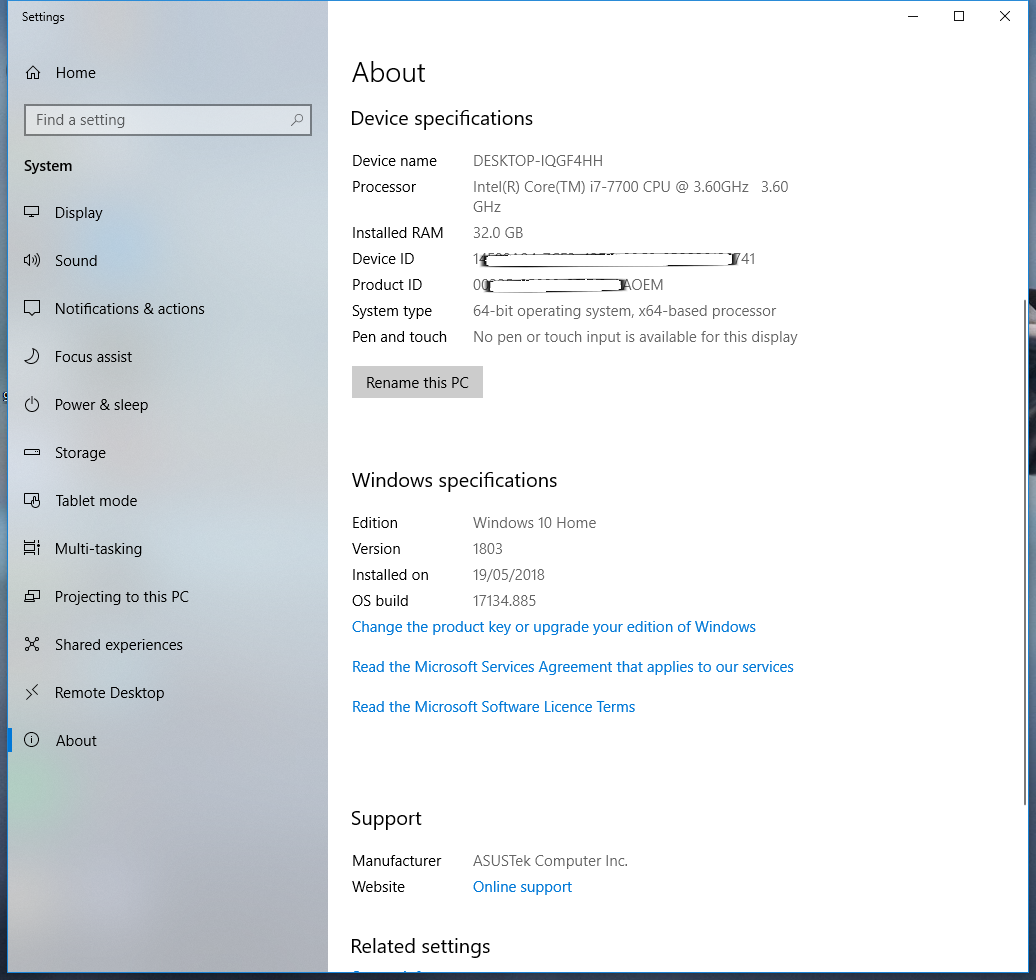
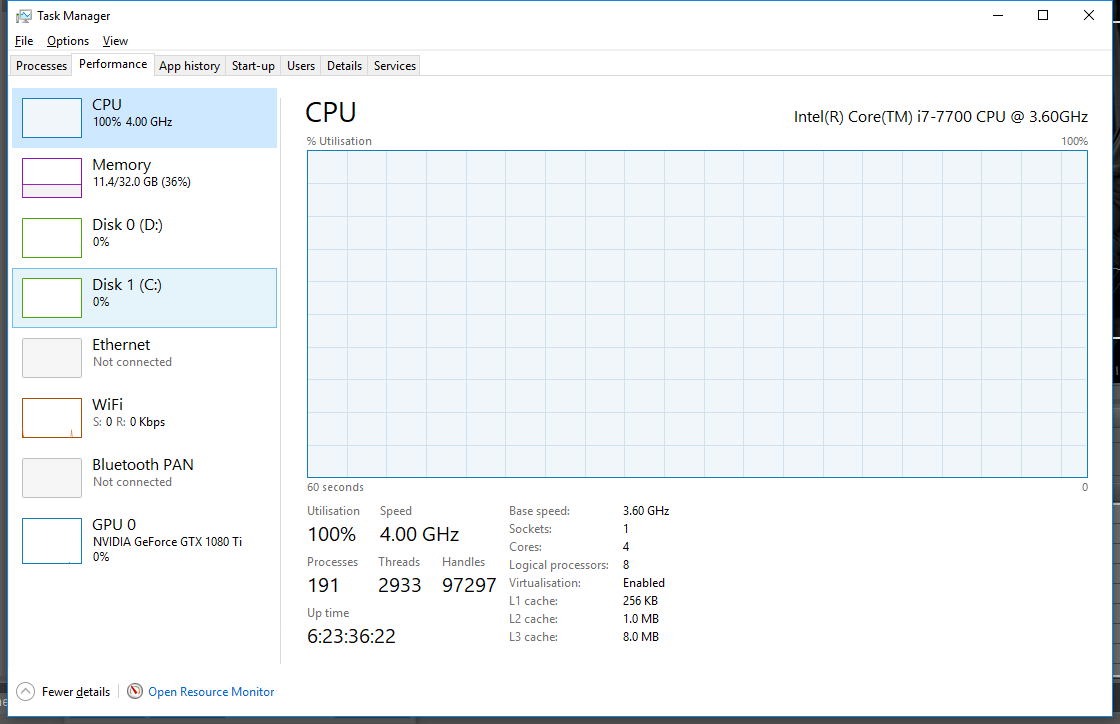
This is what the CPU is doing while rendering
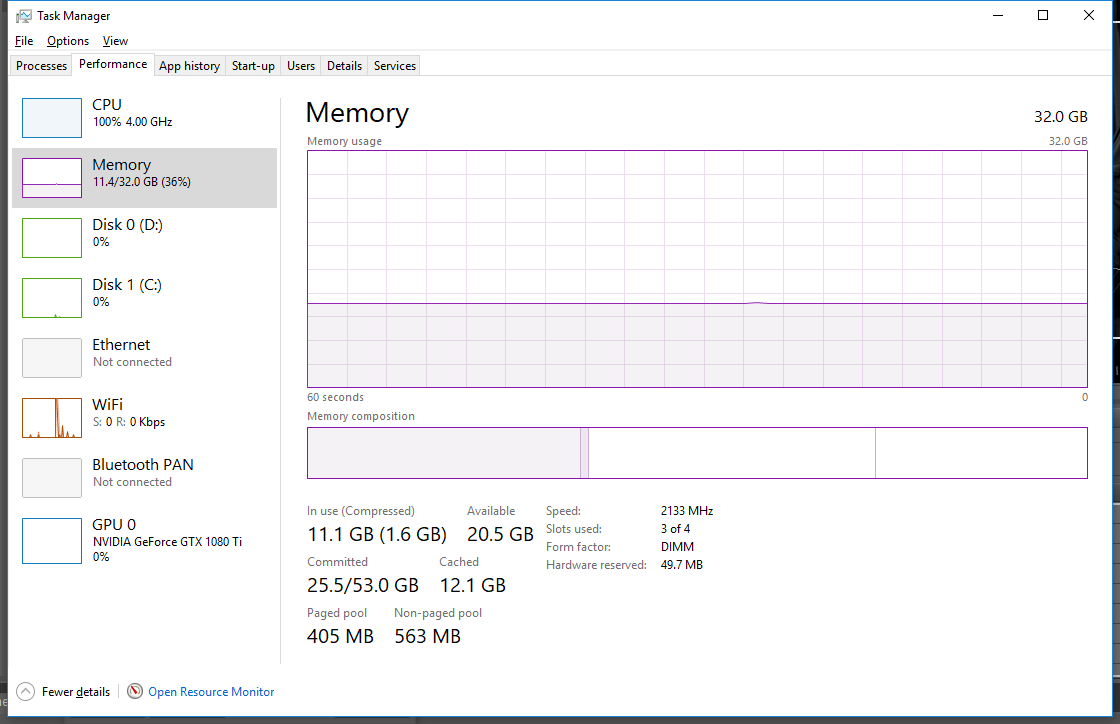
This the use of memory
And this the GPU
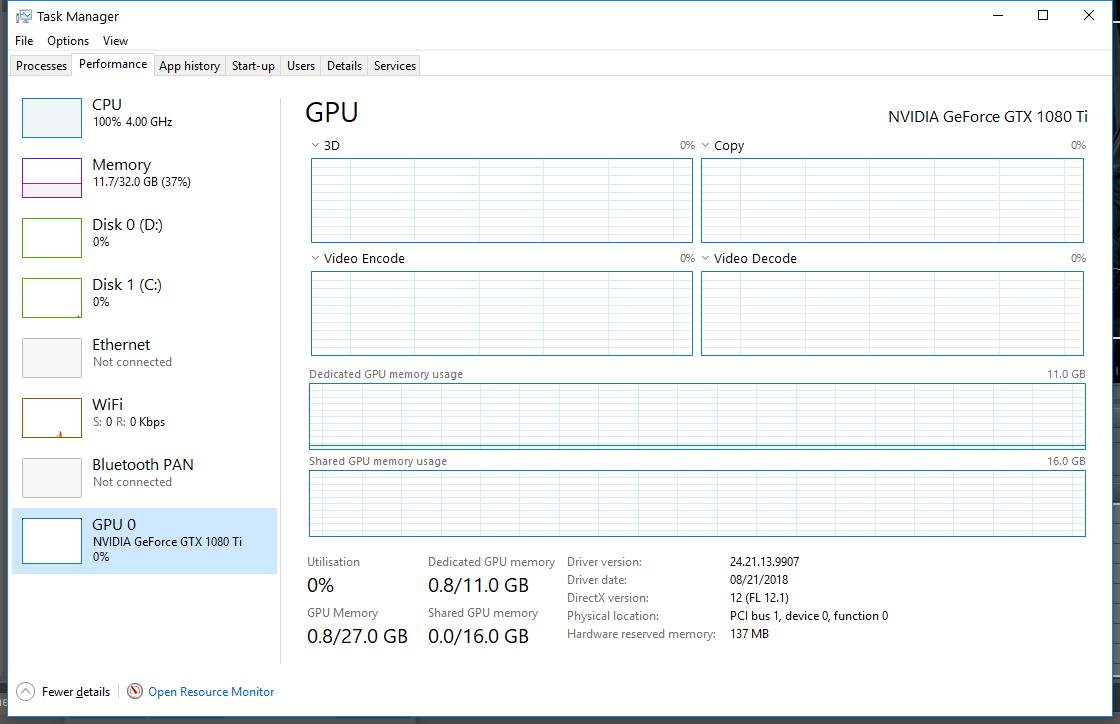
As you can see all the work is done by 4 cores 8 logical processors of the CPU, none by the Nvidia GTX 1080 Ti GPU (only 0.8 of its 11Gb dedicated memory) and is only using 11 Gb having 32Gb
These are the settings in my Nvidia card
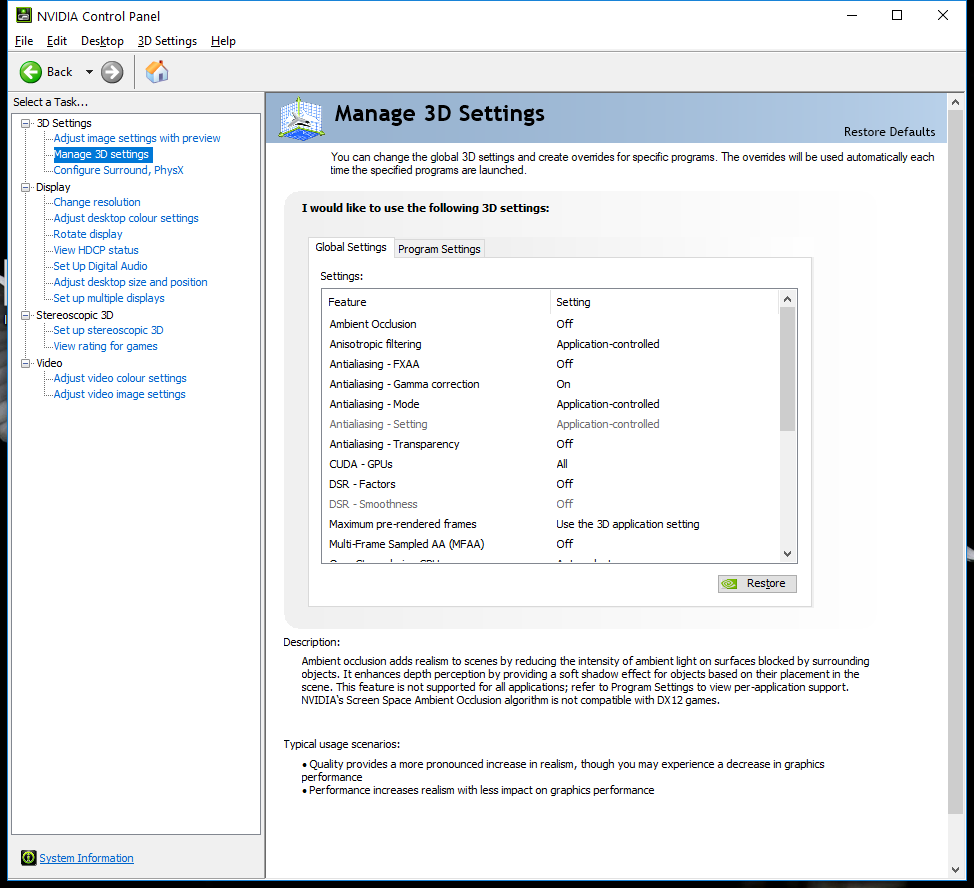
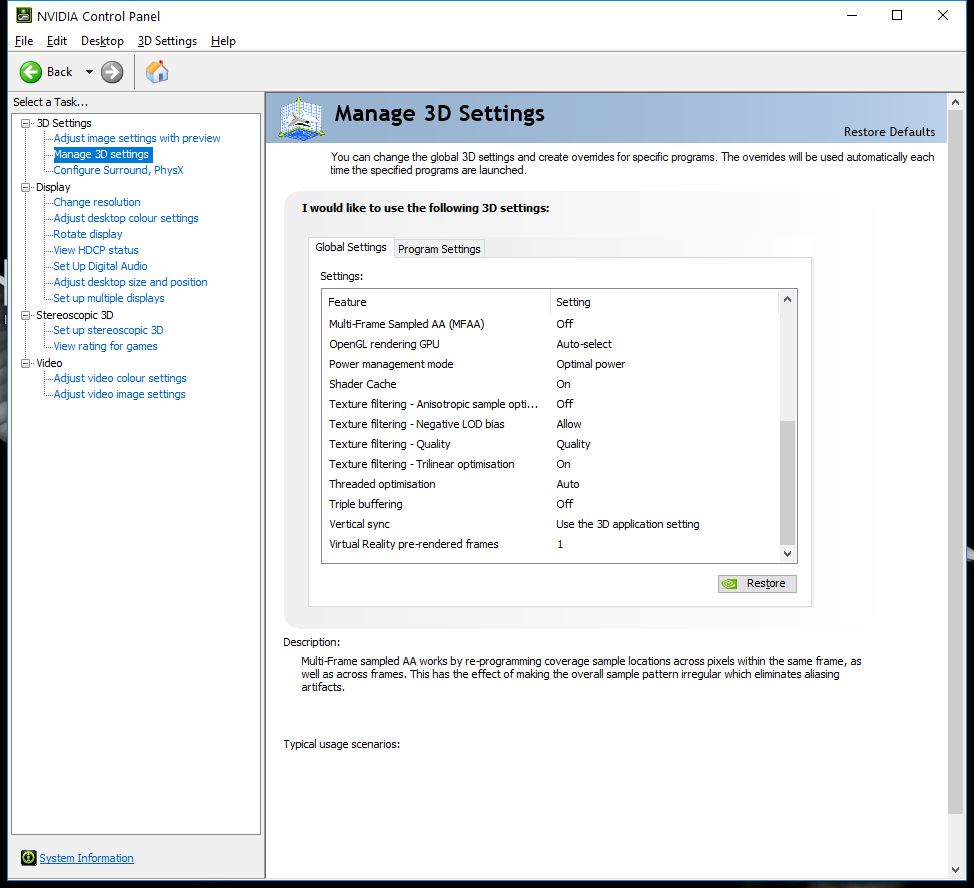
And these my render settings in DS
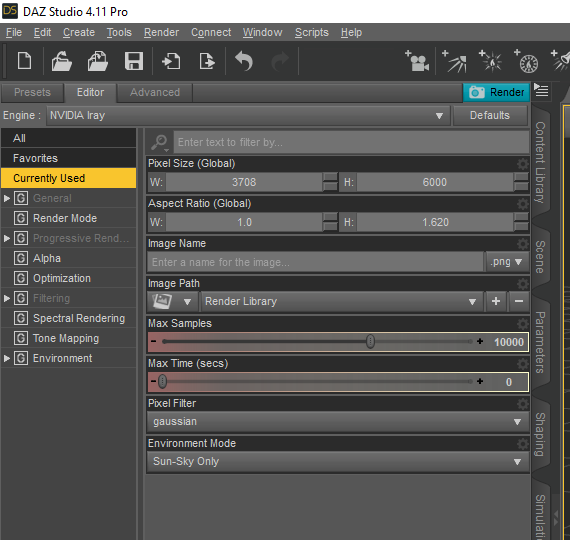
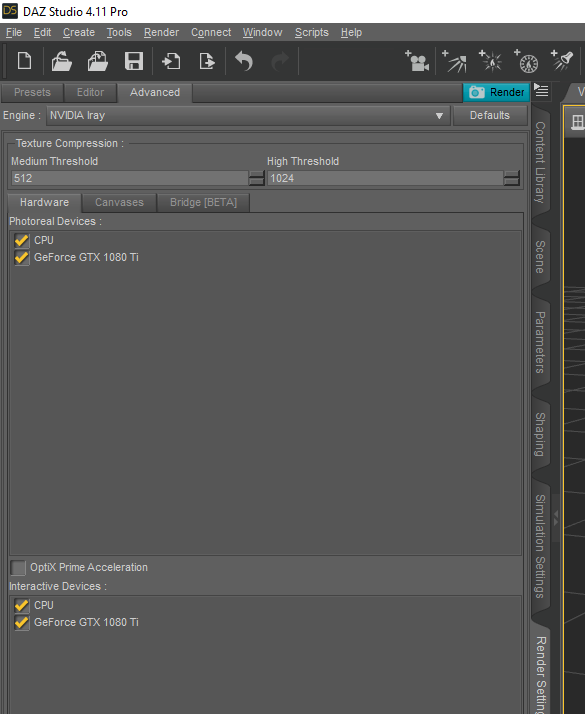
Why I can't use the mouse while rendering if there is plenty of memory avalaible? Cause I can open other programs but not use the mouse but in bursts in them
(I've tried several mice and updated its drivers)
(I've updated the video card when I installed 4.11)
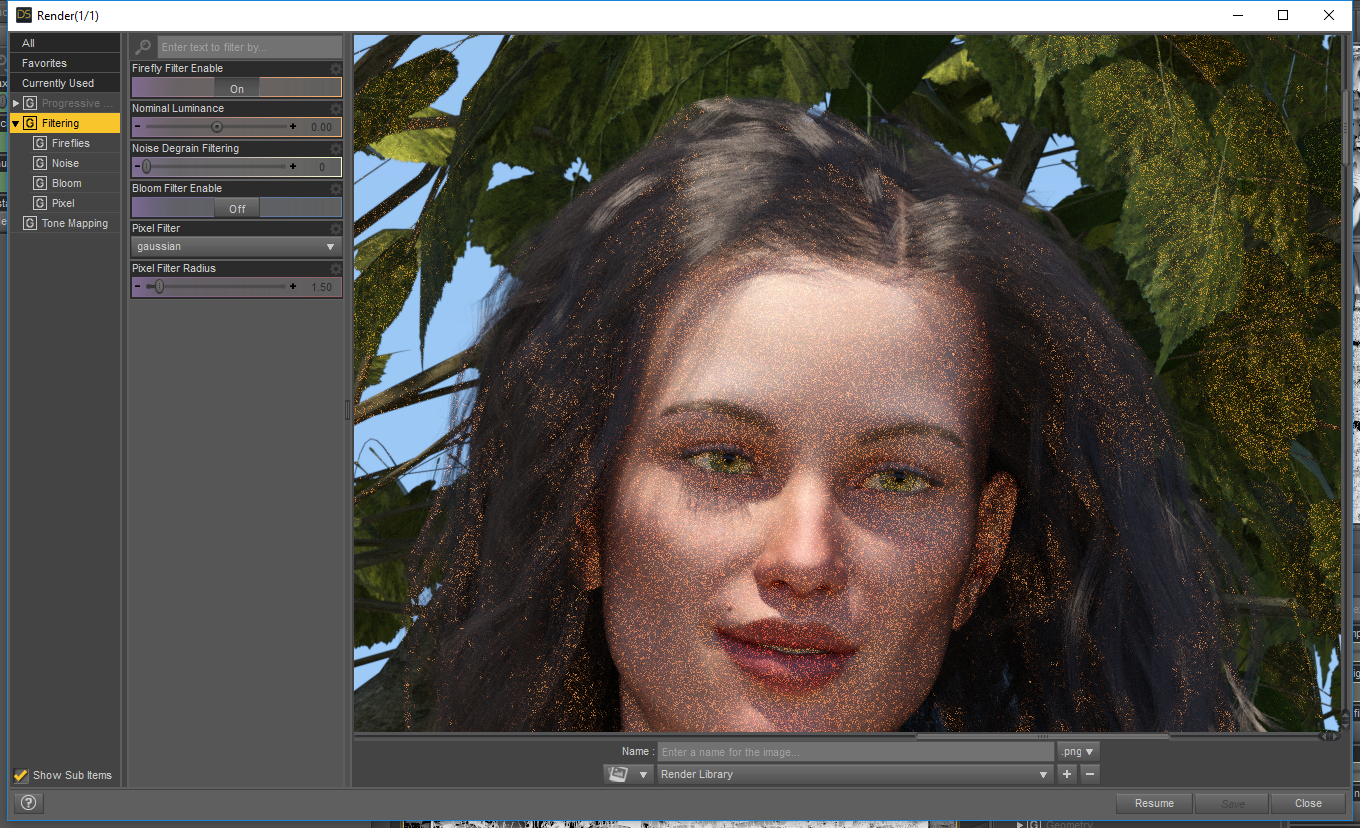
I also would love to know about those filters denoise related

Daz 3D is part of 
Connect
DAZ Productions, Inc.
7533 S Center View Ct #4664
West Jordan, UT 84084
Licensing Agreement | Terms of Service | Privacy Policy | EULA
© 2026 Daz Productions Inc. All Rights Reserved.
Comments
Are your Graphic card drivers up todate?
You are rendering very large, whatdo you have in the scene there's a chance that at that size you are running out of VRAM which is why Iray is dropping to CPU only.
Try downloading and installing GPU-Z it gives an better idea of what your graphics card is doing.
thanks for your answer scorpio
(I've updated the video card when I installed 4.11)
I've done this size since I started with iray after reading some threads that said bigger was better, lol. It was in my old laptops with only 8GB
Will look that GPU-Z
Added (Lol, I've seen those before, they are a bit chinese to me and won't know what to do with all that information)
1°/ get latest nvidia drivers and do a clean install (there's an option in the installer to tickle) so that old drivers are wiped out
2°/ deselect the CPU in the rendering devices
From there, do a render and post your log
I've made a test. rendering at 6 hundred instead of 6 thousand pixels; it is faster (but the result is not printable)
The only difference is now the memory is using the 32 GB instead of 11
CPU use is 100% GPU use is almost none (Dedicated mem is yet 0.8/11GB shared GPU mem is 0.1/16Gb) which result I inform you but don't really know what implies
I have been typing this while rendering and the mouse has clogged several times but less
Here at 4% completion after 15 min
(the light in this scene is sun.sky plus a RenderTheory light plane parented to the camera)
I updated the drivers on June 5th. current is 24.21.13.9924
If I deselect the CPU I only obtain a black canvas
but will do to show you the log file
Are you sure the GPU is being used? Some CPU will be used when the render is running on the nVidia card, but not 100%. In Render Settings (Render> REnder Settings ... or Ctrl-Shift-R) ensure that Engine is set to NVIDIA Iray (it shoudl be), then in the Advanced tab ensure that teh graphics card you wish to do the render on is checked (in both Photoreal and Interacive Devices) and that CPU is not checked (if the render needs more VRAM than your gfx card has it will fall back to CPU anyway).. Do teh render and watch the messages at the start of the process, untilthe actual canvas (image) is written to, and watch for messages about falling back to CPU or anything similar (I cannot recall the exact message).
(I just refreshed the page, and there are several more responses then when I started this post…)
I suspect a big part of your slowness issue is related to the dimensions of your image:
I'm not sure where you read "larger is better" and I've no idea of the context, but I can tell you rendering an image that is 3408 by 6000 pixels is going to be slow going.
I like large images, and I frequently render "large" images, which to me means the about 2000 on the smaller dimension. There are times when I've been forced to render smaller if I want to keep it all on the GPU. The more pixels Iray has to process, the slower it's going to take to get rid of that noise.
When Iray was first released, one of the ways people would get images rendered "faster" was to double the dimensions, render to maybe 50% or slightly better convergence, and then size the image to 50% in Photoshop or Gimp, letting the graphics program clean up the noise. Iray has improved greatly since then, and I don't recommend this technique on computers with newer Nvidia cards.
The current version of Iray in DS 4.11 is visually slower than the version in 4.10. Each iteration takes longer, but it's also processing more information. I haven't tested it, but based on what I've read, I'd expect the image to reach 95% Convergence with fewer iterations than the older Iray version. I realize you've bypassed that algorithm, (Yay!) but I think it would be a good way to test the two. (I have both installed; I should try it…)
About the only thing I pay attention to with GPU-Z is Memory Used and GPU Load, about half-way down on the Sensors tab. I set the Draw Mode to Nvidia Iray in my viewport, (the scene I'm working on now is actual in 3Delight,) and you can see in the graph when Iray started to render. There is a big jump in the graphs of both, including the GPU going from virtually nothing to 100%.
If you are rendering in Iray and the GPU Load is 0%, the CPU is doing all of the work.
Your Nvidia driver is too old. It's version 399.07 / 399.24 WHQL from last year (mine is 430 / 26.21.14.3086)
DAZ 4.11 requires at least 418 if I'm not mistaken
Get studio drivers here for example https://www.nvidia.com/download/driverResults.aspx/147971/en-us
Install as I said and you should be able to render with the GPU
Hey, Simon. Good to see you here.
Here is the image she uploaded with those settings:
@Jerife, as others have recommended, uncheck the boxes for CPU. (In my own experience, I've found using CPU doesn't increase my rendering speed enough to be worth using, and it's not being used for the render, it will be available for your mouse.)
Iray is a resource hog. It will use 100% of both your GPU and CPU, it they are both enabled.
I've also had the GPU stop working for unknown reasons. Rebooting my computer usually fixes that. (In fact, I shut my computers down at night; I'll only leave The Beast running if it's busy rendering.)
Good find. I know I didn't associate the "24.21.13.9924" with the version numbers I'm familiar with.
@Jerife, I'm running the 418.91 drivers. I've read others who've had issues with it that went to 419.xx without problems. I have read of several who have had issues with the 430.xx drivers, though. Once you update the drivers, disable the CPU in the Advanced Settings, and you should get control of your mouse back. And be able to use other programs at the same time.
What issue did they have? And did they use the studio version?
This is what I get when rendering at 600 pixels only with GPU after more than 20 min (I was afk)
A black canvas and no info about procesing any where, the log says if you understand it:
2019-07-22 20:21:48.627 Iray INFO - module:category(MATCNV:RENDER): 1.0 MATCNV rend info : found 821 textures, 60 lambdas (28 unique)
2019-07-22 20:21:48.636 Iray INFO - module:category(IRAY:RENDER): 1.0 IRAY rend info : Emitter geometry import (2 light sources with 4 triangles, 1 instance) took 0.00s
2019-07-22 20:21:48.636 Iray INFO - module:category(IRAY:RENDER): 1.0 IRAY rend info : Updating environment.
2019-07-22 20:21:48.641 Iray INFO - module:category(IRAY:RENDER): 1.0 IRAY rend info : Updating backplate.
2019-07-22 20:21:48.641 Iray INFO - module:category(IRAY:RENDER): 1.0 IRAY rend info : Updating lens.
2019-07-22 20:21:48.641 Iray INFO - module:category(IRAY:RENDER): 1.0 IRAY rend info : Updating lights.
2019-07-22 20:21:48.641 Iray INFO - module:category(IRAY:RENDER): 1.0 IRAY rend info : Updating object flags.
2019-07-22 20:21:48.643 Iray INFO - module:category(IRAY:RENDER): 1.0 IRAY rend info : Updating caustic portals.
2019-07-22 20:21:48.647 Iray INFO - module:category(IRAY:RENDER): 1.0 IRAY rend info : Updating decals.
2019-07-22 20:21:48.649 Iray INFO - module:category(IRAY:RENDER): 1.0 IRAY rend info : Allocating 1-layer frame buffer
2019-07-22 20:21:48.650 Iray INFO - module:category(IRAY:RENDER): 1.0 IRAY rend info : Using batch scheduling, caustic sampler disabled
2019-07-22 20:21:48.650 WARNING: ..\..\..\..\..\src\pluginsource\DzIrayRender\dzneuraymgr.cpp(302): Iray ERROR - module:category(IRAY:RENDER): 1.0 IRAY rend error: Cannot render: found no usable devices.
2019-07-22 20:21:48.655 Iray Render error: Invalid parameters (NULL pointer).
2019-07-22 20:21:48.669 Saved image: C:\Users\Jerife\AppData\Roaming\DAZ 3D\Studio4\temp\render\r.png
2019-07-22 20:21:48.671 Finished Rendering
2019-07-22 20:21:48.701 Total Rendering Time: 43.55 seconds
2019-07-22 20:23:20.613 WARNING: ..\..\..\..\..\src\sdksource\cloud\dzcloudtasknotifier.cpp(178): peer performed orderly shutdown errno=0
2019-07-22 20:25:23.876 WARNING: ..\..\..\..\..\src\sdksource\cloud\dzcloudtasknotifier.cpp(178): peer performed orderly shutdown errno=0
2019-07-22 20:19:58.413 WARNING: ..\..\..\..\..\src\sdksource\cloud\dzcloudtasknotifier.cpp(178): peer performed orderly shutdown errno=0
2019-07-22 20:21:28.723 WARNING: ..\..\..\..\..\src\sdksource\cloud\dzcloudtasknotifier.cpp(178): recv failed errno=10054
2019-07-22 20:23:20.623 WARNING: ..\..\..\..\..\src\sdksource\cloud\dzcloudtasknotifier.cpp(178): recv failed errno=10054
2019-07-22 20:25:23.887 WARNING: ..\..\..\..\..\src\sdksource\cloud\dzcloudtasknotifier.cpp(178): recv failed errno=10054
2019-07-22 20:27:41.198 WARNING: ..\..\..\..\..\src\sdksource\cloud\dzcloudtasknotifier.cpp(178): peer performed orderly shutdown errno=0
2019-07-22 20:27:41.199 WARNING: ..\..\..\..\..\src\sdksource\cloud\dzcloudtasknotifier.cpp(178): peer performed orderly shutdown errno=0
2019-07-22 20:30:10.683 WARNING: ..\..\..\..\..\src\sdksource\cloud\dzcloudtasknotifier.cpp(178): recv failed errno=10054
2019-07-22 20:32:41.308 WARNING: ..\..\..\..\..\src\sdksource\cloud\dzcloudtasknotifier.cpp(178): recv failed errno=10054
2019-07-22 20:35:34.244 WARNING: ..\..\..\..\..\src\sdksource\cloud\dzcloudtasknotifier.cpp(178): peer performed orderly shutdown errno=0
2019-07-22 20:30:10.683 WARNING: ..\..\..\..\..\src\sdksource\cloud\dzcloudtasknotifier.cpp(178): recv failed errno=10054
2019-07-22 20:32:41.308 WARNING: ..\..\..\..\..\src\sdksource\cloud\dzcloudtasknotifier.cpp(178): recv failed errno=10054
2019-07-22 20:35:34.244 WARNING: ..\..\..\..\..\src\sdksource\cloud\dzcloudtasknotifier.cpp(178): peer performed orderly shutdown errno=0
2019-07-22 20:38:29.564 WARNING: ..\..\..\..\..\src\sdksource\cloud\dzcloudtasknotifier.cpp(178): recv failed errno=10054
2019-07-22 20:41:36.535 WARNING: ..\..\..\..\..\src\sdksource\cloud\dzcloudtasknotifier.cpp(178): recv failed errno=10054
2019-07-22 20:38:29.564 WARNING: ..\..\..\..\..\src\sdksource\cloud\dzcloudtasknotifier.cpp(178): peer performed orderly shutdown errno=0
2019-07-22 20:41:36.469 WARNING: ..\..\..\..\..\src\sdksource\cloud\dzcloudtasknotifier.cpp(178): recv failed errno=10054
2019-07-22 20:45:07.792 WARNING: ..\..\..\..\..\src\sdksource\cloud\dzcloudtasknotifier.cpp(178): recv failed errno=10054
2019-07-22 20:49:04.174 WARNING: ..\..\..\..\..\src\sdksource\cloud\dzcloudtasknotifier.cpp(178): peer performed orderly shutdown errno=0
2019-07-22 20:45:07.811 WARNING: ..\..\..\..\..\src\sdksource\cloud\dzcloudtasknotifier.cpp(178): peer performed orderly shutdown errno=0
2019-07-22 20:49:04.044 WARNING: ..\..\..\..\..\src\sdksource\cloud\dzcloudtasknotifier.cpp(178): recv failed errno=10054
2019-07-22 20:53:19.311 WARNING: ..\..\..\..\..\src\sdksource\cloud\dzcloudtasknotifier.cpp(178): peer performed orderly shutdown errno=0
2019-07-22 20:57:52.265 WARNING: ..\..\..\..\..\src\sdksource\cloud\dzcloudtasknotifier.cpp(178): recv failed errno=10054
2019-07-22 20:53:19.461 WARNING: ..\..\..\..\..\src\sdksource\cloud\dzcloudtasknotifier.cpp(178): recv failed errno=10054
2019-07-22 20:57:52.295 WARNING: ..\..\..\..\..\src\sdksource\cloud\dzcloudtasknotifier.cpp(178): peer performed orderly shutdown errno=0
2019-07-22 21:02:39.573 WARNING: ..\..\..\..\..\src\sdksource\cloud\dzcloudtasknotifier.cpp(178): recv failed errno=10054
2019-07-22 21:07:55.517 WARNING: ..\..\..\..\..\src\sdksource\cloud\dzcloudtasknotifier.cpp(178): recv failed errno=10054
2019-07-22 21:13:30.754 WARNING: ..\..\..\..\..\src\sdksource\cloud\dzcloudtasknotifier.cpp(178): recv failed errno=10054
Wow! how many answers, thanks
I will read them carefully
Thanks Simon, the settings are as you say
If I unchek the CPU what happens is what I said above to Takeo.Kensei and the log I don't understand
You didn't read my second post and didn't do as I said
Do what I told you and update the driver. If your driver version is not 26.xx then there is nothing anybody can do
See below
I learned iRay when it was launched first. Came from Carrara after having used DS2 a lot. I know nothing about 3Delight
Yes I read those threads and found that rendering big was good because my render time was fixed and still is. lol
I go to dinner and hit render. I expect a good, printable image after breakfast. Before, (I mean with a 8Gb laptop and DS4.7, 4.8, or 4.9) I could achive that in that gigasize and all my gallery is of huge detailed images that admit resizing that improves quality or whatever use I want to do to them
Normally the 95 percent was not acomplished at breakfast time and never my laptop was fully operational but I could pause and resume if needed when the images where really complex
With DS4.10 and much better card and more RAM that I ever dreamed things kept well with my size but was impossible to do any thing on the Computer
But at breakfast time completion was high enough to consider finished most renders
Now with 4.11 simple renders, characters over transparencies go quick and fine
Some others need several nights in order to render and even though are grainy
I would love to go again to the one night, one render scheme.
sorry, dinner time, this night won't have a render I'll continue later
I didn't pay close attention, but some of those are in the 4.11 beta thread, I believe. Some were threads started here in The Commons. Usually a Google "site:" search is helpful finding those old posts, but not today. I got a lot of results, just not for the latest drivers. Sorry.
I have a 1080ti as well and I'm on driver 26.21.14.3086. I'm not having any problems so I think your suggestion is the solution, I recently had to update as DS wouldn't render using the GPU.
I had not time to do it Takeo
searching now
If you hold down the Ctrl, Alt, and Delete keys at the same time, a menu comes up that lets you click on "Task Manager". In the task manager, under the "Details" tab, you can find DAZStudio.exe. If you right-click on DAZStudio.exe, a menu comes up that looks like the attachment below. In that menu, you can choose "set priority" and choose "Below Normal" or "Low". I think it will ask you to confirm that you really want to do that. Then DAZ Studio will stop making your mouse and keyboard hang while rendering. But you will have to do this every time you launch DAZ Studio, and it won't make your renders finish faster.
Getting it now
The one I downloaded july 5th was installed through Windows Device Manager
I am downloading now what Nvidia Geforce Experience has offered me; GeForce game Ready Driver 431.36
But once I found the 1080GTi to install manually I have plenty of options as shown here
which one to chose? (I don't play games nor do other things than renders and web browsing in this PC)
PD: have not seen this yet -- do a clean install (there's an option in the installer to tickle)
Third one the creator driver should be more optimized for DS
If you're more into gaming first or second
Windows Task Manager is not a good indication of what the GPU is actually doing. The GPU_Z program is much better at showing you what the GPU is doing. You get GPU loading, VRAM memory usage, fan speed, all that. What this will show you is when or if the Iray engine runs out of VRAM and drops down to CPU. The VRAM usage will drop while the render is still going. If your renders are running, and the GPU is actually contributing, GPU_Z will show that.
https://www.techpowerup.com/gpuz/
I thought you were not online Takeo and already installed the offered one with the clean install 431.36
will test a render in low size and post results
This was rendered to completion at 10000 samples, 600 pixels height and is still grainy
Done with the new driver 421.36 and both GPU and CPU checked
log said:
2019-07-23 01:12:16.236 Saved image: C:\Users\Jerife\AppData\Roaming\DAZ 3D\Studio4\temp\render\r.png
2019-07-23 01:12:16.239 Finished Rendering
2019-07-23 01:12:16.306 Total Rendering Time: 51 minutes 33.74 seconds
2019-07-23 01:12:16.317 Loaded image r.png
2019-07-23 01:12:16.339 Saved image: C:\Users\Jerife\AppData\Roaming\DAZ 3D\Studio4\temp\RenderAlbumTmp\Render 2.jpg
And then
2019-07-23 01:13:26.408 WARNING: ..\..\..\..\..\src\sdksource\cloud\dzcloudtasknotifier.cpp(178): recv failed errno=10054
2019-07-23 01:18:54.427 WARNING: ..\..\..\..\..\src\sdksource\cloud\dzcloudtasknotifier.cpp(178): recv failed errno=10054
2019-07-23 01:24:45.440 WARNING: ..\..\..\..\..\src\sdksource\cloud\dzcloudtasknotifier.cpp(178): recv failed errno=10054
2019-07-23 01:30:58.650 WARNING: ..\..\..\..\..\src\sdksource\cloud\dzcloudtasknotifier.cpp(178): recv failed errno=10054
2019-07-23 01:37:31.658 WARNING: ..\..\..\..\..\src\sdksource\cloud\dzcloudtasknotifier.cpp(178): recv failed errno=10054
2019-07-23 01:44:26.674 WARNING: ..\..\..\..\..\src\sdksource\cloud\dzcloudtasknotifier.cpp(178): peer performed orderly shutdown errno=0
2019-07-23 01:49:07.275 Iray INFO - module:category(IRAY:RENDER): 1.0 IRAY rend info : Device statistics:
2019-07-23 01:49:07.275 Iray INFO - module:category(IRAY:RENDER): 1.0 IRAY rend info : CUDA device 0 (GeForce GTX 1080 Ti): 8154 iterations, 28.565s init, 3027.626s render
2019-07-23 01:49:07.280 Iray INFO - module:category(IRAY:RENDER): 1.0 IRAY rend info : CPU: 1846 iterations, 27.086s init, 3028.887s render
2019-07-23 01:51:50.591 WARNING: ..\..\..\..\..\src\sdksource\cloud\dzcloudtasknotifier.cpp(178): recv failed errno=10054
2019-07-23 01:59:40.535 WARNING: ..\..\..\..\..\src\sdksource\cloud\dzcloudtasknotifier.cpp(178): recv failed errno=10054
The GPU is being used and the CPU isn't which is progress.
To improve the render quality you need to fix your image size. 600 x 370 will look terrible when blown up enough to be seen on a 1080p display. For the time being try a 1080p render. It is one of the render size presets.
Test with CPU unchecked and now is rendering!
This issue was the driver, Now is rendering
I will leave it this night to compare times and qualities
Log says
2019-07-23 03:08:04.861 Saved image: C:\Users\Jerife\AppData\Roaming\DAZ 3D\Studio4\temp\render\r.png
2019-07-23 03:08:04.869 Finished Rendering
2019-07-23 03:08:04.899 Total Rendering Time: 1 hours 1 minutes 53.27 seconds
2019-07-23 03:08:04.906 Loaded image r.png
2019-07-23 03:08:04.922 Saved image: C:\Users\Jerife\AppData\Roaming\DAZ 3D\Studio4\temp\RenderAlbumTmp\Render 1.jpg
2019-07-23 03:13:49.848 WARNING: ..\..\..\..\..\src\sdksource\cloud\dzcloudtasknotifier.cpp(178): recv failed errno=10054
2019-07-23 03:20:22.050 WARNING: ..\..\..\..\..\src\sdksource\cloud\dzcloudtasknotifier.cpp(178): recv failed errno=10054
2019-07-23 03:27:01.317 WARNING: ..\..\..\..\..\src\sdksource\cloud\dzcloudtasknotifier.cpp(178): recv failed errno=10054
2019-07-23 03:34:08.568 WARNING: ..\..\..\..\..\src\sdksource\cloud\dzcloudtasknotifier.cpp(178): recv failed errno=10054
2019-07-23 03:41:37.856 WARNING: ..\..\..\..\..\src\sdksource\cloud\dzcloudtasknotifier.cpp(178): peer performed orderly shutdown errno=0
2019-07-23 03:46:09.699 Saved image: D:\Documents\DAZ 3D\Studio\Render Library\102 12 600.png
2019-07-23 03:46:09.967 Iray INFO - module:category(IRAY:RENDER): 1.0 IRAY rend info : Device statistics:
2019-07-23 03:46:09.973 Iray INFO - module:category(IRAY:RENDER): 1.0 IRAY rend info : CUDA device 0 (GeForce GTX 1080 Ti): 10000 iterations, 27.169s init, 3642.176s render
2019-07-23 03:49:20.043 WARNING: ..\..\..\..\..\src\sdksource\cloud\dzcloudtasknotifier.cpp(178): recv failed errno=10054
Glad you got it working.
I suppose you have no more mouse problem ?
There is still something strange : I don't understand how it is possible that with 10000 iterations, your render looks so bad
You have to either learn to light/setup your scene properly, or at least learn to use the denoiser so that it can clean the picture
Check also your render config so that it doesn't stop unless convergence ratio is not at least 95%