Is this normal for a 1080ti?
 Wonderland
Posts: 7,137
Wonderland
Posts: 7,137
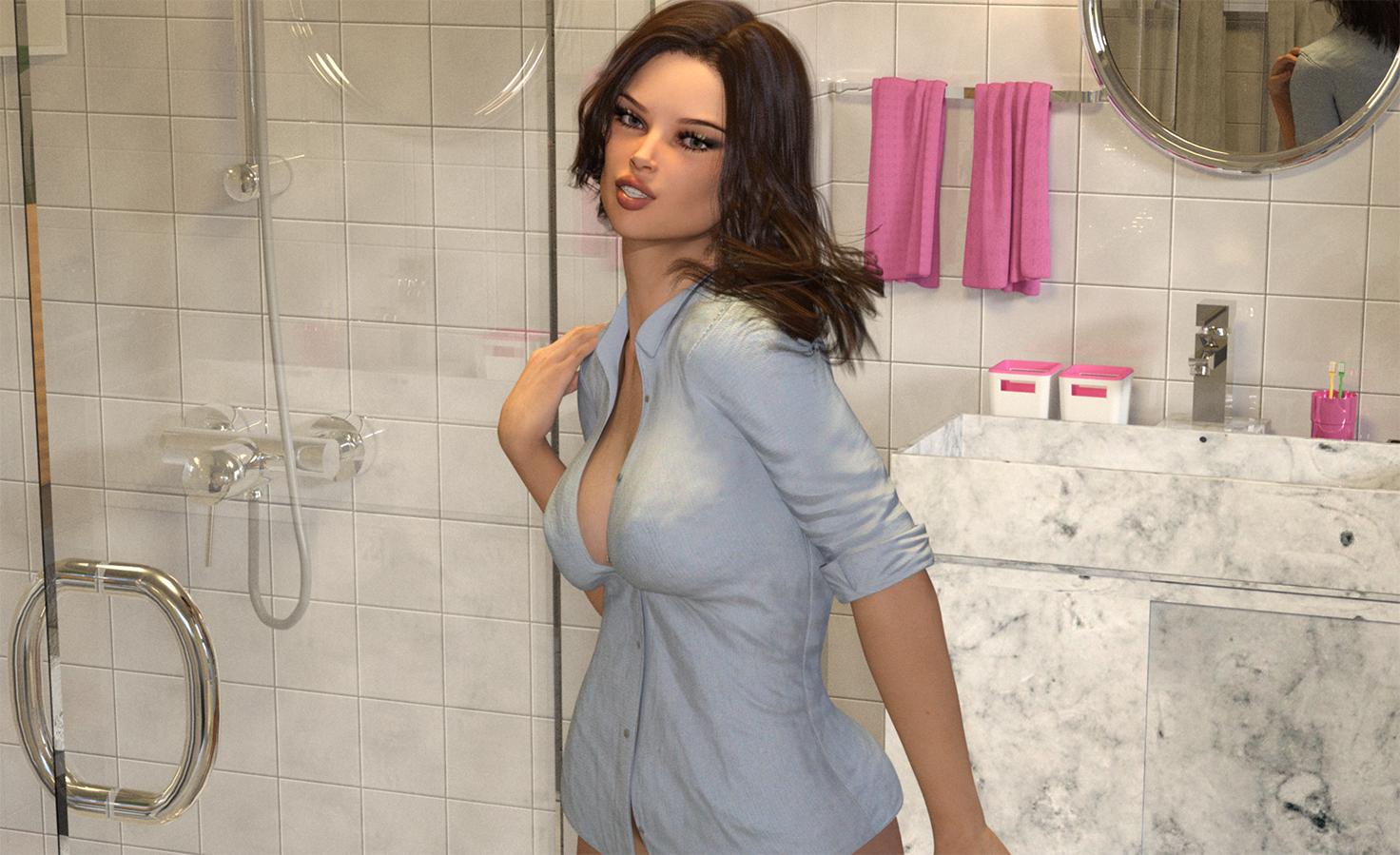
I know there are a lot of reflections and stuff but this has been rendering 1 hour and 20 minutes and still is at 0% 1964 iterations. The full size is 2400x2000 (This is as much as I could get in a screenshot.) This seems about as slow as my CPU only Mac & low end laptop... There is no added subdivision or smoothing on this one. I did bump up render quality and max samples because otherwise it tends to end early and non-converged even at 99.8 convergence.Is it because of the shiny reflective surfaces or is something else weird going on? Does a screensaver slow/stop the render? Why does my computer fall asleep while it is supposedly rendering?
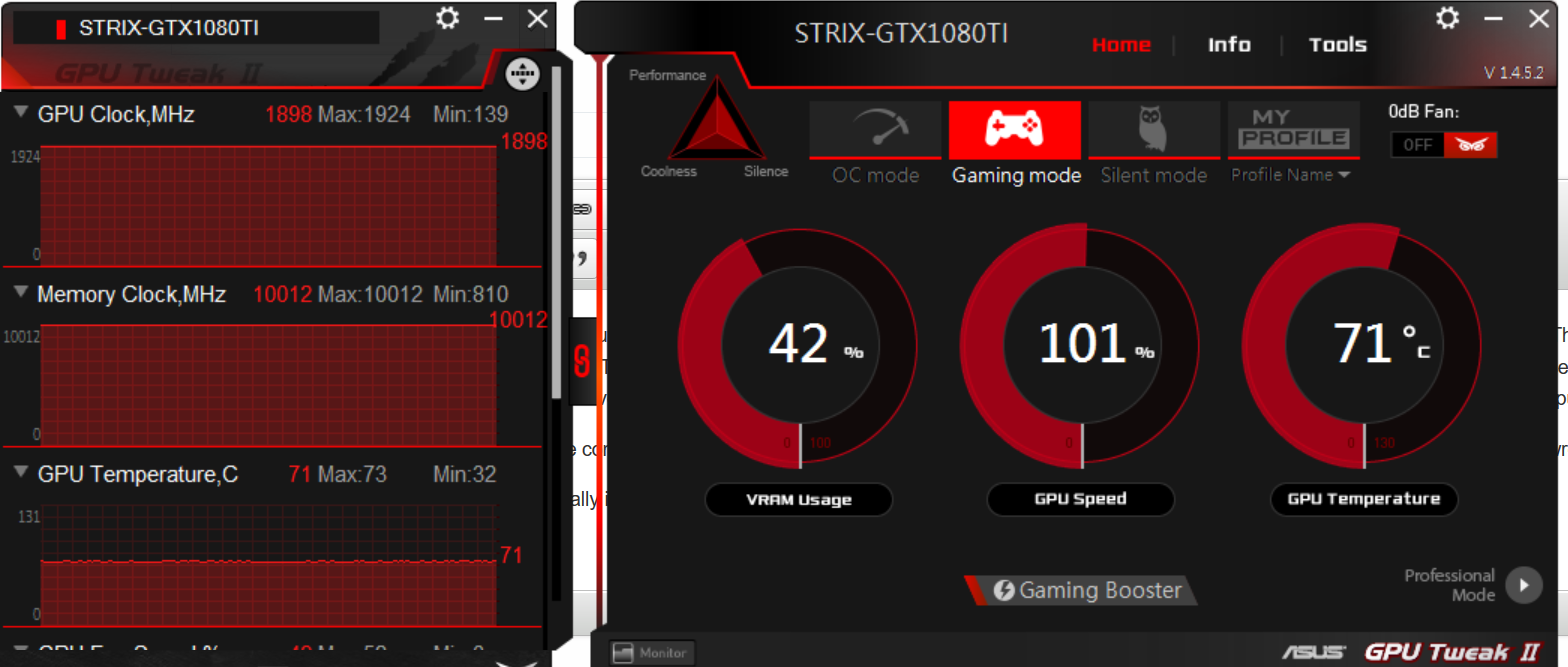
I have some sort of app that came with trhe computer to put it in game mode which I did, thinking it would speed it up, but clearly it doesnt. What am I doing wrong????
This may look more converged than it actually is because I have to reduce the size for the forum.

Daz 3D is part of 
Connect
DAZ Productions, Inc.
7533 S Center View Ct #4664
West Jordan, UT 84084
Licensing Agreement | Terms of Service | Privacy Policy | EULA
© 2026 Daz Productions Inc. All Rights Reserved.
Comments
Looking at the GPU clock speed on the screenshot, and the temperature, I would say that it's comparable to my 1080ti so I would surmise that it is indeed rendering correctly. If it had fallen back to CPU then I doubt that you would have a temperature of 71 Celsius.
I think that the problem is more likely to be that as all of us upgrade our machines, we then start creating higher resolution and more complex images. Once you've completed this render, try setting the render settings to default and give that a try - the 1080ti should be a lot faster. After that it's a matter of tweaking the render settings for a particular render. It might also be worth loading up a scene that you did previously before you have the 1080ti and rendering that just to check that it is as fast as it should be.
It might also be worth posting your render settings once you can access them - there are plenty of people here who could give advice on how to optimise them.
Looks perfectly good to me. There's no way you could get almost 2k iterations with CPU only on this image. Convergence is also something you shouldn't base your renders on. Just take a good look at it and if you're satisfied, save it. And IIRC render quality also pushes the convergence requirement up, so it might not even start going past 0%.
Lastly, bathroom scenes like that with all the reflections will always render slower than usual, it's just the nature of ray-tracing renderers like Iray.
I stopped the render for a minute because it's still at 0% after 1 hour and 50 minutes!
On my CPU computer, I would put it at 99.8 or so converged and max out the time and eventually it was done, but when I put it at 99.8 (ish) on the 1080ti, it renders fast but is not converged at all, still really grainy! So I bumped up the render quality and max samples to random numbers. I have no idea what the real numbers should be and others said, doing that increases render time, but if I don't, it ends early and I just get a lot of grain! One time I put it at 100% converged which is supposed to go on forever until you stop it, but it stopped anyway, still not converged. The only way I can get it to converge is with these larger max samples and render quality. But I'm just randomly bumbing them up, I have no idea what numbers they should be at.
That would be fine, if the grain went away. But it is still really grainy at full size.
I have a 1080ti and I almost never let a render run for longer than 45-60 minutes. By that point, it's hitting at least 70 convergence, if not 95+%, but that of course depends on what's in the scene. Sometimes it'll get to 60% and I won't be able to see any graininess. I can't remember ever seeing a render stay at 0% longer than a few minutes.
Usually my renders are only 5-15 minutes, tops, and leaving a render going for an hour means I'm making a promo with lots of stuff in it and want the full size before downscale to be usable. However I don't usually go up to 2k+ in size, my max size tends to be 1300x1600 which I downscale to 1000x1300. I've attached my render settings (which I keep as a preset that I call "Promo Quality Extreme"). For examples, you can pretty much just check out any of the promos in my product catalog from the past year.
The amount of light you use in a scene matters a lot more than you'd think. Add some more "ghost" lights here and there, or just increase the environment settings somewhat and see if that helps.
Render Quality of 4.64 is very high - as I understand it there's a roughly linear relationship between render Quality and time, so you are slowing your render by a factor of 4.64. Do you really need it that high? I can imagine the default 1 might be too low, as it might leave a lot of unresolved noise in the areas that hadn't converged once the rest of the image had reached the covnergence point, but I'd try smaller increments to find a value that worked (or do spot renders to fix up the noisy areas, or in the beta use the de-noiser).
If you turn off Render Quality and put the Max Time to 0, the only thing that will determine how long it renders is the Max Samples setting. Then you can put that up to something like 15k samples and it should render pretty clear. Even with alot of reflections and shiny surfaces.
Wait, what? What is the de-noiser and where can I find it??? Thanks.
The denoiser is only in the new beta for now. But I agree that 4.64 for the rendering quality is VERY high. I never go over 2.00 to be honest.
If you do use the beta be advised that the denoiser is not a miracle cure: it basically destroys hair and things like glittery materials and car paint.
Laurie
I have been doing what Zoombietaggerung says, but I push max samples as high as it will go and then just stop when I like the look of the image. I had one that would NOT render clear - I have no idea what was wrong with it, I had to delete the camera and make a new one from scratch, copying the camera view from the 1st camera would give me the same issues. I think I was using the betta version when I had this issue. I also sometimes turn on Architectural sampling and Caustic sampling. Architectural - if my reading is correct improves the accuracy of interior lighting, and reduces the graininess of the rendering and Caustics are light patterns that occur when light illuminates a surface via specular reflection or transmission and caustic sampler improves the accuracy of this type of lighting.
I have a 1080ti and render with my longest side being 4000 pixels as I need them large enough to print clearly, I also sometimes have to paint things in the scenes in photoshop and I hate trying to do that in tiny images. They are generally done to my satisfaction before an hour is up, but sometimes I let them go longer, it just depends on how much is in the scene and how dark it is.
Sometimes normal maps add a ton of extra iterations in small rooms like this scene seems to be. I use scene optimizer to quickly see if maps are a bottleneck.
Also can the light escape somewhere?
If not you could try setting path length to 10, so after ten bounces it stops. I have a 1060 and I manage to keep all my renders under 30min, in full HD.
"4.64 for the rendering quality is VERY high"
I go up to 16 sometimes!
Hmm... I guess I'll try the max samples trick, maxing them out and keeping render quality at 2. I rarely get a render under three hours, unless it's a small test for the forums, so something weird is going on.
3 hours and 27 minutes, still at 0%. But the computer went to sleep. Why does it go to sleep when it should be rendering?
As far as I know it just looks for user-activity (typing or mousing), if there isn't any it will go to sleep or othrwise do idle-time stuff. You can chnage the timing, or turn it off, in Setting>System>Power and Sleep.
Weird. On a Mac, if it's doing something, like rendering, it doesn't go to sleep. Does the screensaver stop it from rendering too?
If you go to C:\Users\**your user name**\AppData\Roaming\DAZ 3D\Studio4 and look for the \temp folder, there should be a \render folder there that has a copy of whatever DS is rendering at the time. Or it will have the last few things you rendered. That way you can get a full size copy if you need to. It gets cleared out whenever you close DS. You may have to edit the address depending on where you installed DS.
No, but depending on what your screensaver is, like how graphic intensive it is, it can slow things down. You should probably turn off the screen saver and not allow the computer to hibernate/sleep while it's rendering.
Your screensaver could lock everything up if it's graphically intensive. Because I use my desktop and gaming laptop for rendering, I only use the Blank screensaver on those and they're set to never hibernate or go to sleep.
Laurie
I've also found that the Iray interior camera over on sharecg drastically reduces render times. I pretty much use it for all my scenes now.
I've also been using the method Zoombietaggerung described with my 1080TI, "Rendering Quality Enable" set to Off, Max Samples at 15,000, and Max Time set to zero. What is your "Pixel Filter Radius" set to in the Filtering section of Render Settings? Smaller values produce a sharper image but at the expense of additional render time. If you keep it at the default 1.50 you can just sharpen it in PS.
In Optimization, set the "Instancing Optimization" to Speed to see if that helps.
My renders have been starting faster with the Aux Viewport set to NVidia Iray, but not sure that it decreases render time significantly.
I thought I read that Architectual and Caustic settings can increase render time, especially if you use both.
Well, I went in the other room to use my other computer (Mac) for Photoshop and when I came back, the computer was asleep and Daz had closed! So had to start the whole render over and now doing iit with just max samples bumped up. After 2 hours, it's still only at 0% done, but visually it looks almost done. I haven't tried architectural, caustics and my pixel filter radius is at default because I never knew what that did.
Macs don't go to sleep while you're rendering so I'm finding it very odd that Windows machines do. On my old Windows's laptop, I kept the screensaver off and got a huge burn in my screen so I'm a bit afraid of doing that on an expensive monitor... The screensaver I have now is a photo slide show and it seems that when that comes on, DS stops rendering or goes really slow. I wish there was a way that you could get Windows to not go to sleep while something is rendering so I don't have to keep changing settings. I think that's crazy it goes to sleep while it is still working on something!
Windows has been that way for decades! Do what Richard said above.
I had this happen to me a few times when my laptop went on sleep during rendering. Turing off sleep option is not recommended as it can impcat the longivity of the components and your power bills. There are various free utility programs which you can run in background to prevent sleep.
Again, this should not be hard to rectify by Daz given that many programs like AV scanner, media players and disk management tools have already addressed this for decades. On the technical side there are functions provided by the Windows API which can prevent sleep while the invoking program is running.
Depending on the sleep settings can be to turn of the hard drives too.
What you can do is turn off sleep mode, then just simply turn off the monitor to keep from getting the burn.
Don't stop a render because...
Unless:
Generally if it looks good stop it; otherwise don't; exceptions will apply, and the circumstances, well obviously your choice.
As an artist, you are the arbitar of what is "finished, done, ok, suitable, etc"; not a tool. Sure use the tool to stop the render when you're elsewhere, but tools are only useful if you question what they are doing.
I'm doing another render that after 2 hours, is still is at 0% and very grainy. This time I have Max Samples at max and time bumped up and that's it. If I don't bump up time, it renders in 2 hours but VERY grainy. When I put time at 0 as someone suggested, it also ended early and grainy. In both renders I used this: https://www.daz3d.com/dl-modern-bathroom I'm wondering if that is the culprit? The last render took a bit over 5 hours to render with a girl, hair and top with only a portion of the set, everything out of view was turned off. In this render she is nude in the shower but there are a lot of reflections which look cool, I don't want to get rid of them, but I really thought with a 1080ti things would go MUCH faster!
If it's that grainy, it sounds like you need more light and lower exposure in the camera. While the image may LOOK right, that doesn't mean the lighting/camera settings ARE right. If your ISO rating is at 100 ISO, double the intensity of every light, and switch to ISO 200. Not having enough light will have IRAY struggling even with a fairly simple scene. Persistent graininess of the image is usually a good indicator of this.
Also, that particular scene shows a LOT of inter-reflection and refraction going on. That's going to skyrocket the render time unless you limit path length, like another on here recommended.
In Windows 8 the settings for sleep, etc are under Control Panel/Power Settings (I think it's the same in Windows 7 too). Click "Change Power Settings" next to the setting that is selected (radio button) and you'll get a screen with two drop downs. How long before the monitor goes off and when to put the computer to sleep. You can turn the monitors off (just requires a mouse move to turn them back on) in any time increments you want, and set the computer to sleep "Never".
If you want to go into more detail choose Advanced Settings and change a bunch of settings.
My computer never goes to sleep and the monitors go off after 10 minutes because I set it up that way when I set up Windows.
Laurie
I paused the render, changed the ISO to 200 and thought it would resume again but it started all over after 3 hours of rendering, ugh! 200 ISO is way too light for this render. Switched it to ISO 120, but now it started at the beginning again. It was only at 1% after three hours. I guess the reflections are causing the problem but I like them.