Cinema camera for pre-vis
 jonesjcj
Posts: 0
jonesjcj
Posts: 0
I am directing a movie in the next few months and I wanted to use Daz3d for my previs. The biggest trouble I have is that the camera in Daz doesnt really behave like a real camera on set. I want to set proper lenses (like 18, 35, 50 for example) and want to simulate actual dolly moves. On a real camera, you can pan and tilt, but the way Daz's camera works its more of an "orbit". That's fine for 3D but it doesnt translate to an actual movie set.
Does anyone know how to do this? Even better, it would be amazing if there were actual cameras, dollies and cranes that I could import into Daz so that I am making a true pre-vis with a virtual camera. Then I could show diagrames to my crew on set, about where to set up the dolly and such.
Let me know if you had any experience with this and have any solutions.
Thanks in advance.

Daz 3D is part of 
Connect
DAZ Productions, Inc.
7533 S Center View Ct #4664
West Jordan, UT 84084
Licensing Agreement | Terms of Service | Privacy Policy | EULA
© 2026 Daz Productions Inc. All Rights Reserved.
Comments
Look at the parameter tab with the camera selected. Under camera you can change the focal length to 18, 35 etc, and there you can use the x, y, x translation and rotation to move the camera around
Specifically... I think I used this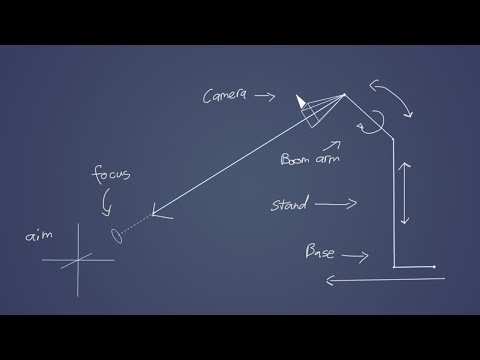 tutorial?
You can do everything except the focus in DS. Also if you lock the parts of an element that you don't want to move (ie lock the translation of the boom arm) it becomes very easy to pull around with the manipulators in the view