Attention Zev0 and your Pose Convert Gen2 to Gen 3
 Griffin Avid
Posts: 3,822
Griffin Avid
Posts: 3,822
I've hit you up before about this and need troubleshooting help. I don't want to high jack the gen 8 thread and the search didn't find your older threads.
Anyone that can help. I'm using the Pose Conversion Script from Genesis 2 to Genesis 3.
https://www.daz3d.com/genesis-2-to-genesis-3-pose-converter
SOME poses convert and create their own folders where I choose and some do not.
All the end folders --> The ones that have the converted files are listed and show up in the Smart Content, those work.
Others have physical folders there, with poses, but Daz nor the content librarian can see those subfolders.
Reading a pdf for the product
mentions buttons an options that do not exist. I assume this is an old PDF and somewhere there's a new one.
But it does suggest that If I pick the same folder for source and destination, THE NEW POSES should be in the SAME FOLDER as the original with a different ending g3 name bit.
That doesn't work either.
So, can someone with total assuredness (lol) say exactly WHAT FOLDER I SHOULD START FROM
- is it the cloud folder, with a name like Data/Cloud 17_4502
- should I go further down to the folder that contains the poses?
-for converted destination, can I pick the source folder so all the poses STAY TOGETHER
-Find the DEFAULT Daz folder and place it there?
-Make my own directory and place all the converted poses there?
I see this
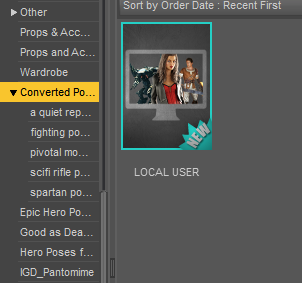
Should there be a local user heading?
And navigating to the files that work, gives me this....
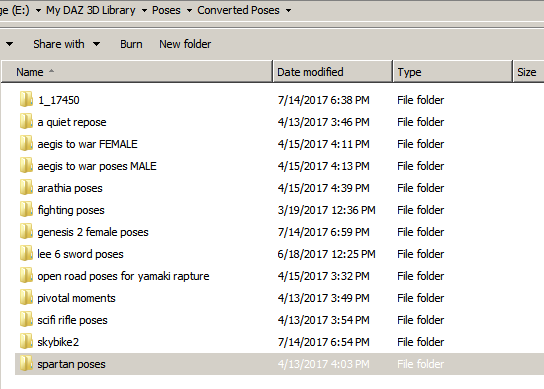
Which shows the conversion happened, but Daz doesn't see the files- and I checked they are all that DSON and png formats.
SOME of those folders show up and others don't.
Any ideas?

Daz 3D is part of 
Connect
DAZ Productions, Inc.
7533 S Center View Ct #4664
West Jordan, UT 84084
Licensing Agreement | Terms of Service | Privacy Policy | EULA
© 2025 Daz Productions Inc. All Rights Reserved.
Comments
That's not a pdf for Zev0's converter. Note the author.
It's really simple. I've attached the first promo from the product.
The PDF you posted is for this product. Do you have both the 3D Universe converter and the Zevo/DraagonStorm converter?
It works, it just doesn't work right. It could be becuase the pose source folder is in the data cloud folder and that breaks the links to the converted poses.
And yes, it is simple. UNLESS it is not meant to work with anything other than poses in the DEFAULT Daz 'usual places for poses to be found'.
I suspect that's the problem.
I'll buy this other product - I've already lost too many hours tonight battling products.
Not today tho.... lol
Thanks all.
This 3D Universe converter saves converted poses into the same folder as the original pose. When the original pose was installed by Daz Connect, that location is in the Daz Connect "cloud" folder structure. When you look in that "virtual folder" in the Content Directory with Daz Studio, none of the converted poses will be visible. It is my understanding that a user is not allowed to save files into the Daz Connect cloud folders, but that is exactly what this script product does. I returned it. I do not recommend it, if you have installed your poses with Daz Connect.
THANK YOU BARBULT. That is MY ANSWER.
So Zev0 pose converter works - maybe I'll install the poses again using the DIM. I feel much better knowing this.
Going to put some more work into this, but it's tough to be patient.
Well, I wasn't very happy with the Zevo/DraagonStorm converter either. I haven't used it for quite a long time. It seems like it couldn't find the poses in the Daz Connect folders in order to convert them. Sorry I can't remember all the specifics now. It has a really annoying requirement to click on a Z Forearm Unlocker script. I found that cumbersome. The 3D Universe converter does not require that. After some time, I had enough G3 pose sets and didn't care much about converting old sets anymore, so I just quit trying to use the Zevo converter.
I guess if you reinstall all your poses with DIM, either the Zevo converter or the 3D Universe converter would work. I didn't want to uninstall all of them and reinstall all of them.
I think I *should be able to install without the install....oh snaps, well - my DIM profile is blinkered and it doesn't show more than 10% of my owned products as installed. lol
I gave up on it and started using the connect.
CONNECT may be the issue with Zev0's converter. I use DIM but none of my content, or the Studio application is on the default paths, so that's not the source of your problem.
The G2 to G3 you wont find poses via connect or smart content because it does not create metadata and was created before connect system was even a finalized feature. However if you use content library, your converted poses will appear exactly where you set them to be. Also the difference is in our converter you can choose where the converted poses go instead of being populated among the existing old poses.
The Z Foremarm Unlocker was required for pose sets that didn't obey limits and in order for Genesis 3 to properly emulate those converted sets or poses, the limiter on the forearm had to be removed. It is only something you click once and gets applied to the figure. You can then save that Genesis 3. Sure you can just set figure limits to off, but that concept was frowned upon so we had to create an alternative method where only limits were removed on the forearm as that was one of the noticable bodypart causing issues that caused pose variation regarding limits.
The G2 to G3 you wont find poses via connect or smart content because it does not create metadata and was created before connect system was even a finalized feature. However if you use content library, your converted poses will appear exactly where you set them to be. Also the difference is in our converter you can choose where the converted poses go instead of being populated among the existing old poses.
Thank you. You know I asked you about this exact problem before (in your "all my products thread") and you and everyone else kept telling me how easy it was and follow the directions. lol
Can you release an update to fix this? There must be something you can do. Pretty please.
Pretty, pretty, please....
P.S. I think NORE poses is the original folder is easier to keep organized
I wish I could, but my current partner at the time Draagonstorm passed away and she had the source files. I did however add this feature in the new converter, but I doubt that helps your current situation.
"P.S. I think NORE poses is the original folder is easier to keep organized"
I don't think so. If I want to use poses on Genesis 3 I dont want to go to genesis 2 poses and troll for the converted files accidently clicking on the old poses because they all next to each other. Now imagine you convert that folder to genesis 8 you are now creating two of the same files where half of them wont work. Also all converted poses in a location of my choice was a better solution to me which also eliminated the previous mentioned scenario.
I wish I could, but my current partner at the time Draagonstorm passed away and she had the source files.
Sorry to hear. That sounds crushing and terrible.
I don't think so. If I want to use poses on Genesis 3 I dont want to go to genesis 2 poses ...
Your product is meant to remove all concerns and pauses.
There's no more worrying about Genesis X WHAT pose and Geneis X WHAT pose.
All my poses become just poses.
In ANY folder, I'll find what I want and all I have to do is scroll down a bit farther.
PROBLEM IS, the Content Librarian is cumbersome and has too many folder trees and drop down menus and navigation is in a litlle, continually shrinking set of tabs- it's horrible for finding things..
Using that to find a pose (or anything) is truly the definition of trawling.
C'mon you're a genius with this stuff. Make something that solves this.
Do you need a kickstarter for this, a GoFund me? What does it take....lol
Zev0!
Zev0!
Zev0!
Zev0!
Hear that crowd? - they believe you in.
Now go out there and give 'em hell!
"PROBLEM IS, the Content Librarian is cumbersome and has too many folder trees and drop down menus and navigation is in a litlle, continually shrinking set of tabs- it's horrible for finding things.."
Again I disagree. All depends how you set up your content library to show trees. Mine is set up so things are so simple to find.
Again I disagree. ..
So, in other words....NO.
Okay, thank you for your time and consideration and responding to this thread. Have a nice day.
How is this hard? It's four steps including running the script.
1. Double click the script
2 In the dialog that pops up, selected the folder where you want the converted poses to be placed. It can be anywhere in your DAZ LIbrary
3 Select the pose folder to convert. If Genesis 2 poses, they will be in your library, People/Genesis 2 Female/ Poses
$ Click the convert button. The selected folder and subfolders will be converted.