
Daz 3D is part of 
Connect
DAZ Productions, Inc.
7533 S Center View Ct #4664
West Jordan, UT 84084
Licensing Agreement | Terms of Service | Privacy Policy | EULA
© 2026 Daz Productions Inc. All Rights Reserved.
Comments
@ Roman_K2 cows with thin skin you might have to elaborate a bit. I think cows have the toughest hide on the earth and it's heavy, except maybe an elephant. LOL
I am going to try the sculpt tools next in hexagon. I need to open Blender up again and go over the UI and refamiliarize myself with it. Just keep working at it. You will get it eventually. :)
as for animals since I raise them chickens, turkeys, cows, one horse, cats and have disected all but the horse at some point it gives a person a good idea of the skeleton workings. Plus just being around them and watching them helps. lol
I meant that some dogs (like my very fluffy Yorshire terrier) have very dense hair or fur, while others (Dachshunds and miniature Pinschers come to mind) have that very short, somewhat shiny stuff like you get on a modern horse or a cow's flank. Also raccoons have thick fur... so with that sort of animal (fluffy terrier or raccoon) the LAMH coat or layer might "smooth over" mistakes in the underlying geometry.
It was just an aside on improving some of the meshes; I am not sure what the deal is with big feet on (artist-created) dogs... to me it seems to go back to Mickey Mouse and Pluto, (Wikipedia link) and Snoopy has un-naturally big feet as well.
Here's a story about posing animals-that-you-don't-really-know... there used to be this great big sculpture in downtown Toronto, some geese by Michael Snow. It was a flock of the animals in "flight", achieved by suspending them in the air via long cables... the whole thing was a couple of storeys high. Very pretty and tourists used to always want to pose in front of the geese, like they do at Niagara Falls or in St. Peter's Square... ok, so one day some native people came down to visit from James Bay or something like that, and when they saw the geese setup they burst out laughing! No offense to the artist but it seems that what the indigenous people saw -- and they were more experienced with hunting wild geese, I guess -- was a flock that was coming down hard for a crash landing! So to them, their take on the artist's "3-D" arrangement was that it was just a riot.
I have to confess that to me, although I am a bit of a detail freak my artistic license to do whatever the heck I want is the most important thing... when I look at Kerr Eby's drawings of WWI trench warfare for instance, I'm not checking to see if he got the regimental insignia on the uniforms done just right... it's the broad, grimy sweep of the battlefield that's important here. I usually go to some trouble to get things right but from there I like to "throw paint" at the canvas.
Another example of modelling and posing and knowing your subject might be Audobon the bird artist, who was more like a cataloguer of the New World compared to say Roger Tory Peterson who had access to photography and nifty tools like a gun-type, 16mm motion picture camera.
Funny how picky we can get depending on what we are familiar with or have a strong interest in. :) Nice stories too Roman.
We are still experimenting on the cow and a couple of others things too. I have loads to learn so I am like doing crash courses in all kinds of stuff. LOL
Pleased to be of service. I have made some TIFF layers here... this is the DAZ "realistic grass evolution" set by whitemagus if I'm not mistaken... (checking - yeah that's the one) this is the lorez version of the set - chew on that word ("lorez") for a minute though while I explain that in doing this I used the Geometry Editor to cut chunks of turf away... not really sure what I am doing... one "chunk" that I removed was on the order of 300,000 polys, and another was well over 500,000 polygons!!! So this is about a 2 hour render (the inset shows the approximate resolution that I was able to comfortably achieve) and you can have some of the TIFFs if you want. The regular size grass crashed my itty-bitty computer, weep weep.
  Impressive model though.
Wow! That is some heavy grass. LOL Hmmm... once we get to that point. We'll have to check it out. :)
I have not done much with the cow as of late. I am trying to get my head wrapped around the whole morph concept, bones, and geometry/poygons. Trying to get the most learned in this process I am working on various things at once. I even made a water trough and got it mapped out to my liking in hexagon. I think I have this uvmapping down mostly now. I did what I call a complete retexture using a uvmap on another project which is helping me to learn how to refit 'items/clothing' to other figures and that whole process. I put that on my own little thread here http://www.daz3d.com/forums/discussion/72303/liana-s-art-studio#latest to keep this thread with cow stuff. All my other work, learning,etc is helping me to work on the cow and anything I might make for her. My little digress from the cow. :)
I think if you have the original template you can redo the texture with that in photoshop or another 2d program. I go in and redo textures all the time using the original template. But that's all I have learned to do so far so not sure how helpful that actually is lol.
And I have to say your cow looks wayyyy better.
Another peson got it for me from earlier in the thread. The uvmap is really a mess, so in a nutshell it needs to be redone. I think I can do that in hexagon after I create I believe is called 'shape' morph for her. I had some other things to do today and tomorrow also, so I might not get real far in the next couple of days. I have a good mentor to help when I get confused or in a sticky spot. :) lol
I'm not sure of the relationship between templates and uv maps?
Does the template come FROM the "uv map" or is it part of the new stuff that results from making a uv map? A forum post from 2015 mentions something called "UV-Viewer" in addition to UVmapper?
I noticed that if I set up a primitive shape in DAZ Studio and arrange a texture file on it, and then send it to Hexagon my texture file is there but it isn't arranged the same way at all. The primitive in question is the same one that I reference in my other forums post today: beginner-hexagon-question-can-t-complete-a-sweep-line-operation-on-a-long-thin-primitive
The template is just another name for the UV map. It's what's used to make the texture maps (diffuse, displacement, bump, normals, transparency). Way back in the beginning, content creators called them templates and the name is just an artifact from that time. Anymore people call it the UV map and everyone pretty much knows that that's what you use to make your textures against.
In my book they are one in the same. Uvmap is a template to create a texture/material map from, which ensures that you get your created textures in the right place on your uvmap. So, basically a template whatever it may be is just something a person uses to recreate a new texture from. Kind of like using a template to make a shape on a piece of paper or wood then cut it out.
People say you can use already painted texture map. I find it can be difficult depending on just how messy of a painter the person prior was in creating their texture/material map. I like to have the uvmap for guidelines where the edges of your object is.
In a 3d modeling program like hexagon, blender, etc they have uv viewer. Basically, if your object has been 'unwrapped' then you should be able to view its uvmap in the viewer and see how it is laid out.
Uvmapper from what I understand is basically a program that can decide just the supposedly best way is to unwrap your object. Like taking a box and unfolding so it is flat. 3D modeling programs like hexagon it is best to make 'seams' or kind of like cuts in your object so it can lay out flat and be painted on. I hope this makes sense took me a long while to get it in my head so it made sense. lol
The cows is just an example and not a very good one of an 'unwrapped' uvmap to create a texture from.
the3Ddigit was able to get the one for the cow for me. I use the uvmap so I know exactly were the unwrapped mesh edges lay.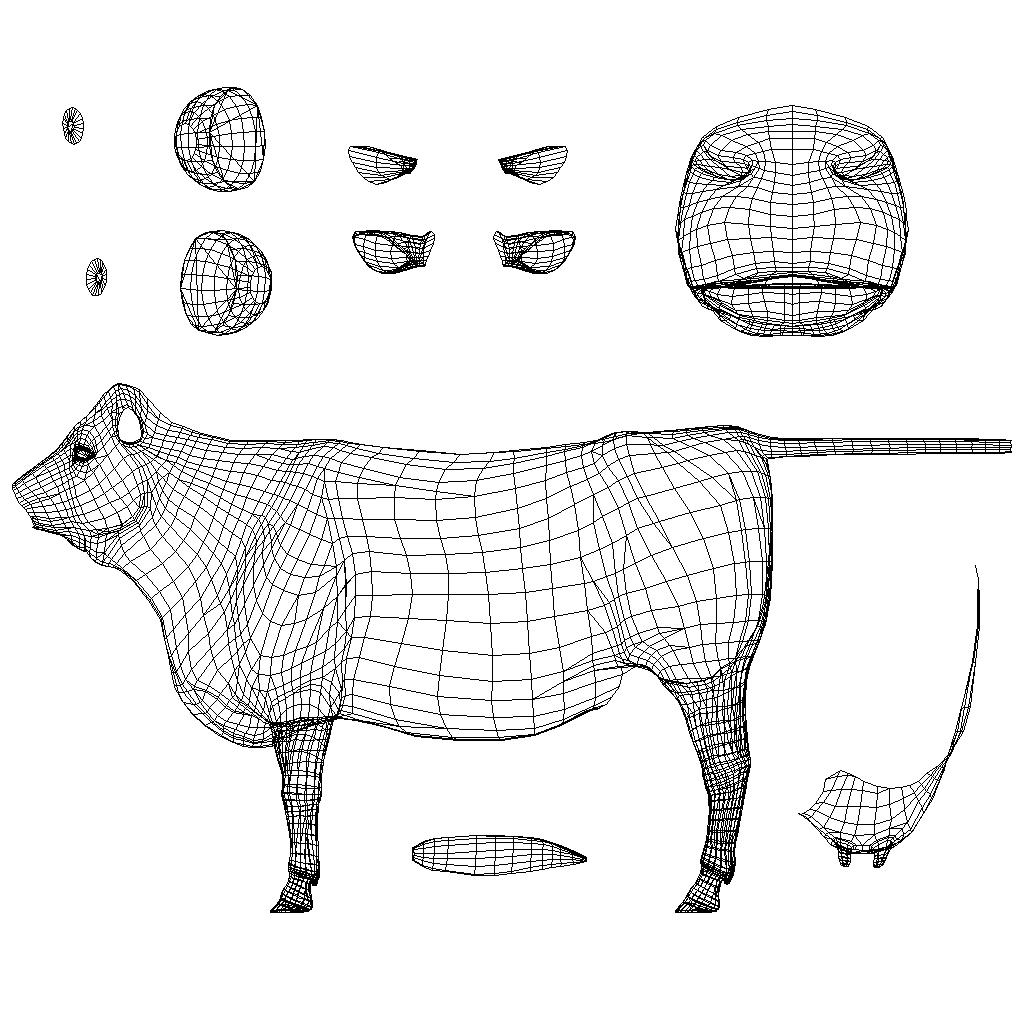
Thanks Fey.:)
Roman - I forgot to address your question about the UV map/texture in Hex versus in DS. Hex is a little more persnickety. Even though you've set a texture up on your primitive in DS, that doesn't mean Hex will "read" it that way. You have to assign the texture to the primitive in Hex before you can "see" it properly. And even then there's some major hoops in getting it to look good in Hex. Which is why I never look at my textures in Hex. It's always the opposite. I build my mesh in Hex (or Modo, or zBrush) as well as the UV maps. I texture it in Photoshop and then I look at the results in DS.
Now, that being said, there is a product in the store that is very good regarding viewing/editing UV maps inside of DS. I'm trying to think of the name of it, but it's escaping me at the moment. I hear from other PAs who use it that it's very helpful, especially when you're building something out of primitives inside DS and you want to be able to texture them properly. If I think of the name, I'll post it for you (and anyone else interested.)
edited to add: I found it! http://www.daz3d.com/uv-tailor Ironically, I have it (but forgot that I bought it. The amount of stuff I've bought and forgotten over the years is scandalous.) I will now have to dig it and another product I have but forgot out and learn how to use them. Seriously, there ought to be a twelve step program to help us Dazzers remember the stuff we've purchased AND make us use said products. At least once.
Yay! Thanks :)
Holy jumpin' - complicated! I probably have several videos about this saved to disc, that I haven't watched yet. Looking around in the Reference Guide I glanced at the video about the relaxing tool (red arrow in the attached screen shot) and... I thought wait a minute, it's like they are fiddling with a spider's web - the UV map has gone organic! Then I read the 1st paragraph in the text (the purple arrow) and I realized that was exactly what was going on, wow.
Thanks to all for taking the time to try and explain it to us new people. I had no idea that it could be seen as a "more fluid" sort of thing.
Cool. I will have to watch and read some of that too. A person always picks up new things from others in some way. :)
To be technical about it, the UV map is a file with a whole lot of numbers in it, which tells the computer which parts of a picture to put on which polygons of an object. The template is a picture created by running the edges of the object back through the UV map, which lets a human artist see where to put the texture so that it will be applied properly.
Most people don't care about this distinction.
Ok... thanks for the extra or "alternate" description. Currently I am just *fascinated* by that relaxing tool, eg. you are modifying the UV map by looking at an interactive 2-D representation of the template, in Hexagon, and you're using familiar 3-D tools to alter the numbers I guess.*
At least three years at this and I've not previously encountered your explanation, or any mention of the relaxing tool and its cousins!
*meaning that by the time a person gets this far the earlier tools are supposed to be at least a bit familiar
I should mention this caveat - the video about the UV map relaxing tool etc. is the Reference Guide is posted in French. I happened to glance at it *first* and thought "oh cool, an organic approach..."
Following this short mental transaction I read the English description confirming what the video suggests. For what its worth the UV editing map module (or whatever it's called) makes the map appear as a sort of spider's web, and you can move the points around a bit, adjusting the values to allow for a bit of overlap, of the texture(s), on the finished 3-D model.
Thought I'd better add this to benefit the new people who might REALLY be getting confused.
By the way here is a graphic representation, by a dog house manufacturer, of their product and they are using a highly simplified stuffed toy of a furry dog, to illustrate what they have to offer. Notice the feet on the stuffed toy! All smoothed over the way LAMH may work on some animals (like lamas, wooly bear caterpillar etc.)! No need for ancillary polys, just the basics tells the story esp. in low resolution scenes, like way off in the distance.
I think the manufacturer is "Alibaba" or "Aliexpress" or something... my dog has one of these and the other day there was all this racket that I stepped out to investigate - he was dragging the whole thing around his living room, looking for a better spot. Anyway, great feet on this... like I want to do the DAZ dog(s).
I think it's all good explanations even the technical ones can at times make things clearer or at least be interesting. I am glad people are sharing info here. I hope some are finding it helpful too. :)
I was pretty much tied up all day running my grandpa to get his cloudy, filmy eye lazered taking 5 hours out of my day.
I went back to working on the cow last night for a bit. A lot of me working on the cow is also learning, so I have been adding bones, trying to shift polygons/geometry, and reassigning the polys to the bone area. I am having a bit of trouble in the later area reassigning the polys to the bones. I know it is something I am missing. It always is in my case. :P FeralFey has been great in helping me out in my learning process. Answering my crazy questions and even doing some things herself to see why I am getting stuck. I greatly appreciate her help, advice, etc. :) I do need to reread stuff and see if I am just missing things. I have been looking at other figures human and animal disecting them so to speak and seeing how things are done on them. It gives me some ideas on what can be done. FeralFey calls me the mad scientist. lol
When I get done molding her. I am not sure what else I can call it. I can not add or take away polygons/geometry on something I don't own, just rearrange them. I will show what I have done. I am going to work on creatign a geograft for horns too. :)
Oh, I should ask. Does anyone know any good hair brushes, mostly for short hair. I can use gimp or photoshop files. Even some good tricks in creating hair type brushes. I know how to make a brush in gimp, not in photoshop though. I am sure it is not too hard. :D
I have ideas in my head. I have just not got to the actual painting part of the cow. Once I get past the point of what I CAN do to improve her. I am going to remap and do some texture painting. I know Fey said she went crazy and worked on remapping her last night. When she should have went to bed. LOL *gives evil eye to Fey* I hope you don't get sick my friend. Thanks by the way Fey. :)
Nice Roman. It would be great to get the LAMH hair thing to work properly. There are winter hair coats for some cows that are pretty shaggy like the scotish highlander cows and a few others. My own cows have a little longer hair in the winter.
Ok, so I am just diddling with the existing daz cow no changes perse except, I am not using the horrible pose that loads with the cow character. I am working from the zero pose. I made this pose called "switching flies" and just recolored her in the surfaces tab. By doing this I learned a bit about specular lighting and how the changing the glossiness can make certain effects.. In the mean time, FeralFey has been playing with the uvmap, bones, etc also and has something for me to work with. She has been trying to figure out what road blocks I have been running into with my work. I learned a bit more about material maps and that they are my friend. LOL This info greatly helps my thinking process when working on the cow. I know how things should be in real life and to try to transfer it here is the tricky part. :)
I know people might ask me a few questions about the cow and coloring in general. So, a little black angus cattle info. Black is a dominent gene coloring in the angus and most cattle with black hair coloring, but there is also what is called a recessive red hair coloring gene that they can carry. Why we get red angus cattle, red holstiens, etc. When breeding two red critters or two black critters that carry the red gene can result in red baby. The black cattle when their hair gets long (winter coat) or later in the year with sun bleaching it shows a bit of red coloring. Why my cow has a hint of red in her hair coat. This does not carry in the skin part of the black cattle why all the other parts are more black or greyish. A little cattle trivia. I hope no one fell asleep. :)
Add: I just played with surface settings some more. will look better painted and with a normal amp showing hair better.
Roger re: Scottish highland cows. I pictured that type of surface when you first suggested that the coat was thick and heavy; those are certainly more shaggy. FWIW moose can have a winter coat too; the coat can be real shaggy and variegated in the spring, when it seems to come off in sheets or clumps. It's also iridescent, and it spits out reds, grays and purples in certain lighting situations. So if the moose is in thick woods and you can't clearly make him out but these bits of strange colors are clearly visible through the trees it can look pretty weird, like some sort of pioneer quilt.
I like quilts could be neat. Have you played or got the moose yet? The shaggy, clumpy hair might be a challenge to do.
My only quibble about the cow renders you posted, Liana, is that the second one looks like she's going to shoot laserbeams out her eyes. Lol. You might want to tone down the whites of her eyes in the surface tab.
Did that already.. it has more to do with the eye texture map.. when just changing colors makes it hard to get them right. I really hate the texture map. lol
My partner Jim thinks I should make a cow that has glowing eyes. Wierdo lol
I'd be tempted to slap an emitter on those eyes and render it in iRay. Mwhahahahahaha!!! Then postwork in the laser beams shooting out of them. OR, use Orestes Studios' Electromancy Iray set, either of the hand lightning props, parent those to the eyes and render in iRay. Double MWAHAHAHAHAHAHAAHAHA!!!
OK. Sorry about that. It's the pain in my hip. It's affecting my brain. But I'm sure that Jim will appreciate it.
You called me the mad scientist! lol