

Semi-OT - nVidia Pascal cards debut finished, 1080GTX and 1070GTX announced!

11011121315

Comments

  • MEC4DMEC4D Posts: 5,249

    You need not only a lot of cores to render with your other programs , but also fast cores to process the data fast to your cards or you will hang on for minutes between movements when you use big scenes .. you need to find the best balance between the 2 worlds and it is not going to be cheap for you if you want speed for both the CPU and GPU rendering programs and the fact that you don't want to OC anything it will cost you extra ,  so big and precise planing so  it feed proper the 2 rendering worlds at optimal performance .. I would not even start thinking about .. that why I give up on one and choice the other as I would ends with double the budged as usual as I planned ..

    kyoto kid said:

    ....just looking to plan for expendability without needing to fully replace components.

    Yeah I guess I could use the 1060 or 1080 to drive the displays when I was able to afford a Titan-P WC (or Titan-HBM when that comes out).  Still need the x 99 MB as part of the core to get the memory and PCI slots needed for expansion.  Again it is recommended to purchase a full memory kit from the same silicon batch than to mix & match so for expanding memory, it would mean effectively "tossing" say the 32 GB for a 64 or 128 gb kit when I can afford it.  The CPU choice also needs to be part of the core. as that is an expensive replacement.  PSUs on the other hand are not that terribly expensive so no reason to scrimp there. PCI SSDs are much faster than SATA III and tend to be more solid as for reliability and service life.

    Basically I would like to minmise the possibility of having to effectively build yet another new machine just to upgrade when the money comes available, as like I mentioned, depreciation on computer parts is hell.


  • MEC4DMEC4D Posts: 5,249

    So we are not going to see iray VR until this Fall or later .. I was excited to see the new cameras in iray .. Since Nvidia made already presentation with Pascal Quadro and iray and Optix 4 does this mean they are ready or waiting also until Fall for general release to feed the artists and graphic designers market .. I hope not 

  • mtl1mtl1 Posts: 1,508

    Any word on the 1070/1080 drivers yet?

  • MEC4DMEC4D Posts: 5,249

    beside Nvidia nobody can yet run Pascal with iray .. and it will take little longer and not just display driver to fix it .

    mtl1 said:

    Any word on the 1070/1080 drivers yet?


  • nonesuch00nonesuch00 Posts: 18,729

    openGL / Metal / Vulkan / directX 12 need to get competitive with these manufacturer specialized rendering solutions. Physics is not going to change between new versions of video cards.

  • ANGELREAPER1972ANGELREAPER1972 Posts: 4,555

    ordered and paid for my new computer after much debating went with origin based on reviews and what they offered got the chronos pro (aussie version ours is different to us version) so got dual gtx 1080s, liquid cooling, high performance fans, asus maximus viii gene, i700k quad core 4.0ghz (4.2 turbo), power 850w tough power 80+gold, memory-32gb corsair dominator platinum ddr4 3000mhz (4x8gb), windows 10 pro, raid1, 1tb ssd samsung 850 evo series, a free 2tb seagate sshd, 2x 4tb western digital black sata 6.0gb/s 7200rpm 64mb cache and other bits and pieces, sure would've liked the millenium or genesis way more powerful but really out of my price range really and they're huge and the power supply thing and yeah I did list other sites and builds in these forums that considered some were cheaper and some offered more for price but reading some reviews put me off so decided play safe and go with this one and it should be good enough for me and do what I want and it's way better/more powerful than others offered either premade store built or custom built choices offered around here. My desktop was using before this aspire v17 nitro which has a gtx 850m, just noticed uses a gt320 card was using that when we first got iray no wonder it crashed sometimes when doing at time lot in a scene or took days to render no way it could handle the renders I do now on my laptop. Should have my new computer by mid August so hopefully we get iray drivers by then if not still got my laptop and can do 3delight stuff on the new one (and game) prefer iray rendering but do have content don't iray well like daz big cats 2

  • MEC4DMEC4D Posts: 5,249

    Congrats ! you will have a lot of pleasure  rendering with that in iray for sure soon .. 

    ordered and paid for my new computer after much debating went with origin based on reviews and what they offered got the chronos pro (aussie version ours is different to us version) so got dual gtx 1080s, liquid cooling, high performance fans, asus maximus viii gene, i700k quad core 4.0ghz (4.2 turbo), power 850w tough power 80+gold, memory-32gb corsair dominator platinum ddr4 3000mhz (4x8gb), windows 10 pro, raid1, 1tb ssd samsung 850 evo series, a free 2tb seagate sshd, 2x 4tb western digital black sata 6.0gb/s 7200rpm 64mb cache and other bits and pieces, sure would've liked the millenium or genesis way more powerful but really out of my price range really and they're huge and the power supply thing and yeah I did list other sites and builds in these forums that considered some were cheaper and some offered more for price but reading some reviews put me off so decided play safe and go with this one and it should be good enough for me and do what I want and it's way better/more powerful than others offered either premade store built or custom built choices offered around here. My desktop was using before this aspire v17 nitro which has a gtx 850m, just noticed uses a gt320 card was using that when we first got iray no wonder it crashed sometimes when doing at time lot in a scene or took days to render no way it could handle the renders I do now on my laptop. Should have my new computer by mid August so hopefully we get iray drivers by then if not still got my laptop and can do 3delight stuff on the new one (and game) prefer iray rendering but do have content don't iray well like daz big cats 2


  • RAMWolffRAMWolff Posts: 10,343
    edited July 2016

    I'm currently beginning the process of looking at a new computer rig.. probably in a month or so.  I always buy from CyberPowerPC as they are local and do great things.  I'm really interested in a dual video card but was under the impression that a bridge wasn't optimal for iRay?  Is that a correct?  Also was informed that Pascal wasn't supported as of yet so really hoping that happens sooner than DAZ SOON!  LOL 

    Here is the link to the page with all the customizations below it... http://www.cyberpowerpc.com/category/gaming-pcs/ ; As you can see the card they include in the default rig is a GeForce Pascal.  So DAZ Studio can't run at all with that or ?? 


    Post edited by RAMWolff on
  • ANGELREAPER1972ANGELREAPER1972 Posts: 4,555

    Ecosystem Announcements: New SDKs, Iray VR, & OptiX 4

    Along with the announcement of the Quadro P-series, NVIDIA is also using SIGGRAPH to announce updates to various software and ecosystem initiatives within the company. Overall a number of the company’s SDKs are receiving an update in some form, ranging from rendering to video encode and capture, the latter taking advantage of Pascal’s 8K encode/decode capabilities.  image
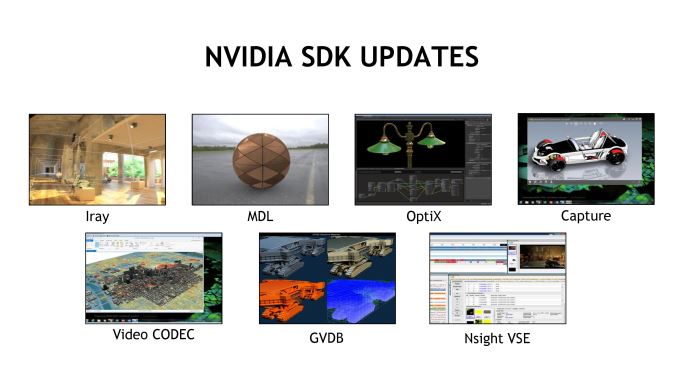
    Of particular note here, NVIDIA’s Iray physically based render plugin for 3D modeling applications is getting a significant update. As with other parts of their ecosystem, NVIDIA is doubling down on VR here as well. The next update to Iray will include support for generating panoramic VR lightfields – think high detail fixed position 3D panoramas – which can then be displayed on other devices. NVIDIA has been showing off an early version of this technology at GTC 2016 and other events, where it was used to show off renders of the company’s under-construction headquarters.

    image

    The Iray update will also be part of a larger focus on integrating the company’s software with their DGX-1 server, which incorporates 8 Tesla P100 accelerators. Iray will be coming to DGX-1 this fall, supporting the same features that are already available in multi-GPU setups with the older Quadro VCA. Longer term, in 2017, the company will be adding NVLink support for better multi-GPU scaling.

    image

    NVIDIA’s OptiX ray tracing engine is the other product that’s getting a DGX-1 update. OptiX 4.0, which is being released this week, adds support for the DGX-1, including NVLink support. It is interesting to note though that the company is only supporting clusters of 4 GPUs, despite the fact that DXG-1 has 8 GPUs (the other 4 GPUs form a second cluster). This may mean that OptiX needs direct GPU links to perform best – as in an 8-way configuration, some GPUs are 2 hops away – or it may just be that OptiX naturally doesn’t scale well beyond 4 GPUs.

    image

    Finally, NVIDIA is also announcing a change to how mental ray support is handled for Maya. Previous, integrating the ray tracer with Maya was handled by Autodesk, but NVIDIA is currently in the process of taking that over. The goal of doing so is to allow mental ray to be updated and have features added at the more brisk pace that NVIDIA tends to work at. The new plugin is currently scheduled to ship in September, and as one of their first actions, NVIDIA will be integrating a new global illumination engine, GI-Next.

  • MEC4DMEC4D Posts: 5,249
    edited July 2016

    Richard the page was not found .. You don't need SLI bridge for Iray you can disable it after under Nvidia Panel so this is no problem .. Iray is prepared for Pascal cards so will be here soon , I am sure DAZ programmers got it already so we may expect it soon 

    The new features for iray are what I am waiting for , so we can finally make amazing light maps at zero costs , save on vram and do quick jobs

    I made physical camera for myself to capture panoramic 360 degree HDRI light maps in iray , but soon  it will be much easier with just one cam and not just for VR , it is going to be a lot of fun 

    RAMWolff said:

    I'm currently beginning the process of looking at a new computer rig.. probably in a month or so.  I always buy from CyberPowerPC as they are local and do great things.  I'm really interested in a dual video card but was under the impression that a bridge wasn't optimal for iRay?  Is that a correct?  Also was informed that Pascal wasn't supported as of yet so really hoping that happens sooner than DAZ SOON!  LOL 

    Here is the link to the page with all the customizations below it... http://www.cyberpowerpc.com/system/Cyber_Deal_Z170-I7 ; As you can see the card they include in the default rig is a GeForce Pascal.  So DAZ Studio can't run at all with that or ?? 


    Post edited by MEC4D on
  • kyoto kidkyoto kid Posts: 41,861
    MEC4D said:

    You need not only a lot of cores to render with your other programs , but also fast cores to process the data fast to your cards or you will hang on for minutes between movements when you use big scenes .. you need to find the best balance between the 2 worlds and it is not going to be cheap for you if you want speed for both the CPU and GPU rendering programs and the fact that you don't want to OC anything it will cost you extra ,  so big and precise planing so  it feed proper the 2 rendering worlds at optimal performance .. I would not even start thinking about .. that why I give up on one and choice the other as I would ends with double the budged as usual as I planned ..

    kyoto kid said:

    ....just looking to plan for expendability without needing to fully replace components.

    Yeah I guess I could use the 1060 or 1080 to drive the displays when I was able to afford a Titan-P WC (or Titan-HBM when that comes out).  Still need the x 99 MB as part of the core to get the memory and PCI slots needed for expansion.  Again it is recommended to purchase a full memory kit from the same silicon batch than to mix & match so for expanding memory, it would mean effectively "tossing" say the 32 GB for a 64 or 128 gb kit when I can afford it.  The CPU choice also needs to be part of the core. as that is an expensive replacement.  PSUs on the other hand are not that terribly expensive so no reason to scrimp there. PCI SSDs are much faster than SATA III and tend to be more solid as for reliability and service life.

    Basically I would like to minmise the possibility of having to effectively build yet another new machine just to upgrade when the money comes available, as like I mentioned, depreciation on computer parts is hell.


    ...not about to toss CarraraPro into the dustbin as I have a huge investment in large environmental sets for it.  Daz is not designed to handle that type of load.

  • MEC4DMEC4D Posts: 5,249

    I told you early that iray need upgrade and not just display driver ?  well it is out, I hope DAZ is working on it  already .. best thing it is plug  and play so may not take long for the programmers to upgrade DS and I hope they do not skip the VR cameras .. 

    New Iray 2016.2 SDK

    Building on NVIDIA Iray SDK 2016.1’s introduction of industry standard lenses and spherical lenses and stereo for VR panoramas, the latest release (2016.2) continues to push VR to the next level. Iray now provides one-step creation of stereo panoramas and the ability to stream stereo to a device. Sending jobs to a Quadro VCA or DGX-1 will soon enable the creation of Iray VR immersions for inspecting scenes from any perspective.

    What’s new in Iray 2016.2

    • Support for NVIDIA Pascal generation GPUs.
    • Stereo output from a single render
    • Support of X-Rite’s AxF 1.3 format (for measured materials)
    • Create Iray VR by sending jobs to Quadro VCA or DGX-1 (no additional setup required)

    Sample 4K Iray VR output

    Learn more on NVIDIA Iray and VR

    For more information on NVIDIA Iray plug-ins and VR developments, check out the following:

  • RAMWolffRAMWolff Posts: 10,343
    MEC4D said:

    Richard the page was not found .. You don't need SLI bridge for Iray you can disable it after under Nvidia Panel so this is no problem .. Iray is prepared for Pascal cards so will be here soon , I am sure DAZ programmers got it already so we may expect it soon 

    The new features for iray are what I am waiting for , so we can finally make amazing light maps at zero costs , save on vram and do quick jobs

    I made physical camera for myself to capture panoramic 360 degree HDRI light maps in iray , but soon  it will be much easier with just one cam and not just for VR , it is going to be a lot of fun 

    RAMWolff said:

    I'm currently beginning the process of looking at a new computer rig.. probably in a month or so.  I always buy from CyberPowerPC as they are local and do great things.  I'm really interested in a dual video card but was under the impression that a bridge wasn't optimal for iRay?  Is that a correct?  Also was informed that Pascal wasn't supported as of yet so really hoping that happens sooner than DAZ SOON!  LOL 

    Here is the link to the page with all the customizations below it... http://www.cyberpowerpc.com/system/Cyber_Deal_Z170-I7 ; As you can see the card they include in the default rig is a GeForce Pascal.  So DAZ Studio can't run at all with that or ?? 


    Thanks Cath.  Here is the link: http://www.cyberpowerpc.com/category/gaming-pcs/ ; It's the first one in the the line up with the white mid tower chassis. 

    I'm SO looking forward to this update!  I hope that DAZ will create a new update for DS very very fast! 

  • MEC4DMEC4D Posts: 5,249

    You will need little more ram than 8GB , you will have left just 2GB for the system , 16GB would be optimal and recomended by  Nvidia to run card with 6GB vram .. why you not going  for 1080 ? the rig is slightly overpriced for what it offer for the simple basic 

    RAMWolff said:
    MEC4D said:

    Richard the page was not found .. You don't need SLI bridge for Iray you can disable it after under Nvidia Panel so this is no problem .. Iray is prepared for Pascal cards so will be here soon , I am sure DAZ programmers got it already so we may expect it soon 

    The new features for iray are what I am waiting for , so we can finally make amazing light maps at zero costs , save on vram and do quick jobs

    I made physical camera for myself to capture panoramic 360 degree HDRI light maps in iray , but soon  it will be much easier with just one cam and not just for VR , it is going to be a lot of fun 

    RAMWolff said:

    I'm currently beginning the process of looking at a new computer rig.. probably in a month or so.  I always buy from CyberPowerPC as they are local and do great things.  I'm really interested in a dual video card but was under the impression that a bridge wasn't optimal for iRay?  Is that a correct?  Also was informed that Pascal wasn't supported as of yet so really hoping that happens sooner than DAZ SOON!  LOL 

    Here is the link to the page with all the customizations below it... http://www.cyberpowerpc.com/system/Cyber_Deal_Z170-I7 ; As you can see the card they include in the default rig is a GeForce Pascal.  So DAZ Studio can't run at all with that or ?? 


    Thanks Cath.  Here is the link: http://www.cyberpowerpc.com/category/gaming-pcs/ ; It's the first one in the the line up with the white mid tower chassis. 

    I'm SO looking forward to this update!  I hope that DAZ will create a new update for DS very very fast! 


  • RAMWolffRAMWolff Posts: 10,343

    Yes, I did add that to the upgrade list.  Which is better DDR4 the 2800 or 3000, very little difference or allot?

  • MEC4DMEC4D Posts: 5,249

    DDR4 have XMP profile that will run it faster automatic 2800 is good already for what you need  

    RAMWolff said:

    Yes, I did add that to the upgrade list.  Which is better DDR4 the 2800 or 3000, very little difference or allot?


  • ANGELREAPER1972ANGELREAPER1972 Posts: 4,555
    MEC4D said:

    Congrats ! you will have a lot of pleasure  rendering with that in iray for sure soon .. 

    thanks and from the latest news and what you posted maybe when my computer arrives the 1080s with be iray ready or close? sweet and with new features :)  so would these new updates affect enhance current iray made products such as your shaders which are already great 

  • ANGELREAPER1972ANGELREAPER1972 Posts: 4,555
    MEC4D said:

    Congrats ! you will have a lot of pleasure  rendering with that in iray for sure soon .. 

    thanks and from the latest news and what you posted maybe when my computer arrives the 1080s with be iray ready or close? sweet and with new features :)  so would these new updates affect enhance current iray made products such as your shaders which are already great 

  • RAMWolffRAMWolff Posts: 10,343
    MEC4D said:

    DDR4 have XMP profile that will run it faster automatic 2800 is good already for what you need  

    RAMWolff said:

    Yes, I did add that to the upgrade list.  Which is better DDR4 the 2800 or 3000, very little difference or allot?


    Thanks hon!  XO

  • MEC4DMEC4D Posts: 5,249

    No my shader will be not affected since all is controled by maps and less values and that are standard PBR , we may get some extra improvement or additional functions as well but not see big changes regarding products at last not mine . You see you can use my shaders in all programs that use PBR  even without MDL like Octane , from Maya to Max it is uncomoressed standard PBR ..all values are stored inside the maps

    MEC4D said:

    Congrats ! you will have a lot of pleasure  rendering with that in iray for sure soon .. 

    thanks and from the latest news and what you posted maybe when my computer arrives the 1080s with be iray ready or close? sweet and with new features :)  so would these new updates affect enhance current iray made products such as your shaders which are already great 


  • jardinejardine Posts: 1,215
    edited July 2016

    well, i'm taking the jump.  this'll be my first nvidia card and my first windows box...

    folks who're building it for me wanted to use the 1080 Founder's Edition because of its easy availability and its cooling design, but i went with the (backordered until august 3rd or 4th, and no surpise there) EVGA 1080 FTW.

    any thoughts?

    i'm already reckoning that the cooling system may need to be upgraded when the second FTW's added, since it seems like the uppermost card could wind up venting heat onto the lower...

    CPU: Intel i7-6700k 4.0ghz CPU / Cryorig H7 Cooler
    MOBO: MSI 1151 Z170A (w/ USB 3.0, SATA 6)
    GPUs: one Nvidia GTX 1080 EVGA FTW now, one more eventually
    MEM: 32GB DDR4 (4x8GB) @3000mhz
    DRV1: 1TB SSD
    PSU: 850W bronze certified modular
    CASE: NZXT S340

    seem like a solid enough foundation build? 

    i have to say--i'm really looking forward to measuring render times in minutes or hours instead of days.  knock on wood...

    j


    Post edited by jardine on
  • RAMWolffRAMWolff Posts: 10,343

    Enviable rig there Jardine. 

  • nicsttnicstt Posts: 11,715
    edited July 2016
    jardine said:

    well, i'm taking the jump.  this'll be my first nvidia card and my first windows box...

    folks who're building it for me wanted to use the 1080 Founder's Edition because of its easy availability and its cooling design, but i went with the (backordered until august 3rd or 4th, and no surpise there) EVGA 1080 FTW.

    any thoughts?

    i'm already reckoning that the cooling system may need to be upgraded when the second FTW's added, since it seems like the uppermost card could wind up venting heat onto the lower...

    CPU: Intel i7-6700k 4.0ghz CPU / Cryorig H7 Cooler
    MOBO: MSI 1151 Z170A (w/ USB 3.0, SATA 6)
    GPUs: one Nvidia GTX 1080 EVGA FTW now, one more eventually
    MEM: 32GB DDR4 (4x8GB) @3000mhz
    DRV1: 1TB SSD
    PSU: 850W bronze certified modular
    CASE: NZXT S340

    seem like a solid enough foundation build? 

    i have to say--i'm really looking forward to measuring render times in minutes or hours instead of days.  knock on wood...

    j


    yeh nice system; just be sure to check inside to make sure you have what you asked for. Physical check inside, and then check the details in software. Is one of the many reasons I build my own and source components from suppliers I trust; not that I trust them enough to not make sure I'm getting what I asked and paid for. :)


    And yeh minutes and hours; at least until you decide you can do more becuase your rig is capable of it... Then its back to days again. :)

    Post edited by nicstt on
  • jardinejardine Posts: 1,215
    edited July 2016

    thanks, RAMWolff...

    don't mind saying i'm relieved to hear that.  :) 

    i'm really grateful--i totally good-lucked or good-karma'd out, connecting with this builder.

    among other things, he talked me into waiting for the pascal-based cards to come out when i approached him about putting a rig together months and months ago. cool guy...

    j


    Post edited by jardine on
  • MEC4DMEC4D Posts: 5,249

    Very good choice .. FTW have more power and better cooling than any founder edition card that I would not recommend for rendering so very good choice .

    Your 2 cards will use not more than 320-350W while rendering 

    and 32GB RAM is enough  

    so solid foundation for sure 

    iray works optimized  with 1 or 2 cards for the money 

    Congrats !

    jardine said:

    well, i'm taking the jump.  this'll be my first nvidia card and my first windows box...

    folks who're building it for me wanted to use the 1080 Founder's Edition because of its easy availability and its cooling design, but i went with the (backordered until august 3rd or 4th, and no surpise there) EVGA 1080 FTW.

    any thoughts?

    i'm already reckoning that the cooling system may need to be upgraded when the second FTW's added, since it seems like the uppermost card could wind up venting heat onto the lower...

    CPU: Intel i7-6700k 4.0ghz CPU / Cryorig H7 Cooler
    MOBO: MSI 1151 Z170A (w/ USB 3.0, SATA 6)
    GPUs: one Nvidia GTX 1080 EVGA FTW now, one more eventually
    MEM: 32GB DDR4 (4x8GB) @3000mhz
    DRV1: 1TB SSD
    PSU: 850W bronze certified modular
    CASE: NZXT S340

    seem like a solid enough foundation build? 

    i have to say--i'm really looking forward to measuring render times in minutes or hours instead of days.  knock on wood...

    j


  • hphoenixhphoenix Posts: 1,335

    ....and it's now been pushed to late September for Iray 1000-series compatibility.

    *sigh*

    They've got to get CUDA 8 out first, since the 1000-series support requires it, supposedly.  And THEN they have to get full Iray support in for Pascal.

    So, we have another 6-8 weeks before we can get any benchmarking done.  (and for me to use my new GPU for Iray renders.)

    *double sigh*


  • MEC4DMEC4D Posts: 5,249

    I read a couple days ago they plan to do everything for the  fall so it may be so   :(   

    hphoenix said:

    ....and it's now been pushed to late September for Iray 1000-series compatibility.

    *sigh*

    They've got to get CUDA 8 out first, since the 1000-series support requires it, supposedly.  And THEN they have to get full Iray support in for Pascal.

    So, we have another 6-8 weeks before we can get any benchmarking done.  (and for me to use my new GPU for Iray renders.)

    *double sigh*


  • namffuaknamffuak Posts: 4,410
    hphoenix said:

    ....and it's now been pushed to late September for Iray 1000-series compatibility.

    *sigh*

    They've got to get CUDA 8 out first, since the 1000-series support requires it, supposedly.  And THEN they have to get full Iray support in for Pascal.

    So, we have another 6-8 weeks before we can get any benchmarking done.  (and for me to use my new GPU for Iray renders.)

    *double sigh*


    Don't forget that DAZ will need to run a series of alpha and beta tests of the new Iray module before they ship it with a Studio update.

  • kyoto kidkyoto kid Posts: 41,861

    ...so November at the earliest, perhaps?

    Thinking of digging out R4 and Lux in the meantime, supposedly I heard there were some fixes. If I have to render in the slow lane, at least with Lux I can do so in background while working on something else.

Sign In or Register to comment.