Strange hair issue
 joseft
Posts: 310
joseft
Posts: 310
Hi all,
i am having a strange issue with Seema Hair seeming to leave what looks like a shadow on my characters forehead, that shouldnt be there. It looks like the scalp geometry part of the hair model (which is invisible via transmap) is leaving a shadow. Its fine if i hide the full hair model, and only seems to happen when there are lights near the characters face.
I have looked at the transmap and cant see anything wrong with it, i have tried playing with the collision and smoothing values, and i have tried sending character and hair to zbrush and manually pulling the scalp part of the hair away from her forehead, and pulling it back into her forehead.
example image attached
Anyone have any ideas why this is happening?


Daz 3D is part of 
Connect
DAZ Productions, Inc.
7533 S Center View Ct #4664
West Jordan, UT 84084
Licensing Agreement | Terms of Service | Privacy Policy | EULA
© 2026 Daz Productions Inc. All Rights Reserved.
Comments
Is this Iray? It looks as if the hair skullcap isn't quite transparent - find the Cutout opacity setting in the Surfaces pane for that surface (if the hair has only 3Delight shaders you will need to apply the Iray Uber Base first), then click the image thumbnail to get the menu for picking an image, click Image Editor and make sure the gamma value is set to 1.
Ah, thanks for that Richard. While I'm not the OP, I spent way too long working with a hair the other day that used to work perfectly and then started doing that. After a million attempts, I switched hairs. I'll have to look and see what my settings got switched to with that hair I was trying to use which was a totally different hair, btw, from the one the OP was using. With mine, I think it happened because I accidentally had the skullcap selected while playing with UHT2 despite the fact that I know Slosh has said more than once not to have the skullcap selected. Then I couldn't figure out how to undo that.
Almost all of my hair models seem a bit strange.
Thanks for the replies
It is indeed iRay. I tried your suggestion richard, and the gamma value is set to 1 on the trans map, so this is not the cause of the issue.
I turned off the headlamp on the camera, and it was no longer having this strange effect, but the only light that was then in the scene was ambient and not really illuminating her face properly. I then added a spotlight to illumate her face to test, and the spotlight brings the issue back, so its definitely something to do with a shadow.
But also interestingly, i created a new scene with just this character in the default pose, added two lights and rendered close up to the face, and the issue is not there. So just to be sure the issue isnt related to the hair shader, i saved the hair as a material preset from that base scene that was not generating the issue, and then returned to my saved scene that is causing me troubles and applied that material preset to the hair, and that didnt fix it. So its somehow related to the saved scene, but i have no idea what exactly is wrong in the scene that is causing this.
I had the same problem while testing UHT2, but not with this particular hair. I can't remember which, but I ended up having to save the scene with a different name, then when I reopened the newly saved scene, the problem was gone. Could be just a happy coincidence, but that seemed to fix it for me. Like you said, it seems to be something wtih the saved scene. I've had other scene problems that seem to go away once you resave it with a different name. Again, this might not solve your problem, but give it a try. Maybe it will :)
Although I don't use iray, I'm an octane boy, this happened to me the other day. I found it wasn't the hair causing the problem, it was becaused I'd accidently switched off "alpha shadows" in the octane interface. As I indicated, I'm no iray expert, but it could well be a setting in iray that you've accidently changed, rather than a problem with the hair.
unfortunately this did not solve it for me
I have tried moving the character to different location in the scene, changing camera settings, light settings. I saved my poses and re-created the scene from scratch. But it still persists
pretty frustrating
Maybe try rescaling the skull cap to make it smaller, or using the z parameter to move it back so it's hidden behind the front of the face? Or what happens if you delete it completely? Sometimes it's not even needed.
Moving the hair did not achieve anything, however i now know that mesh smoothing is somehow causing the issue. Turning mesh smoothing off on the hair fixes this. I tried incrementing the smoothing iterations up to the maximum value, but only turning it off completely has any effect on this shadow thing.
problem solved i guess
I have similar issues with another hair (Aubree). Works perfect in 3Delight, but when I render it in Iray, there's a strange shadow on the scalp-line:
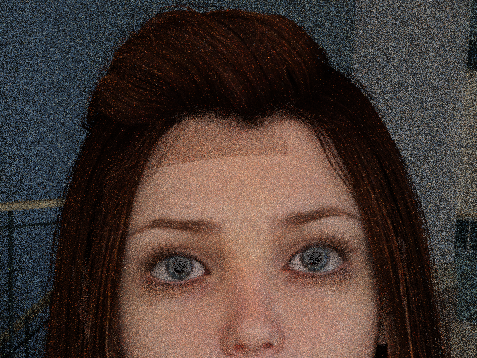
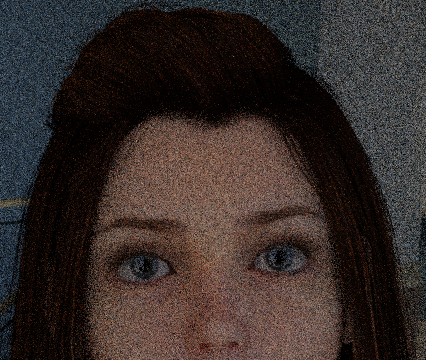
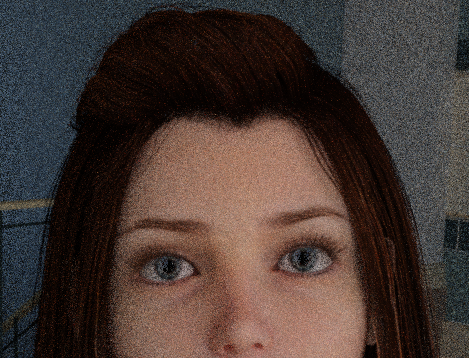
Actually, it's more like a reflection. I have a light exactly on that side. If I turn that light off, and only let the skydome light the scene, the shawod (reflection) is gone:
If I move the light over to the right (her left), then there is no reflection, and it looks like it should:
So for me, moving the lights around seems to solve this issue. At least for this hair.
Thanks for this post!
I have been getting this hair problem for a long time for a lot of different hairs. I have also solved it by not shining a light in iray from above or close in front of the character's face and it seemed to fix it. i have yet to try the smoothing 'off' attempt. I haven't run into the problem in a while though.
I know nothing about IRAY or DS. But, if the reports above are true about possible "fixes", then it could be a specular or translucency problem. Apply an appropriate transmap to these materials/channels or turning them off for that material should fix the issue. (IF the above reports are true) Again, I know nothing of the particular engine's in use, so consider me ignorant of them, but not rendering in general.
PS - Depending upon how Ambient Occlusion is being generated, that should also be something to be checked over/mapped/turned off for the material.
Previously I could resolve this problem by deleting and re-adding the character, lights, or hair.
None of that works now. I've renamed the scene, checked the gamma value, and all the other suggestions above. The problem is happening with some, but not all, characters and hairs. In the attached image it affects two of the three characters; all three are using Iray surfaces.
Adding more light reduces the problem but doesn't eliminate it -- and not every scene can be brightly lit.
Does anyone have other ideas about how to fix this?