Problem with textures/shaders on Amaya for The Girl 7
 DustRider
Posts: 2,905
DustRider
Posts: 2,905
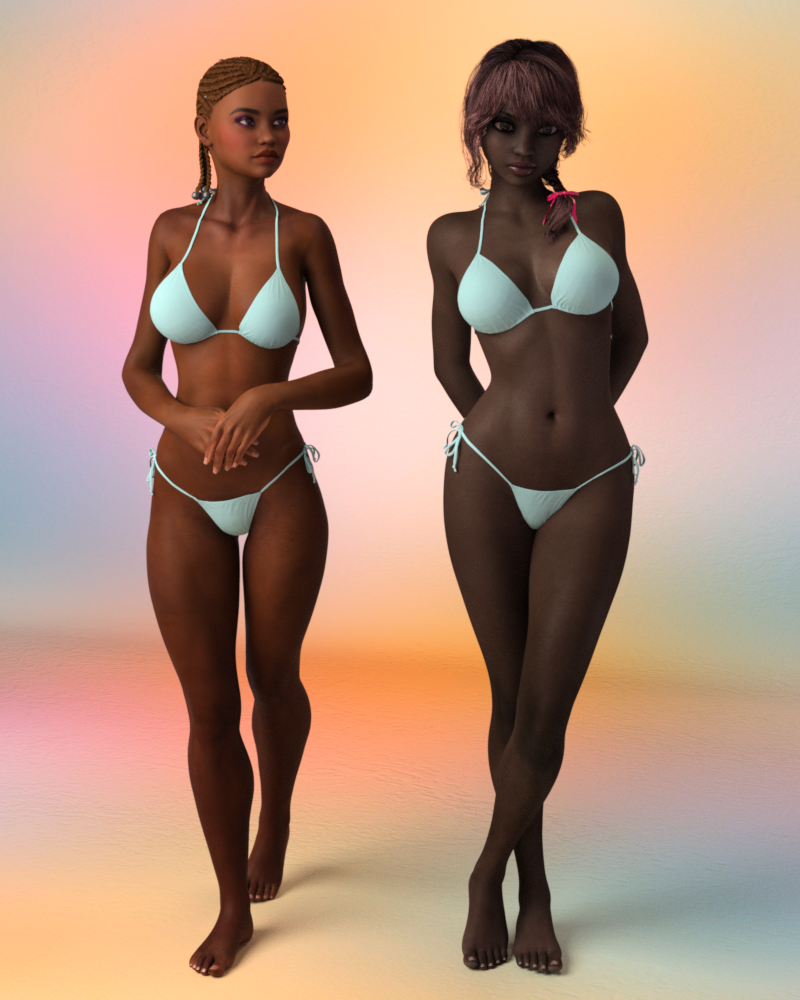
I seem to be having a DUH moment. Usually I'm pretty good with getting the results I want, but I don't seem to be able to match, or even come close to the skin color/tone on the Iray promo renders. What I get is much darker than the promos, unless I crank the lights up to crazy amounts that blow everything else in the scene out. I attached a sample render of the default Amaya Iray textures (on the right) and for comparison Quinty on the left (who in promos is much darker than Amaya). I also attached the main promo render of Amaya for comparison.
By changing the translucency color (lighter) and the SSS reflectance tint to lighter and from the blue tint to yeloowish things lighten a bit, but nothing close to what the promos are. So I thought I'd check here first to see if I'm either missing the obvious, or if someone has already figured out the magic key to reproducing something similar to the promos. I've also tried several different light rigs, and HDRI's without any better results (even the "go to" Pixar campus HDRI doesn't seem to lighten her up). Maybe the SSS or spec maps need adjusting?
Hopefully it's just me being stupid. This is the first time I've been tempted to return something because the promos are sooo much different than what I'm getting.
Daz Promo Image

Default Amaya on right, default Quinty on left

Daz 3D is part of 
Connect
DAZ Productions, Inc.
7533 S Center View Ct #4664
West Jordan, UT 84084
Licensing Agreement | Terms of Service | Privacy Policy | EULA
© 2026 Daz Productions Inc. All Rights Reserved.
Comments
She is actually quite a dark skinned character, i was really suprised with how light they got her in promos! Id love to know how they did it also its really bright makes her look completely different.
So, Silver, you are saying that DustRider's render above, is how she should be?
Yes she is actually quite dark this is one of my original 4.8 renders of her (i am updating the shaders for 4.9 currently). I dont think that Daz's promo artists change the skin settings just for promos so it most certainly must be lights and environment id really love to know what they used i love how bright everything is!
Thanks for dropping in Silver!! Yes, it would be nice to know what was done for the promos, since she looks like a completely different character.
The attached image shows the results after a little more futsing around, I got her a bit lighter. I changed both the translucency color (lighter) and the SSS reflectance tint to lighter (almost white) and from the blue tint to pinkish-yellow, and put the diffuse color map in in place of the gray scale maps for the translucency color channel.
Quinty on the left, Amaya on the right
I got something close to the Iray promo renders by using the 3delight material presets in Iray. I also got close by completely changing the material settings for the iray preset, but I think the 1st option is pretty likely.
Thats really good! Similar to how I adjusted my shaders for 4.9 and much better then the first render :)
Thanks! I thought that maybe the shaders were for 4.8. I'm getting closer to what I was expecting based on the promos, so I think I'm keeping her (I could only afford/justify the Girl 7 Base and Amaya), the textures will be useful for other characters too.
Daz definitely needs to get a bit more representative promos of what she looks like "out of the box" though. For anyone who won't mess around with shaders, what they get is definitely different from what the promos show.
Anyway, nice work on the character and the texture set! I'll play a bit more later to see how close I can get to the promos.
For this one I took the image out for the translucency color slot (no image), and had a translucency color of 0.22, 0.12, 0.02
Hmm. This is a little concerning since I've actually seen this happen with a few darker skinned characters that wind up way lighter in the Daz promos.I have been playing with since this thread was first posted. Tweaking the skin settings I have pretty close to the promo look. The render is only at 19% so I post it when 'done'. along with my settings.
I should have posted an update, but it seemed that not very many people were concerned with this issue (or maybe they didn't have any problems). Based on the few responses I got with similar problems, and the post by Silver showing her own render, I thought it would be best to submit a ticket so that Daz would hear that this is an issue with their customers as well. I'm sure that Silver alerted them to the problem as well, but I thought that hearing it from the customer would help them to realize that it isn't good to have such a dramatic difference between the promos and the "out of the box" shaders.
Anyway, the response I got from Daz was that the PA (Silver) and the promo artist are working together to resolve the issue. I feel bad for Silver, because this is causing more work for her and I don't feel it is her problem (the promo artist took quite a bit of liberty and "artistic license which misrepresented the product being sold). But, at least Daz is aware of the problem, and will maybe it will help stop the trend noted by ZamuelNow in the future.
@jestmart - I'm looking forward to seeing your results, and the shader modifications used to get them!
I've never used it before but how do you send support tickets? While I don't have Amaya, I do have Nidale which is another character from Silver that this has happened to. In fact, it was Silver's own promos that got me to buy her, not the Daz promos. I mean the Daz promos of Nidale aren't bad (barring the hair choice) but it does throw you off if you were looking for something different.
I got bored and stopped the render at 43%. One thing I change with any skin preset is to move specular strength maps from the color slot to the strength slot. In the case of the Iray shader that means the Glossy Layered Weight and Top Coat Weight slots.