I don't remember Auto-fit doing this...
 nightwolf1982
Posts: 1,320
nightwolf1982
Posts: 1,320
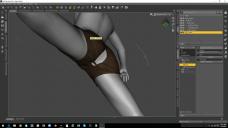
So, playing around with autofit, and I think something got broken. I don't remember ever seing this before. Did I miss something? I've tried in both DS 4.9.2.70 and in the DS 4.9.3.37 Public Beta, and both are giving me these results.
Loaded a base Genesis figure, loaded Exnem's Action Girl shorts for V4, Selected V4 for the source figure, Pants/Tight as the clothing type, and now it looks like Genesis had one burrito too many.
Did I miss a step somewehere?

Daz 3D is part of 
Connect
DAZ Productions, Inc.
7533 S Center View Ct #4664
West Jordan, UT 84084
Licensing Agreement | Terms of Service | Privacy Policy | EULA
© 2026 Daz Productions Inc. All Rights Reserved.
Comments
Have you tried loading it with "none" as the source and/or type? Sometimes that gives better results.
What I hate is when you can see the clothing fitted perfectly when that little Source/Type window comes up, but when the fitting is done, it's a mess. It's like the computer knows how to do it, but won't because it's mad at you or something.
Looks as if the OBJ may not be welded at that seam. If you switch to wireframe view is it clear that there's a gap, not just some of the mesh getting buried inside the figure?
The gap is there even in the standard T-Pose, but not on the original V4 shorts. Fact is, every pair of shorts or underwear I've tested gives horrendous results in the area between the legs.
I had a problem yesterday with a G3 outfit ON G3, and it looked perfect in the Iray AUX screen but rendered full of holes/poke through! I may post a separate thread with screenshots later. I can fix them in post, but why would it look perfect in the NVIDIA Aux screen and render totally differently? And this is the 3rd time a G3 dress had poke through on a G3 model of normal proportions....
And it's not just poke-through, as I asked above (it doesn't look like it, but I want to be sure).
Wonderland: if the issue doesn't show until renderinmg it may be down to displacement (out on the wearer or in on the clothes).
It's definately not poke-through, the mesh is split right along the seam there. The same thing happens when autofitting to genesis 2.
Then there's a seam there where the vertices are not welded.
I can verify this is a problem on my machine as well. G3 autofit for V4 clothing is goofed up and needs to be updated.
It doesn't happen on G3F for me, no matter what V4 outfit I choose. Genesis seems problematic. On G2F the Action girl shorts "tear" at the seam. Other outfits are better, although one example looks like it is starting to tear. The pose is fairly extreme.
As far as poke through, my percpetion has been that there are a lot of new content providers that haven't yet mastered clothing / G3F. Seems more prevalent on Rendo than Daz, but I have also had outfits that I just couldn't fit on "normal" proportions, even the help of products from Zev0, Valzheimer, and Sickleyield.
This could have something to do with the polygon count of the clothing artical ya think?
I'm thinking this is more about rigging than anything, how the mesh is grouped and weight mapped. From what I can tell, pants and shorts are getting stretched and distorted in the crotch and across the butt crack.