Dark preview scene but bright render
 Xyetzt
Posts: 27,546
Xyetzt
Posts: 27,546
I am starting on a scene which in preview is dark but renders bright. Nothing is visible in the preview but when I render everything is visible. It takes forever to do an iray render so not sure how to proceed with this scene. I am feeling like giving up but I just started on this scene.
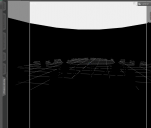
darkpreview.png
900 x 764 - 35K
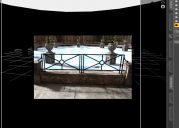
darkpreviewbrightrender.png
897 x 643 - 403K
Post edited by Xyetzt on

Daz 3D is part of 
Connect
DAZ Productions, Inc.
7533 S Center View Ct #4664
West Jordan, UT 84084
Licensing Agreement | Terms of Service | Privacy Policy | EULA
© 2026 Daz Productions Inc. All Rights Reserved.
Comments
Have you turned off preview lights? You won't be able to see the lighting, but you can position everything else.
Also I use the Aux viewport to get lighting. I leave it closed until I'm ready to fiddle with the lighting, of course, but then use that to see how the lighting is working. It does take a while for the initial set up on mymachine, but once it's done that, it doesn't take as long when I tweak the lighting.
How do I do that?
Preview lighting is on the Window menu (main menus) You can also use CTRL+L to toggle them on or off.
The Auxillary Viewport is a pane/tab that you can find under Window -> Panes(tabs). It basically is the same as the main viewport, but I keep it small and docked under my Scene tab. (I have a small group of tabs that I use only occasionally with relatively small lists of options there.) There you just set the veiwport draw style to Nvida Iray (you may have to reset it to this with each session) and wait. (And wait, and wait... :))
Sorry for late response but I ran into this issue again. I decided to look into it and found this thread again. Right now doing an iRay render so unable to follow your directions.
Turn your camera headlamp to "on" or "auto." (Camera setttings, headlamp) If you have the headlamp set to auto and any lights in your scene which are turned off, delete them and your preview lights will return. Just be aware that if you turn the camera headlamp "on," make sure you shut it OFF before rendering in Iray.
Don't use the headlamp, turn the prview off (cmd(Mac)/ctrl(Win)-L to toggle, as noted above) - with the preview off you will get the hedlamp, but the sceen will not use it (as long as it's not on in Render Settings or overridden to on in the render camera).