Install Mannager filters?
 drinformation
Posts: 123
drinformation
Posts: 123
in The Commons
I always receive poserCF package with my install manager,

Since I'm only using daz and I don't think I'll ever try poser should I go to the filters and uncheck poser filters?
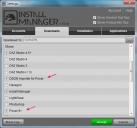
is there anythin important about the rest of filters I should know?

22.jpg
551 x 516 - 61K

11.jpg
551 x 516 - 51K

Daz 3D is part of 
Connect
DAZ Productions, Inc.
7533 S Center View Ct #4664
West Jordan, UT 84084
Licensing Agreement | Terms of Service | Privacy Policy | EULA
© 2026 Daz Productions Inc. All Rights Reserved.
Comments
You certainly don't need the DSON Importer option checked. Unchecking the Poser files may also hide the Poser files thata re needed for DS on soem older products, but you can uncheck it and see how it goes.
thanks ^_^
the filters come with lots of options checked, should I uncheck the the ones like bryc and carrara as well?
I'm installing Daz on my new laptop and I wonder: shoud I skip packages with Ps or PoserCF at the end of their name?
Carrara files should be skippable, if you see an item with PS and DS versions check the file size - usually theye will be independent, in which case the size should be comparable, but sometimes the DS version will be much smaller, in which case it's likely that the Poser version has the models and textuers and the DS is just material presets to be applied to the poser models. Companion Files (CF) for an aplication you don't use can always be ignored, DAZ StudioCF almost certainly means you do need the base Poser product as well.
thanks, this info helps me keep my drive as clean as possible. ^_^