Iray EnviroCam for cool renders [commercial]
 RawArt
Posts: 6,216
RawArt
Posts: 6,216
EnviroCam
http://www.daz3d.com/iray-envirocam
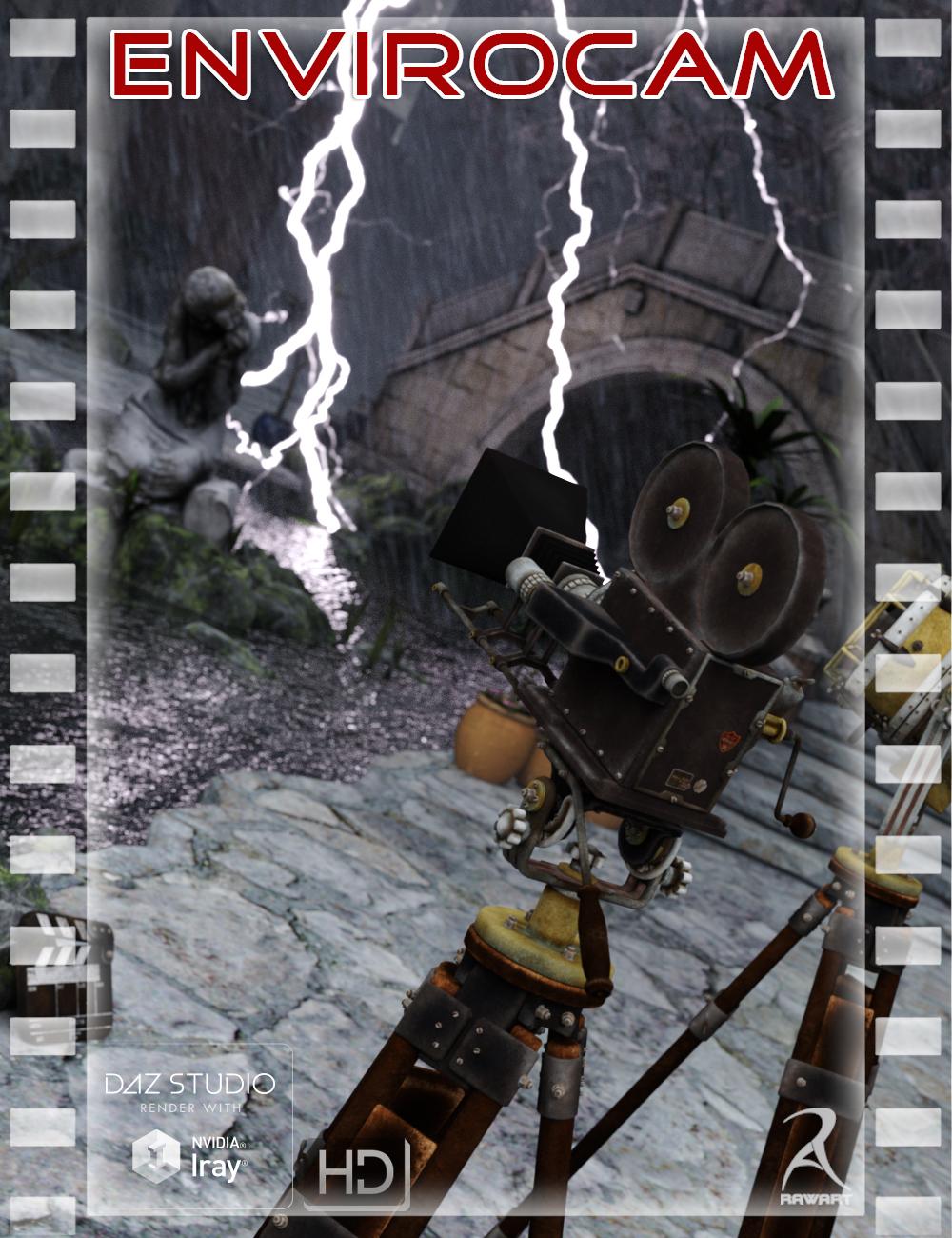
This Iray camera includes many different Environmental effects all parented to a camera, so wherever you point you are guaranteed to have the effect rendering properly.
Effects include such things as Depth Haze, Dust, Ground Fog, Rain, Snow, Darkness, Clouds, and an Explosion!
Plus also comes with blended effects to create more complex environmental effects.
AND…also comes with Material files for additional effects like Lightening or Rainbows
The Parented figure also has many movement controls to allow greater control of the positioning of the effects.
AND..and individual Panel which can be placed anywhere for any individual effects you wish to add.
Product Includes:
One Enviro-Camera
One Single Enviro Panel Prop
One Multi Enviro Panel Figure
Ten Basic Material Presets
Five Blended Material Presets
Five Individual Panel Material Presets


Daz 3D is part of 
Connect
DAZ Productions, Inc.
7533 S Center View Ct #4664
West Jordan, UT 84084
Licensing Agreement | Terms of Service | Privacy Policy | EULA
© 2026 Daz Productions Inc. All Rights Reserved.
Comments
other effects
sweet.
will pounce on this. the preview pics all look great.
Do they work with animation. I'm guessing not, but if they did that would be an instant buy.
They are not animated....sorry
Ooh, this looks interesting!
This looks most useful!
EnviroCam
http://www.daz3d.com/iray-envirocam
This Iray camera includes many different Environmental effects all parented to a camera, so wherever you point you are guaranteed to have the effect rendering properly.
Effects include such things as Depth Haze, Dust, Ground Fog, Rain, Snow, Darkness, Clouds, and an Explosion!
Plus also comes with blended effects to create more complex environmental effects.
AND…also comes with Material files for additional effects like Lightening or Rainbows
The Parented figure also has many movement controls to allow greater control of the positioning of the effects.
AND..and individual Panel which can be placed anywhere for any individual effects you wish to add.
The panels are fully rigged to completely customise your shot.
You can rotate the panels to add direction to your precipitation
You can twist the panels to add variation to the direction to simulate wind
You can adjust the depth to spread out the effect over a greater distance
You can also move the panels up and down, left and right, and closer and further depending on your need.
You can even move individual panels should you need to.
I just posted about this, cos I couldn't find a commercial thread :)
Looks awesome adn that explosion has me drooling.
Now, I'm not the most technical of people (big DUH from those who know me), so I want to make sure I'm understanding it. The planes contain the 'effects'? And you use the included camera? Are there angles you shouldn't use perhaps, like an angle that may show it to be a 'plane'? It looks fantastic but I just want to make sure I can use it, with my pitiful lack of understanding. LOL
edit: I should post some questions so you get what I'm asking :)
For instance, would you position a person in front of the 'plane' ......rather than say, in the middle of it? (like the snow one)
The explosion looks like it is casting light on the water....that's correct? And if I had a person in front of it, they'd be backlit by that fire?
The panels are parented to the camera, so they should always be in line for a clear shot. They are also large enough that they should also not be visible in the shot (but if the shot is insanely large that they do show up, the panels could be scaled or moved indiviually if needed)
Rawn
If you edit your post to add more questions...there is a chance I may miss them.....good thing it is early in the morning and I am procrastination starting work :P
You can position people or objects as far between the panels as you like, it all depends on the effect you want. If they are further into the panels, then they would obviously be more obscured by the depth of the effect between them and the camera (just like in the real world)
The lightnig and the explosion are both emissive and cast their own light, so they will affect any object around them. So yes...anything in front will be back lit by them.
Rawn
The planes obviously give depth for things like the snow and rain, but how many planes are the lightning and explosion effects using?
The lightening is on an individual plane...the explosion uses 3 panes to give it more depth.
There are seperate material files to apply individual effects like lightning......so you can load up a rain set, choose any individual panel in the set, and then apply lightning to that panel. There are also 3 different lightning strike mats for variety :)
Rawn
Where is that camera from?
How I would build a render using this camera is:
1) set up your scene
2) load and position your envirocam camera for the shot you want (it loads with the panels opaque for easier positioning)
3) position the panels for the depth your shot requires
4) apply the effect you want onto the panels
5) render
It is from this set: http://www.daz3d.com/nikkelahs-vintage-movie-makers
Rawn
This looks fantastic!
And thank you so much for the reasonable pricing.
That made it an easy instant buy. :)
Can't wait to play!
Do the lightning and explosion generate light, or is that done another way?
Yes..they are emmisive and generate their own light
I am curious what this looks like with people in them. They make some very nice scenes, but having trouble gauging how it will look for renders involving the figure.
I haven't tried this with a figure yet, but using it with props is giving me intriguing results. I see potential for use with figures.
Using the Aux viewport gives me a good preview. I like the layering of panels for blending effects.
General question:
I get the effects on props, but the effects aren't carrying over to environment backgrounds. Are they supposed to, or just supposed to affect a physical backdrop?
Here is a render i did with a figure...hope it helps
I don't understand what you mean.
The effects are applied to the panels attached to the camera
Rawn
You do realize that this isnt helping my wallet AT ALL!?
Also, the effects panels seem like they might be customizable? Can we create our own effects for the camera panels?
Yep :)
Sold!
Thanks, was there an easy way to apply to different panels was going to be my follow-up question :)
That's what's confusing me. :-) When I use a backdrop, I see the effects. But when I render with an HDRI environment background, I don't see the effects on the HDRI background itself.
I must be doing something wrong.
Edit: OK, got it. I don't know what I didn't do the first time, but now I'm seeing the effects on HDRI backgrounds. Sorry!!! I'm one step behind the world this morning.
ok cool...glad you got it sorted out :)
Thanks, me too!
Can i use it to render a scene where the character is inside staring out the window on a rainy day? It would not be raining inside but only outside? Also how can I handle an umbrella while the scene is raining?