Using the Light Probe Tool?
 Scavenger
Posts: 2,677
Scavenger
Posts: 2,677
in The Commons
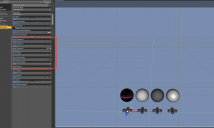
Ok, I got the light probe tool, I've loaded it, I loaded the map onto the one you do that too...
Now how do I use it to adjust things?
I assume there's some corelation between the settings I use to move the probe and what I type into the enviroment controls (in the red box)? but so far my experiments have not lead to understanding...
HELP

Screenshot 2016-04-23 17.26.33.png
1894 x 1134 - 263K
Screenshot 2016-04-23 17.26.33.png
1894 x 1134 - 263K

Daz 3D is part of 
Connect
DAZ Productions, Inc.
7533 S Center View Ct #4664
West Jordan, UT 84084
Licensing Agreement | Terms of Service | Privacy Policy | EULA
© 2026 Daz Productions Inc. All Rights Reserved.
Comments
I have not used it yet, but maybe this will help a little. http://docs.daz3d.com/doku.php/public/read_me/index/30976/start
just testing with maui hdri
front and back view is ok
left and right are confused
seems to do ok, with y-axis /rotation..but not anything else like if you want to lower where the sun is (but I may have no idea what I'm doing.)
I am confused as well. The settings to equate are the Dome Rotation and then the Y Rotate on the Probe, right?, but it seems off to me.