Has Anyone Ever Had This Happen?
 Jan19
Posts: 1,109
Jan19
Posts: 1,109
in The Commons
And does anyone know what causes it? I tried to make the character happy, and it all went haywire.
Checking for viruses now.
Any info appreciated. Thanks.
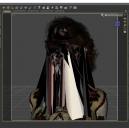
WTF.jpg
800 x 791 - 275K

Daz 3D is part of 
Connect
DAZ Productions, Inc.
7533 S Center View Ct #4664
West Jordan, UT 84084
Licensing Agreement | Terms of Service | Privacy Policy | EULA
© 2026 Daz Productions Inc. All Rights Reserved.
Comments
Where you trying to create a custom morph? I ask because is what it looks like when they go horribly wrong.
Thanks for the reply. :-)
No...not trying to create a custom morph. I was using a character purchased from the store, that I haven't had trouble with before. I've used her several times.
I had tried a bunch of different textures on her, using the LIE. Wondering if the computer ran dry on memory?
I tried an empty scene, with only the base character, and the face/expressions worked ok then.
Very puzzling. :-)
All I do know it isn't anything to do with Viruses or memory. I have seen this before but alas my old brain can't remember the fix.
The polygon order of a morph somewhere has gone astray. Well that what it looks like to me !
Thanks! :-) That's good news -- that it's not to do with a virus or memory.
With an empty scene and fresh-loaded character, all is well.
If you do remember the fix though, I'd love to know it. Mainly so I don't do whatever it is again. Once those polygons started crumbling, that was all she wrote for that scene.
I had to delete it, but it wasn't that spectacular, so no tragedy. :-)
Thanks again for the reply.
That reminds me of the "Victoria 5 Preview" April Fools item
Yes, it happens to me every morning when I look in the mir ... oh, you mean in Daz Studio ...?

Priceless!
I've had this happen occasionally with different models, but the reason has been varied. It used to occur frequently in Poser when I used a hand pose, and selected the (I recall) left hand. The entire geometry of the character would "explode" in something quite similar to this. The problem only occurred if I had previously applied a certain popular bend correction product to the character.
I've also had it using various pre-Genesis characters, including in D|S,, but only after saving the file and returning to it later. Apparently something got corrupted in the file. Remember that facial expressions are morphs, and for me, the one commonality to all the exploding geometry issues had to do with morphs.
I've never discovered the means to correct the problem, other than to redo the scene.
Hi, I'm sorry -- we must've been posting at the same time earlier. I didn't see this. Yes, the polygons developed an evil mind of their own, it seems. :-)
You could try to render it when it happens the next time, and sell it as modern art.
LOL. Or a bad zombie morph. ;-) Very bad.
Reminded me of a real bad hair day, just a bit lower. :-)
Indeed. His comment was funny.
Thanks! That made me think of something. In Poser, if "scaling" isn't checked, the polygon explosion will happen -- I think it's scaling, anyway.
Maybe it's a scaling issue?
Best to re-do the scene, as you said, I guess. :-)
Thanks, everyone, for the replies. I appreciate them. Sorry it happened to others, but very glad it's not memory issues or a virus. Not that I wouldn't love more memory.
Greetings,
Optimization. I used to have this happen all the time, and I finally figured out that it was optimization. There were some super-weird effects, like...I'd try to move a hand, and instead the character's face would 'crack' off and drift a bit away from their body.
Go into 'Preferences', select 'Interface', look down the dialog to 'Display Optimization'. It's probably set to 'Best'. Set it to 'Better' instead, and it should resolve your issue.
It's a super-freaky effect, though, isn't it? Fortunately/unfortunately it actually doesn't render like that, which was one of the things that helped me figure out what was going on.
-- Morgan
Thank you! A drifting face -- glad that didn't happen to me, or I'd be fearing hallucinations. ;-)
Preferences/Display to Better and not Best. Will do!
Yes, it is super-freaky. Not in a cool "she's a super freak" kind of way, either.
Thank you very much -- and thanks to everyone else, also.
Display mode changed. Could be my imagination, but it doesn't seem to take the LIE textures so long to load now...?
Anyway, thanks again, CypherFOX, for sharing that tip.
Many thanks to everyone who chimed in. All suggestions were taken very seriously, even Simon's. ;-)
Another missed response -- I saw it in the email notice. Apologies.
That is an idea. I guess I've rendered worse. I can't remember when, but I'm sure I did, somewhere along the line.