How do0 I get this effect?
 dennisgray41
Posts: 1,013
dennisgray41
Posts: 1,013
in The Commons
The motion blur on the ball in the 4th image from the promo My Human Poses and Expressions for Genesis 8 Male(s) and Female(s) and the DAZ Dog 8 | Daz 3D. Where can I get that?
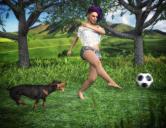
soccerball.jpg
1300 x 1000 - 1M

Daz 3D is part of 
Connect
DAZ Productions, Inc.
7533 S Center View Ct #4664
West Jordan, UT 84084
Licensing Agreement | Terms of Service | Privacy Policy | EULA
© 2026 Daz Productions Inc. All Rights Reserved.
Comments
I don't know what was used, but there are a few products which give you a motion blur effect:
https://www.daz3d.com/motion-blur-for-iray
https://www.daz3d.com/blur-crazy
I think it's just a post effect. It doesn't look like actual motion blur.
You can do motion blur in Blender:
Master Motion Blur in Blender!
Improve your Motion Blur in Blender
Might be DOF. The grass on the right near the camera looks blurred.
Motion Blur in Daz Studio and Photoshop
How To Create A Cool Motion Blur Effect In DAZ Studio
+1
Pick fav Graphics software (photoshop / gimp etc) / Select object / hit-up Blur Gallery
Her foot and leg (maybe her left hand / arm) should also be a little bit blurred... which would have earned some bonus-points
Actually, it may be pre-render, if the texture used for the ball was blurred.