PTF Glitterglaze makes figure disappear when applied

Has anyone encountered this issue? Any of the materials I apply to the skin make that area of the body disappear. This is the product link: https://www.daz3d.com/ptf-glitterglaze

Any advice would be appreciated. 
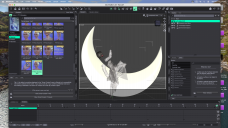
Screenshot 2026-10-14 at 7.18.48 PM.png
4096 x 2304 - 5M

Comments

  • NorthOf45NorthOf45 Posts: 5,921
    edited October 15

    Are you using the geoshell? There are two ways to apply, directly on G9 (from the "Glitterglaze" folder, aka Non-GS; use the materials therein) or with a geoshell (from the "Gltterglaze/Geoshell" folder, or GS). If using the geoshell, be sure to select it in the scene tab before applying the materials in that and sub-folders.

    ETA: Actually, the Geoshell materials are hierarchical, so as long as any G9 node is selected, it will apply the materials to the geoshell.

    Post edited by NorthOf45 on
  • NorthOf45 said:

    Are you using the geoshell? There are two ways to apply, directly on G9 (from the "Glitterglaze" folder, aka Non-GS; use the materials therein) or with a geoshell (from the "Gltterglaze/Geoshell" folder, or GS). If using the geoshell, be sure to select it in the scene tab before applying the materials in that and sub-folders.

    ETA: Actually, the Geoshell materials are hierarchical, so as long as any G9 node is selected, it will apply the materials to the geoshell.

    I tried using the geoshell and it turns my figure silver. I am attaching a screenshot 

    Screenshot 2026-10-15 at 11.45.37 AM.png
    4096 x 2304 - 5M
  • FenixPhoenixFenixPhoenix Posts: 3,257

    irynakhymych said:

    NorthOf45 said:

    Are you using the geoshell? There are two ways to apply, directly on G9 (from the "Glitterglaze" folder, aka Non-GS; use the materials therein) or with a geoshell (from the "Gltterglaze/Geoshell" folder, or GS). If using the geoshell, be sure to select it in the scene tab before applying the materials in that and sub-folders.

    ETA: Actually, the Geoshell materials are hierarchical, so as long as any G9 node is selected, it will apply the materials to the geoshell.

    I tried using the geoshell and it turns my figure silver. I am attaching a screenshot 

    I don't have the product but I would imagine that you need to apply the Geoshell to the character. Then select the Geoshell and apply a material that's meant to be used on the geoshell.

  • FenixPhoenix said:

    irynakhymych said:

    NorthOf45 said:

    Are you using the geoshell? There are two ways to apply, directly on G9 (from the "Glitterglaze" folder, aka Non-GS; use the materials therein) or with a geoshell (from the "Gltterglaze/Geoshell" folder, or GS). If using the geoshell, be sure to select it in the scene tab before applying the materials in that and sub-folders.

    ETA: Actually, the Geoshell materials are hierarchical, so as long as any G9 node is selected, it will apply the materials to the geoshell.

    I tried using the geoshell and it turns my figure silver. I am attaching a screenshot 

    I don't have the product but I would imagine that you need to apply the Geoshell to the character. Then select the Geoshell and apply a material that's meant to be used on the geoshell.

    Ah selecting the geoshell after applying it wroked, thanks so much!

  • FenixPhoenixFenixPhoenix Posts: 3,257

    My pleasure, I am glad you got it working :)

Sign In or Register to comment.
