Why doesn't my facial expression zero?
 dennisgray41
Posts: 1,017
dennisgray41
Posts: 1,017
P3D 100 Natural Expressions Mega Pack for Genesis 9 | Daz 3D Giselle HD for Genesis 9 | Daz 3D
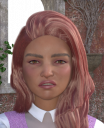
I am trying to pose Giselle for gen 9 and the face expressions will not work properly. When I use P3D 100 Natural Expressions Mega Pack for Genesis 9 She looks like this.
When I check the pose controls they appear to all be at zero, but when I check the parameters tab several items like tye eye lids are slightly off. I have been experiencing this for several days with several characters. Any ideas>?

Daz 3D is part of 
Connect
DAZ Productions, Inc.
7533 S Center View Ct #4664
West Jordan, UT 84084
Licensing Agreement | Terms of Service | Privacy Policy | EULA
© 2026 Daz Productions Inc. All Rights Reserved.
Comments
How do you zero? I think I had the same issue, just not w the face, and I think I got it to work by zero'ing via the little man icon.
little man icon? You mean in the smart content tab?
To zero a figure (or partial figure)
You can also access this from the parameter tab
While you are looking at these menu, observe similar functions for Lock/Unlock and Limits. Might come in handy at other times.
Thanks. I had been redoing the whole figure .