Starting DS6: my prior library doesn't work anymore.
 Second Technician Rimmer
Posts: 494
Second Technician Rimmer
Posts: 494
I didn't want to reinstall everything. I installed DS6 separately from DS4.xx and went into Preferences to add my content folders.
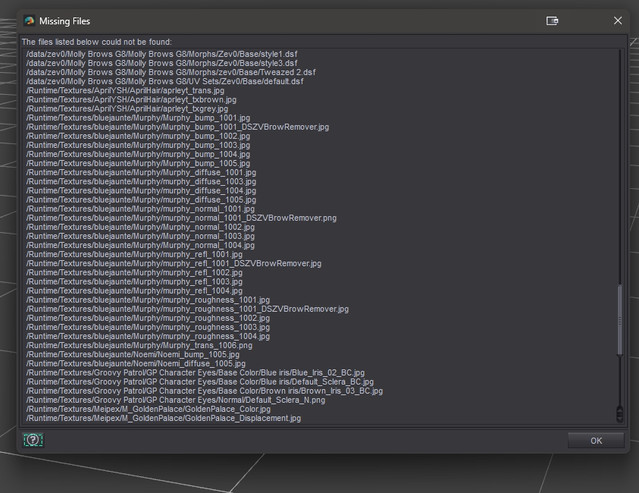
However, when I launch one of my presets (a G8 character with morphs, skin, hair, etc) I get told that most of my morphs can't
be found. I assume I failed to see something here... can anyone help? :)

Daz 3D is part of 
Connect
DAZ Productions, Inc.
7533 S Center View Ct #4664
West Jordan, UT 84084
Licensing Agreement | Terms of Service | Privacy Policy | EULA
© 2026 Daz Productions Inc. All Rights Reserved.
Comments
What is the full error text from the log Help > Troubleshooting > View Log?
Try to make screenshots of your content directory manager in DS4 and DS6, where we can see the libraries for Daz Studio format.
Can you show us a screenshot of the content directory manager for both versions with the folder lists expanded? It's possible you forgot one of them or didn't select the exact same root folder.
Also, do you maybe have some content installed with Daz Connect in DS4?
I only have stuff installed manually through zips or through DIM.

I installed DS6 and when it offered to add my current library to the content, I said yes.
The library and all its subfolders and content show up, includiing their thumbnails.
What I get as errors is like this:
And the content folder tree looks like this in Properties.
The War Zone library is one where I test drive products before committing them to the main.
And you have the exact same directories listed in DS4 preferences?
Is the content directly inside the directories you added (the "runtime" and "data" folders are directly under them) or is there maybe an extra folder you didn't add in the path? For example there could be a "content" folder which might come from extracting DIM zips ==> in that case you need to select "content" as the content directory.
I found it! I had forgotten that many of my lproducts were nestled into separate libraries...
I hadn't touched DS in a while so I had forgotten. All is well now, I think. I re-added everything.
Thanks guys, you gave me the clincher.