[Coming Soon] HDRI Wizard! [Commercial]
 EZ3DTV
Posts: 1,646
EZ3DTV
Posts: 1,646
HDRI WIZARD — Skyscape Generator for Daz Studio
Ever wished you had sky generation tools for Daz Studio with one-click integration — without the overhead of running an entire sky system in your scene? HDRI Wizard is the answer. It carries the full weight of a dedicated sky engine for you, then bakes everything down to a single, gorgeous HDRI at up to 24K. You get a breathtaking, physically-believable sky, and your Daz Studio scene stays light as a feather.
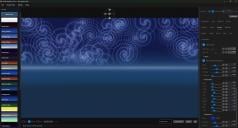
HDRI Wizard is a standalone sky studio that launches right from your Daz Studio Scripts menu. Inside, you build your sky from the ground up — atmosphere, sun, moon, planets, stars, the Milky Way, galaxies, the aurora, clouds, god rays, gobo projections, rainbows, lightning, sun dogs, even a tornado — watching it all come together in a live GPU-accelerated preview. When you love what you see, one click sends it to Daz Studio as a dome-mapped HDRI, perfectly aligned to your scene. Made for Daz Studio, with perfect parity: what you see in HDRI Wizard is what you get in Daz Studio.
It starts with the air itself. Paint your sky with a zenith-to-horizon gradient, layer in volumetric haze and fog, and stack custom color bands to sculpt the exact mood you want — the cool blue of a clear night, the warm wash of a desert dusk, the heavy gloom of an approaching storm. Every layer is tunable, and you can add as many as your scene needs.
And wherever a single color used to live, the Colorize engine puts a whole palette. Author up to six color stops — or auto-fill a spectrum — then paint them as a smooth blended sweep or crisp, hard-edged color bands with one Sharpness slider. Stack a banded sunset ladder inside a sky band, drape a rose-dawn glow that radiates outward from the sun, scatter a cloud layer in mixed hues, or run a rainbow through your starfield: the same friendly panel appears on sky bands, the sky gradient, clouds, sparkles, and the planet's glowing atmosphere. Learn it once, and you hold six brushes.
Then hang your light in the sky. The sun, moon, and planet system is a world unto itself: choose a preset body or build your own, dial in the phase from a thin crescent to full, and shape the surface with layered noise, banding, and emission. Wrap it in a glowing corona of drifting blobs, add diffraction rays, encircle it with rings, and orbit it with moons. A soft, edge-faded glow lets your moon sit naturally in the scene instead of pasted on top — and because the sun also sets the time of day, raising or lowering it takes you from bright afternoon to deep, star-filled night.
After dark, the real magic begins. Scatter a field of color-varied stars across the whole dome, then arc the Milky Way overhead with its own star clusters and glittering sparkles. Build entire spiral galaxies you can move, warp, and flatten, complete with embedded star fields, a glowing core, and soft nebula clouds. And there is a full Aurora — shimmering curtains of northern light with vertical ray striations, flowing waviness, and a green-to-violet color gradient that drapes across the night and veils the moon just as the real thing does.
Fill out your world with weather and detail. Generate drifting clouds with adjustable density, coverage, and turbulence; sprinkle wind-blown sparkle effects that swirl along a band; and pin up to eight of your own PNG billboards — distant peaks, trees, structures, anything you like — anywhere on the dome. Cloud layers can even ring any heavenly body — a beaded crown of pearls circling the moon, or a parted, Saturn-like clearing with the planet resting in its gap. Each element has its own enable switch and its own set of controls, so you are always in command of exactly what appears and how strongly.
Then meet the second cloud engine: true volumetric VDB clouds, raymarched straight into the dome. These are dimensional, self-shadowed hero clouds — puffball swarms or sculpted shape volumes, lit by the physics sun so they obey your sunset, parted around the light with an adjustable sun clearing, even hung as a golden-spun ring of up to twelve volumes crowning the sun or moon. Colorize paints them from wisp to core with a true density ramp no flat cloud can wear. The two engines are partners: classic clouds are your weather system, filling the whole sky for almost nothing, while the volumes are the statement pieces inside that weather. And because HDRI Wizard renders the volume itself, your scene never pays for it — the finished cloud arrives already baked into the HDRI.
Then send the light down in shafts. God Rays hangs a sculptable bundle of up to 48 rays in your sky — anchor it on the sun or place it anywhere, lean and spin it in full 3D, fold the fan closed like an umbrella, and shape every beam with length, spread, taper, stagger, softness and glow. Tint the bundle, run a Colorize gradient along the beams, and hide any individual ray that doesn't compose. And because the rays are baked into the environment light itself, that beam-fall lands on your figures in Daz Studio — light falling through your scene, not painted behind it.
And then project onto the sky itself. Gobos brings true stage-lighting projection to the dome: up to eight independent projectors that cast any image — the lace shaders and color transparencies already in your content library, your own PNGs, even a favorite painting — or any of 21 built-in patterns, as dappled light or a stained-glass color wash. Aim each projector anywhere, stretch and tile its pattern, soften its focus like a real lens, and tell it exactly what to touch: the sky, individual color bands, clouds, the ground, sparkles — even woven through a VDB volume's depth or shimmering inside the aurora. Project light on this, but not that — a promise no real light can make. Dappled forest light, cathedral windows, underwater caustics — with no transparency maps, no masks, no complex light rigs, no gobo distances to measure: 2D simplicity with 3D majesty, arriving baked into the HDRI.
What truly sets HDRI Wizard apart is how it talks to Daz Studio. Import your Daz Studio camera and the preview matches it exactly — focal length, frame width, depth of field, and field of view all line up, so what you frame is what you get. Camera-matched culling can concentrate every pixel of detail on the part of the sky your camera actually sees, letting you push resolution all the way to a stunning 24K where it counts. Export as HDR or EXR with your color grade baked right into the pixels, while the HDRI keeps its full physical dynamic range — so the sun still lights your figures like a real sun. And every gradient ships armored: triangular dither plus a state-of-the-art blue-noise film grain protect your skies at the source, so they stay glass-smooth through every viewer, save, and render downstream. Your brightness rides along as a live, adjustable Iray Exposure Value in Daz Studio's Render Settings, and what you see in the preview is exactly what the launched scene looks like.
And now the sky can step straight into your scene. Beyond the dome, one click builds a razor-sharp background plane for you — a camera-facing panel, sized automatically to fill your frame, carrying your sky as a glowing, self-lit image. Where a dome spreads its detail across the whole sphere, the plate spends every pixel on the exact view your camera sees, so distant horizons and clouds stay crisp instead of soft. Building one by hand means adding a plane, wiring an image into emission, wrestling with opacity and gloss, then chasing down the banding — an afternoon gone. HDRI Wizard does all of it in a single button: it creates the plane, poses it to your camera, fits it to the frame, loads a full-precision image, switches off the texture compression that would band it, and even matches your render frame — ready to go in both major Daz Studio versions. A finished background, lit and sharp, from one click.
And it stays out of your way. Save and reload full projects, browse them in a visual thumbnail library, and start from a library of factory presets whenever you want a head start. Every slider, color, and toggle is fully undoable, so you can experiment freely and step back instantly. HDRI Wizard handles the heavy lifting of a complete sky system and hands you back exactly one thing: a gorgeous HDRI, ready to make your scene shine.
The sky is open to everyone. HDRI Wizard is pack-ready: install a sky pack and its skies appear automatically in the Project View library, ready to load, customize, and render — and Published Artists are encouraged to create and sell their own HDRI Wizard sky packs in the Daz Store. Every sky you design is a tiny, resolution-independent recipe that renders at up to 24K on the customer's machine — a whole product line waiting for your imagination. Ask in the HDRI Wizard (EZ3DTV) PA forums for details on how packs are made.
- - - - - - - - - - - - - - - - - - - - - - - - - - - - - - - - - -
KEY FEATURES
- - - - - - - - - - - - - - - - - - - - - - - - - - - - - - - - - -
- Builds complete, custom skies and bakes them to a single HDRI.
- Outputs at resolutions up to a stunning 24K.
- Live, GPU-accelerated preview as you work.
- Launches right from the Daz Studio Scripts menu.
- One-click export to a dome-mapped HDRI in your scene.
- Zenith-to-horizon sky gradients with layered color bands.
- Volumetric haze and fog with adjustable density and height.
- Full sun, moon, and planet system with surface detail.
- Coronas, diffraction rays, rings, and orbiting moons.
- Edge-faded glow so bright bodies blend naturally.
- Color-varied star fields across the whole sky.
- A movable, warpable Milky Way with star clusters.
- Build entire spiral galaxies with cores and nebula clouds.
- Shimmering Aurora / Northern Lights curtains.
- Drifting clouds with density, coverage, and turbulence.
- Colorize — one color-band engine across sky bands, gradients, clouds, sparkles, and coronas.
- Color ladders with draggable stops and a Sharpness slider — soft washes to crisp bands.
- Sun-centric gradients: rose-dawn color radiating from the sun.
- VDB volumetric hero clouds — true raymarched 3D volumes, self-shadowed and sunlit.
- Volume swarms, sculpted shapes, sun clearings, and golden-spun rings that crown the sun or moon.
- Density-ramp Colorize paints volumes from thin wisp to dense core.
- Cloud layers can ring any heavenly body — beaded crowns or Saturn-like clearings.
- Wind-blown sparkle effects along a band.
- God Rays — sculptable bundles of up to 48 light shafts, sun-anchored or free-placed.
- Rays aim in full 3D, fold like an umbrella, taper, stagger, glow, and take Colorize gradients.
- Hide individual rays for the perfect composition — the light lands on your figures in Daz Studio.
- Gobos — up to eight image projectors casting patterned light or stained-glass color onto the sky.
- Project any image — your lace shaders and transparencies — or 21 built-in patterns.
- Per-projector targets: sky, bands, clouds, ground, sparkles, VDB volume depths, even inside the aurora.
- Project light on this, but not that — 2D simplicity with 3D majesty.
- Film Grain anti-banding bakes protection in at the source — gradients survive every 8-bit stage.
- Pin up to eight of your own PNG billboards on the dome.
- Imports your Daz Studio camera and matches it exactly.
- Camera-matched culling focuses detail where you look.
- One-button razor-sharp background plane — camera-fit and self-lit, zero manual wiring.
- The plate spends every pixel on your framed view, so horizons and clouds stay crisp.
- One Resolution dial sizes dome and plate alike — a 16K export writes a 16K-wide plate.
- Full-precision 16-bit plate, with banding-prone texture compression handled for you.
- HDR and EXR output with your color grade baked in — full dynamic range preserved.
- Brightness arrives as a live, adjustable Iray Exposure Value in Daz Studio.
- Save, reload, and browse full projects in a thumbnail library.
- Start fast from a library of factory sky presets.
- Pack-ready: installed sky packs appear automatically in Project View.
- Published Artists are encouraged to create and sell their own HDRI Wizard sky packs in the Daz Store.
- Full undo on every slider, color, and toggle.
Expected to be available in the next week sometime.

Daz 3D is part of 
Connect
DAZ Productions, Inc.
7533 S Center View Ct #4664
West Jordan, UT 84084
Licensing Agreement | Terms of Service | Privacy Policy | EULA
© 2026 Daz Productions Inc. All Rights Reserved.
Comments
I am afraid that exporting 24K HDRI requires Nvidia graphics card with a lot of VRAM.
On 8 GB of VRAM I am able to export max 8K.
Hi Artini, fair question, and the answer is the opposite of what you would expect.
HDRI Wizard does not render a 24K sky in one piece. Above the size a single framebuffer can hold, it renders in tiles, each capped at 16384 by 2048 pixels, which keeps each pass around half a gigabyte of VRAM. The tiles are stitched together in system memory. So the card sees a 24K export as a series of small renders, and an 8 GB card handles it the same way it handles 8K, just with more passes.
What a 24K export does need is system RAM, about 4 GB free for the stitched image, more for 32-bit EXR, and disk space for the file. That is the practical limit, not the graphics card.
I test on a large card, so I would be glad to hear how it goes on 8 GB once you have it. The export writes a log with each tile, so if anything ever stops, it says exactly where.
EZ3DTV
This sounds really cool, EZ3DTV! I can see myself getting a lot of use out of it. I'm following this with great interest and can't wait to check it out when it's released.
A word on how the image reaches your scene, because HDRI Wizard gives you three roads and they solve different problems.
The first road is the classic one. HDRI Wizard renders a full equirectangular HDRI, up to 24K wide, and sets it on your Iray sky dome. It lights the scene, reflects in every surface, and wraps the whole 360 degrees. That is what an HDRI is for, and it is the right choice when the sky is lighting and atmosphere more than subject.
The second road, a 24K dome sounds enormous, but a camera only ever looks at a slice of it, so even at 24K the part behind your subject is a few thousand pixels stretched across the frame. When the sky is the shot, that is not enough. So HDRI Wizard measures your camera. It reads the active camera's frustum and aspect, builds a plane cut exactly to that frame, and renders the sky again with all 24K of resolution spent on just that plane. Nothing is wasted on the parts of the dome you would never see. The plane carries emission, so it glows and lights the scene like a sky instead of sitting there like a poster, and the image goes out as a high-resolution PNG. The result is a backdrop that stays sharp at any render size you can throw at it, with the sun, clouds, and rays exactly where you framed them.
The third road is the simplest. HDRI Wizard can export the sky straight to Daz Studio's Environment backdrop, the flat image behind everything. No dome, no plane, no geometry in the scene. When you want the sky as a picture and nothing more, that is the one.
All three are one click from the Launch script inside Daz Studio. Render the sky, choose dome, camera plane, or backdrop, and it appears in the scene, already placed.
You can use them together. Dome for the light and reflections, camera plane for the sharp sky behind the subject. The two come from the same sky, so they match.
I am excited to see what artists will do with this! Coming very soon along with a couple other surprise products!
Thanks for the explanation. It is a really clever solution.
The tiled export exists because even my 5090 could not render a 24K HDRI to 32-bit float EXR in one piece.
Even so, there is a Daz Studio limit past that. Daz will load a 24K EXR fine, but a 24K EXR in 32-bit float makes it crash, so HDRI Wizard warns you before writing one.
Honestly, though, 16K is the sweet spot for HDRI Wizard. I do not find that going higher produces better results, and the math actually favors 16K. The noise that HDRI Wizard adds to prevent color banding is tuned around that size, so 16K comes out cleaner than 24K, not just smaller.
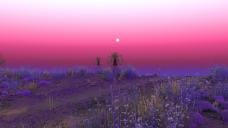
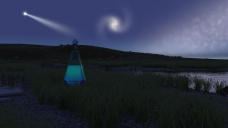
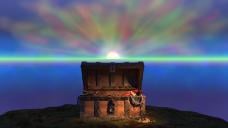
None of the attached images look like real skies to me. They all seem like exotic fantasies. Do you have examples of normal blue skies with some clouds, or some overcast skies, or other skies I might see in real life on earth?