How to convert a realistc character into an anime character?
 yuyu.atem
Posts: 497
yuyu.atem
Posts: 497
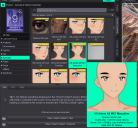
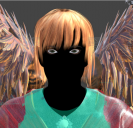
Hi! I initially created a realistic G9 character by dialing some morphs, but finally, I would need an anime character, so I tried to "convert" it by using G9 ALL MAT, but my chracter become all black, so I guess I misunderstood how it works (see screenshots).
Could you tell me how to convert my character into a filatoo character, please? I guess it should exist a way to do that without having to load a new anime character in the secene and dialing again all the morphs from , isn't?
Thank you in advance!

Daz 3D is part of 
Connect
DAZ Productions, Inc.
7533 S Center View Ct #4664
West Jordan, UT 84084
Licensing Agreement | Terms of Service | Privacy Policy | EULA
© 2026 Daz Productions Inc. All Rights Reserved.
Comments
Which version of DS are you using, and are you using Filament as the viewport engine?
I am using DS 4.24 and I tried both Viewport and NVidia Iray engines (see screenshots 1&2). When I load directlt a G9 Base anime in the scene, it appears correctly (see screenshots 3&4). But when I load a realistic character, for exemple Ty for G9, and i try to apply the G9 Anime ALL MAT, I becomes black (see sreenshots 5, 6&7).
Edit: I did another test, and when, after appliying the Anime ALL MAT on my realistic character, I loan an anime character in the scene, the anime ALL MAT suddenlt seems to work on my realsitic character, a bit like if loading an anime character on the scene would have reinirialize the material display. I'm not sure if what I'm saying is very clear, so I made a video to show you what happen. Youc can download the video here: https://workupload.com/file/BbzXLaQ87Sx
However, as you can see, only the skin anime material seems to have been applied, not the eye material, so I am not sure it correctly worked...
Filatoon materials require using Filament to render, so you would set the render engine to "Viewport" and the drawstyle in the viewport to "Filament" (which seems to be the case in your screenshots).
Not sure why you end up with a black character, I just tried loading Ty and applying the anime material and don't get the same result, for me it applies the anime materials correctly. Is there anything else in the scene?
If your realistic G9 character turns black after applying the FilaToon material, it usually means you need to add a light source.
If the "Auto Headlamp" in your Render Settings is set to "Never," try changing it to "When No Scene Lights." This will automatically turn on the camera's headlamp. I believe that when you load a G9 Anime character into the scene, Daz Studio automatically changes this Auto Headlamp setting to "When No Scene Lights" (which explains why the material suddenly started working during your test).
Alternatively, you can add a Distant Light to your scene by loading the "Base FilaToon Environment" from:
Genesis 9 Starter Essentials > Environments (SS1)
As for the eyes, G9 Base and G9 Anime use completely different anatomy parts (Eyelashes, Tear, Eyes, Mouth, Eyebrows, etc.).
To fix this, you will need to delete (or hide) the realistic character's anatomy parts in the Scene tab, and then load/attach the Toon anatomy parts to your character instead. (SS2)
Finally, you can also add the FilaToon Outline to your character if needed. (SS2)
Hope this helps!