[Solved] Studio 4.22 camera cube won't stay where I want it
 john_antkowiak
Posts: 340
john_antkowiak
Posts: 340
Hi. I've once again been away from Daz for quite a while. I hope nobody tells me I have to use the latest version of Studio to solve this problem that I never had before. That's a learning curve for another day. For now, I'm using version 4.22. I'm trying to position the camera I added to the scene but honestly this viewport camera cube behavior started before I added the camera object. It's a large scene, three vehicles on the sea. I drag the cube to the point where I can see the extent I want but when I let go of the cube, the viewport camera moves. At first it moved just enough to be annoying. Two hours later and now it's zipping all over creation; when it stops I can't even see anything in the scene. Not every time, though, so I don't understand. It's 50/50 whether it does what I expect or shifts my perspective on my scene as though somebody pulled the carpet out from under me.
Am I the only one to have seen this? Does it depend on what is selected when I rotate the cube, or what view I'm in? I toggle between the Camera object view so I can see what'll be in my render, and the Perspective View so I can leave the camera alone while I move stuff around.
Any insight is greatly appreciated!
John A.

Daz 3D is part of 
Connect
DAZ Productions, Inc.
7533 S Center View Ct #4664
West Jordan, UT 84084
Licensing Agreement | Terms of Service | Privacy Policy | EULA
© 2026 Daz Productions Inc. All Rights Reserved.
Comments
It's very annoying, hence why i almost never work from "Perspective View". and just use a camera.
If you use a camera and this happens, CTRL+Z and it'll revert.
Try using Aim when looking through the camera and with one of the scene elements selected - is it more predictable (for a while) then? Can you get the same behaviour with a scene using primitives (or the default content)? If so please attach that to a post.
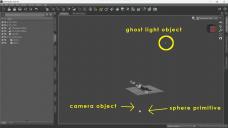
I added a new camera for this test. I might have selected "Active Veiw" but I wasn't paying attention. That was what I used to create my first one, but this time the new camera didn't reflect the active view (which was my desired Camera object rather than Perspective View). I have a feeling this is a hopelessly muddled description of what I did, but what I'm trying to say is I loaded it into the scene and didn't move anything. Once it was in the scene, I selected its viewpoint. Then I changed its "Point At" object to the big boat... that's what was meant by "Aim," yes? This screenshot is what resulted. (I don't care about the rotation of the test camera; that's not the issue.) So then I dragged the cube around and had no issue. Then I selected the ghost light object to make it the center of the perspective. It's the furthest from the world center. It's quite a bit farther away than the camera object ever was, but now when I drag the cube and let go, the behavior exhibits again. Several times in a row, possibly at diminishing degrees. Or maybe it's random, I don't know. But I suppose in a way it makes sense an error would be more pronounced the further from the world center the point of view is.
sounds like the WASD keys are moving it
it is messed up beyond repair once that happens
and keeps getting enabled for me no matter how often I disable it
like docking panes not being locked
I suspect it happens when I open different builds of D|S simultaneously in my case (the re-enabling)
That's odd, i've never had it renable, and i have 5 different versions on my system.
Is the default short cut still set?
I don't need the WASD, so i set the shortcut to something else.
getting offtopic but I honestly don't know how it re-enables, just that it does
was only guessing
Distant objects have issues with Frame if the view is not looking towards the centre of the world, and Point At can sometimes cause unexpected behaviour. DS 6 also seems to have an issue with keyboard (at least) navigation causing the camera to behave oddly when away from the origin by a few meters - for me a quick in-and-out via the mouse wheel seems to snap it back to vertical, though it still requires trial and error to get the right positioning.
Thank you once again for your insight, Richard :) I'll mark this as "Solved" but hopefully Wendy will still be inclined to ask about the keyboard issue if need be.