The menu is completely wrong
 AsuCafe
Posts: 570
AsuCafe
Posts: 570
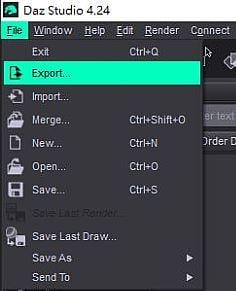
The menus in DAZ 4.24 suddenly changed. For example, the FILE menu shouldn't look like this; it should be "new," "open," and "open recent." No matter how many times I open the program, the "open recent" option completely disappears.
Even the bookmarks in ManFriday's "bookmarks" section have all disappeared. What happened?
Previously, the Surface interface had also become strange. For example, clicking Surface > Face should have listed all the contents, but now it doesn't. For instance, if I wanted to view "base color," I had to click through so many layers, such as Surface > Face > Base > Diffuse > Reflection, to see it.
Incidentally, everything is normal with "Pane" and the layout has not been changed.

Daz 3D is part of 
Connect
DAZ Productions, Inc.
7533 S Center View Ct #4664
West Jordan, UT 84084
Licensing Agreement | Terms of Service | Privacy Policy | EULA
© 2026 Daz Productions Inc. All Rights Reserved.
Comments
Looks like the menu action configuration file which included those actions was damaged or lost for some reason, so it reverted back to the base actions in default DS.
(For the record, the "open recent" option was removed from standard menu actions in DS4.22 when they introduced the "new" window)
I would try running "Window -> Workspace -> Update and Merge Menus" to see if it recreates the missing actions.
If you had the latest layout saved, you'd better load the layout. Then your previous menu layout as well as Open Recent will be back. If you didn't have any layout saved, you'd have to load the Default layout / Update 'n Merge Menus ~ Then Open Recent... menu item has to be manually inserted into the file: C:\Program Files\DAZ 3D\DAZStudio4\resources\menus\Default Advanced.dsx before Update 'n Merge Menus ~
As for the issue in Surfaces pane, check if you by chance have Show Sub Items unchecked in the lower left corner of Surfaces pane... The option could be unchecked by "the glitch" that brought you messy menu items ~~
Thank Leana and crosswind, the "open recent" and "show sub item" issues have been resolved, but some plugin menus are still not restored. It seems I'll have to re-enable the plugins and reset them.