How to Create a Neat Bang Like the Promotional Images?
 seongilkim0107
Posts: 43
seongilkim0107
Posts: 43
Hello everyone.
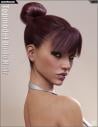
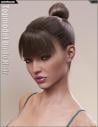
I’m trying to create a neat bang that covers the forehead, like the promotional images for Topmodel Updo Hair and OOT Hairblending 2.0 for Genesis 3 Female(s).
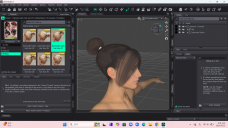
I’ve loaded my Genesis 3 figure and have been adjusting the hair shape, but I can’t get it to look like the promotional images.
In particular, I’m having trouble making the strands hanging down beside the ears short and neat.
I’d really appreciate some help. Is there anyone who could explain how to adjust the hair to achieve this look?
Topmodel Updo Hair and OOT Hairblending 2.0 for Genesis 3 Female(s)How to Create a Neat Bang Like the Promotional Images?

Daz 3D is part of 
Connect
DAZ Productions, Inc.
7533 S Center View Ct #4664
West Jordan, UT 84084
Licensing Agreement | Terms of Service | Privacy Policy | EULA
© 2026 Daz Productions Inc. All Rights Reserved.
Comments
To get that Look from the promo on the Bangs Use the "Toppmodel Updo Hair Bangs 18" (a bit further up the list from your screenshot).
Now your bangs should look exactly like those Promos.
THEN if you ever want to use short bangs on a different shape style, with the hair selected go to the Surface tab click the Downward Triangle to expand it, Select BOTH "Bangs1" and "Bangs2" and scroll down to "Cutout", Click on the image and choose Browse.
In that file find "OOTUtilityTopmodelUpdoHairT3.jpg and select it. (easy to find as it is THE LAST file in the folder). That file is pretty much the secret to short bangs.
*One more thing, Always make sure you use the "Topmodel Updo Hair !Apply First" Preset (which sets the Materials Shader to OOT Hair Blending (MDL) )before using the Shape 18, Otherwise the Cutout Texture is not applied when using the Shape Presets. So in otherwords, when using RSL you always will need to manually select that Tr (Cutout) Texture. Since it looks like "you" are using DAZ 6, doesn't make sense that you would be using the RSL shader anyway, so this for anyone else who had the problem in the future when they ARE using RSL, and can't fugure out why it doesn't look right.