How To Use Ghost Lights Exactly?
 Masterstroke
Posts: 2,522
Masterstroke
Posts: 2,522
I just cannot get ghost lights to work.
My expectations to ghost lights is, to light up a room and to shorten render times.
How to place a ghost light, in order to exactly doing that?
With careful positioning, I sometimes managed to light up a room, but there is no improvement on render times at all.
(I watched tutorial videos on that, so I know the problem with windows in the scene and bouncing off lightrays escaping into eternity, increasing render times)
So where exactly do I position those Ghost light props, in order to lower Render times?

Daz 3D is part of 
Connect
DAZ Productions, Inc.
7533 S Center View Ct #4664
West Jordan, UT 84084
Licensing Agreement | Terms of Service | Privacy Policy | EULA
© 2026 Daz Productions Inc. All Rights Reserved.
Comments
One popular way is to put the ghost light just under the ceiling, facing downward, and scaled to about the same X and Y dimensions this gives a overall illumination to the room, but you need to avoid the camera showing any part of the ghost light.
The room I'm in right now is only illuminated by weak sunlight through the single window, but I can cleaarly see the wall above the window owing to light bouncing around the ( matt ) walls of the room. A ghost light ( or emissive plane ) can help to provide that diffuse illumination. Iray doesn't seem to light up an interior much if the only light is through the window.
Why? It's a ghost light and should be invisible to primary rays: \Scripts\Utilities\Create Advanced Iray Node Properties.dse
Also, for even more diffuse lighting, put it 50 cm below the ceiling facing upward. This, however, will slow render times.
I also like vertical planes made into Ghost Lights that I put between two characters in a scene.
I don't know that ghost lights should render faster. I would think a handful of spotlights the size of points would be much much faster.
I don't think ghost lights' primary function is to make the renders faster. My understanding it that lighting up the space might help with getting rid of graininess and fireflies, which would make your render reach good quality faster, but having more lights also means more calculation of how those light bounce off other objects, so the render time is going to go down, because it's not as dark, but also go up, because there are more lights to calculate. Which would probably cause the difference in render times to not be significant.
Maybe I completely misunderstood this concept.
I beliefed the Gostlight plane also being a barrier for light rays, preventing them from "escaping" through windows and doors, which would increase render times, while at the same time iluminating the interior.
A ghostlight is essentially the same as an emissive plane, with the excemption that a ghostlight will not be visible if you point the camera towards it (primary rays), but you can see it in a mirror.
Thank you for the explainations. :-)
Looks like, I wasted money for nothing Wohoo!
Ghostlight can be usefull if you want to lit an area where a light would be visible from the camera.
But personally I very seldom uses ghostlight, as I usually finds other solutions I prefer.
That is not a ghost light. That sounds like the conflating of invisible lights (ghost lights) and the IRAY Section Plane Node (found in the Create menu). It's the "proper" way to do camera work in tight space. The plane stops tracking rays if they pass through the plane essentially making the "other" side invisible. An Iray section plane could increase render times depending on the scene and its placement, but again, this isn't the primary purpose of the section plane. The primary purpose is for being able to see through walls. Or, at least that's what I usually use them for.
I almost always use a ghost light and a good hdri instead of any other lights; it is definitely much faster in rendering. For example, I rendered an outdoor scene where I wanted the light to look like natural daylight but I also wanted the character to have a flas of light in his eye. I used a DimensionTheory HDRI for the sunlight, an environmental set for the cafe, and a ghost light floating about eye height, in front of, and to the left of the character:
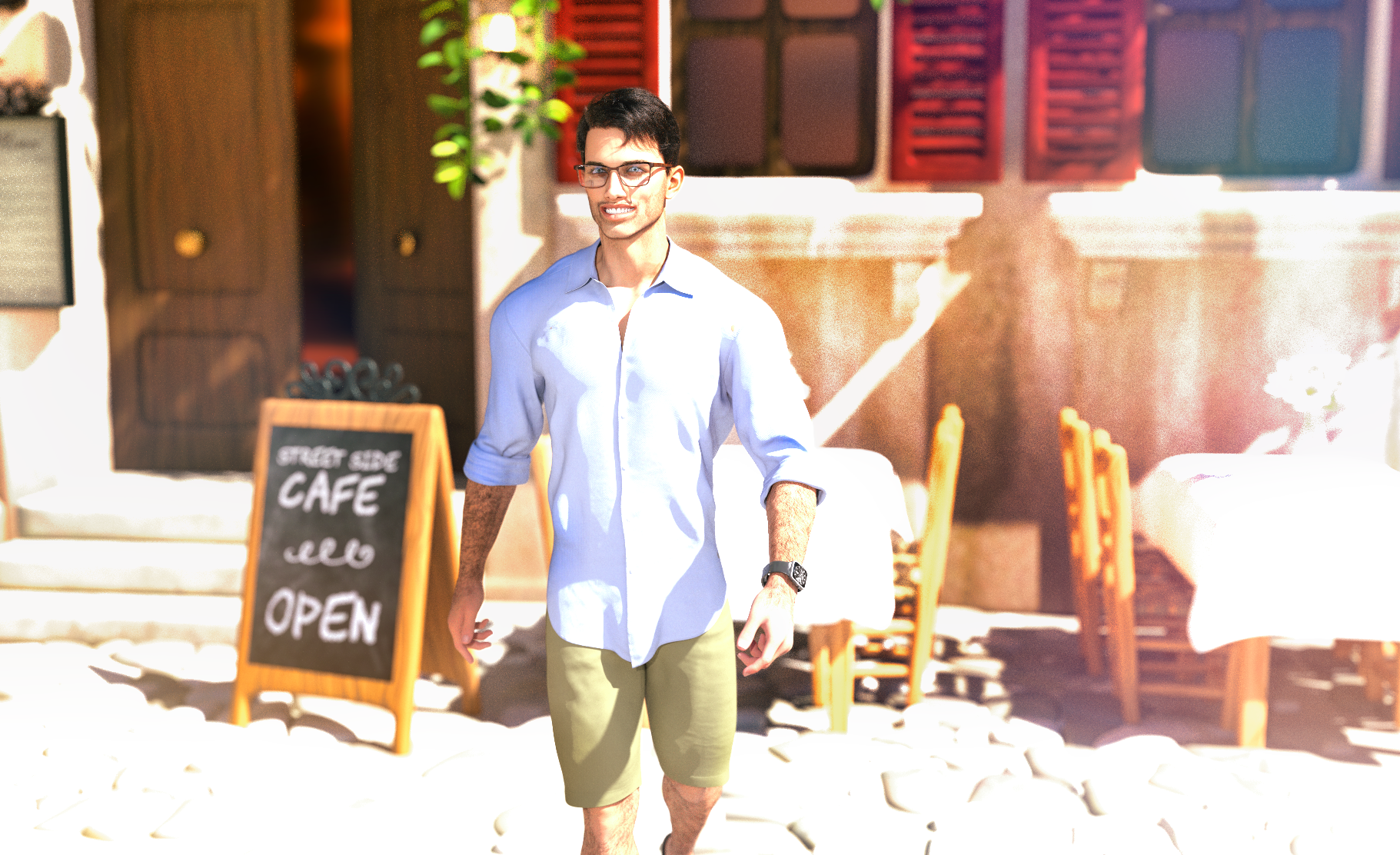
The result had a very quick rendering time with only two light sources in the image: the hdri/scene itself and the one ghost light.
I usually use ghostlights to help make characters not blend into the scene (i.e. make them 'pop' slightly) where DoF either isn't appropriate or wouldn't help. For example, I recently had a midnight scene with an african-american woman with black hair who had a streetlamp over the scene, slightly in front of her, and I had to put the camera with her facing the road. Her hair and face kind of blended into the nighttime and the wall behind her because of her skin and hair color, so I put a small ring ghostlight behind her, giving just enough light to have her head have more of an outline so it wouldn't get as lost into the nighttime. Essentially though, they're emissive planes with invisibility, which is what I needed for that.
There's looking "real" and looking the way people expect an image to look, and they're often not the same thing. The truth is that, in a situation such as you describe, for both still photography and film/video, professional photographers/cinematagraphers often prefer to go with flattering rather than what the naked eye sees, adding flash, fill lights, bounce light, diffusion via scrims, etc to fill in unflattering shadows, and adding even more additional lighting for modeling and to seperate the subject from the background. That goes for both inside and outside imagery... in fact, it's very rare to see outside photos taken professionally that don't use at least some kind of fill light and then go though additional enhancement in post.
Of course, what most professional image makers do now is create their main images in such a way as to give them the widest possible range of options in post, shooting with the uncompressed RAW mode in order to capture image that keep the highlights from burning out while avoiding crushing the blacks to the point where all the detail is lost, and then do the real creative work as far as exposure, contrast, and white balance are concerned at a computer once the actual shoot is over. I set up most of my renders in a similar fashion and seldom consider an image "finished" until it's gone through photoshop.
They were originally suggested for places that were ahrd to light, which would be prone to noise. So in those cases speeding convergence without obviously affecting the actual lighting (they don't show in relfections and so on) does help with render speed.
How does Cybersox land so squarely and accurately. Annoying now, your 'rightness'.
Thank you for participating in the forums.
Speed benefit? Overall, yes, because darker scenes take longer to render than well lit scenes. Mindful of the noise too.
I think it was meanrt that Ghost Lights CAN be in the camera view, but should not intersect with any scene elements.
There's also a version of old Ghost Lights that no longer work with the latest Daz build.
The newer version of the product should work fine.
My overall advice is to light the scene using the provided tools with the set piece (i.e. included HDRI, the room lights, provided product Render settings and use Ghost Lights for flavor and accents.
Get a solid light set up then tweak for character and viewer focus.
Basically, light well whatever you want us to be looking at.
-------
I still find that many Daz renders posted in facebook groups have lighting challenges.
Always too dark.
I suspect that part of the reason for that is the majority of people have their monitors set too bright... which, to be fair, is in no small part due to the majority of monitors' default factory settings being too bright, as they're not set up to be optimal for working at a desk, but rather to be bright and attractive when displayed in a retail store. One of the best investments I ever made was a 32" monitor that was individually factory-calibrated and Pantone Validated .. It cost twice as much as the 32" Samsung sitting next to it in my dual screen set up, but the difference in accuracy is like night and day.
Thank you for that explanation, now I can stop wondering if there's even more wrong with my poor ol' eyes than I thought! I have to turn every display waaaaay down out of the box, otherwise I feel my eyeballs sizzling.
So, how to deal with that scene?
I have no idea, why this scene renders so slowly. There is nothing complicated in it.
I cranked up everything in the exposure pane.
I learnt now, that Ghost lights won't render faster and honestly, the ghost lights would make it look terrible.
I added a clipping plane, in order to render only that geometry, that's in the frame.
It has been rendering for 20 minutes now in the preview editor. So a 4k render would be even slower.
what else can be done to speed up this rendering without loosing quality?
The glossy screen on the wall to the left of the scene will be slowing down rendering.
Thanks, always an annoyence with Iray materials. Lots of Iray shaders have that reflective surfaces.
It is a dark room. It will be slow. That's an HDRI outside the window, right? Is that the only light source?
I thought Ghost Lights were Lights who get hired by other Lights to come in and illuminate a scene without taking any credit. Not to be confused with AI LIghts, which also relight scenes but have weird effects like only lighting four of the fingers on the figure's hands
I was testing this new Ghost Light: https://www.daz3d.com/iray-ghost-light-styles not long ago, here's a render where I've used it to put some more light on the girl, without affecting the rest of the scene very much. You can see the frame of the ghost light plane to her right.
Yeah, you never know, what she is doing. She just cannot be locked in.