Morph Loader Pro will not load morph
 tam_c3df5332fc
Posts: 155
tam_c3df5332fc
Posts: 155
Hey everyone,
Before somone asks - Windows 11 Pro - 12th Gen Intel(R) Core(TM) i9-12900K, 3200 Mhz, 16 Core(s), 24 Logical Processor(s) - Asus ProArt Z690-CREATOR WIFI - Daz Studio 4.20
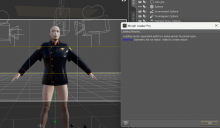
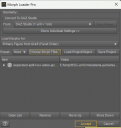
I am trying to make a morph where a jacket opens up and yet I am receiving an error/warning - Geometry did not match, failed to create morph - see attached screenshot
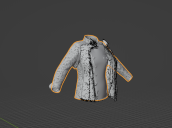
Yet, if you look at the two jackets in Blender, then you can see that they are the exact same height, width and depth - see attached screenshot
Literally the open jacket is the original closed jacket, with the only difference being that I used Blender to create a segmented front - left and right - followed by using rotation tool to "open" the jacket
How is it possible to receive this error/warning if they are the same jacket, with the exception of two parts rotated almost 90 degrees
Thanks in advance
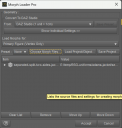
EDIT: I have added three more screenshots showing settings - when I choose Primary Figure from Graft (Facet Order) - receive a little more information saying that the jackets (objects) are different sizes


Daz 3D is part of 
Connect
DAZ Productions, Inc.
7533 S Center View Ct #4664
West Jordan, UT 84084
Licensing Agreement | Terms of Service | Privacy Policy | EULA
© 2026 Daz Productions Inc. All Rights Reserved.
Comments
You can't split the geometry, to open the jacket. That probably created new vertices and edges. If the original geometry was already splitted then be sure you exported at base resolution.
Disregard, the two jackets are not the same - I went into Blender, closed the two open parts, exported the jacket with the name closed at the end, then imported into Daz - Morph Loader Pro worked perfectly
Sorry, for the initial post
Thank you for your response @Padone
I was able to do the morph because I used the same jacket that I segemented into three parts - I was having the error/warning because I was using a different jacet - very similar but not the original
I have tried to upload the render, but it does not appear to be working - let me try a jpg - that worked
It is not perfect but it is my first morph for opening a jacket - not bad
Thanks in advance