Cannot match colors in Gimp to Daz color picker
 tam_c3df5332fc
Posts: 152
tam_c3df5332fc
Posts: 152
Hey everyone,
Before someone asks - Microsoft Windows 11 Pro - ProArt Z690-CREATOR WIFI - 12th Gen Intel(R) Core(TM) i9-12900K, 3200 Mhz, 16 Core(s), 24 Logical Processor(s) - Daz 4.20
I have searched for possible explaination but I have yet to come to a solution
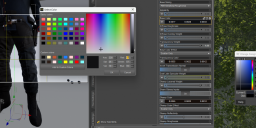
As you can see by the screenshot, I am trying to match the color from Gimp, far right color picker, to the color picker in Daz, but if I input the numbers for HSV, then the RGB values are different and vice versa
Either way, they come nothing close to the color that I am looking for, as a matter of fact, it looks like some sort of off black color - see attached screenshot
I want the pants, which are a straight Base color to match the texture for the jacket, so when I use the color picker in Gimp, I went to input the values, but to no avail
As usual, thanks in advance

Daz 3D is part of 
Connect
DAZ Productions, Inc.
7533 S Center View Ct #4664
West Jordan, UT 84084
Licensing Agreement | Terms of Service | Privacy Policy | EULA
© 2026 Daz Productions Inc. All Rights Reserved.
Comments
Daz Studio can only accept 8bit RGB code which is an integer. In your screenshot, you can click 0..255 in GIMP's color panel to use 8bit code as integers ~ Then you should be able to get the same colors.
Thank you @crosswind
That worked perfectly, thank you so much - awesome - see screenshot
Great ! You're welcome ~