Brooklyn's Loft - Tesla3D
 garrett_3d
Posts: 1,041
garrett_3d
Posts: 1,041
I can't find a thread in PA and I cannot create a discussion there, so....
https://www.daz3d.com/brooklyns-loft
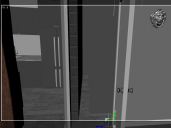
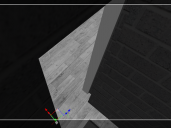
Had this one for quite a while and just came to use it. Found a fault with the doorway. It's too close to the end of the wall. As the door and frame are not separate items, it is beyond my ability to move it. It's also quite annoying that the wall piece is three facets and not just a flat wall, otherwise I'd just replace that one wall.
Any chance Tesla3D can issue a fix for this by moving the door and frame over?

Daz 3D is part of 
Connect
DAZ Productions, Inc.
7533 S Center View Ct #4664
West Jordan, UT 84084
Licensing Agreement | Terms of Service | Privacy Policy | EULA
© 2026 Daz Productions Inc. All Rights Reserved.
Comments
I don't have it.
If you want the attention of Tesla, you better create a ticket. Though whether it will get fixed I don't know.
Another option (if I understand it right) is to hide the door, and then find or create another door that fits.
Hiding the door is easier said than done, it's not an individual bone so I'd have to go through the surfaces panel and change opacity to zero, the frame too. However, that leaves the opening in the same place.
If the walls had all been made as separate pieces, I could have easily sorted it by reducing the thickness of the wall that fouls the opening. Unfortunately, this one is three walls set at perpendicular angles to each other as one item.
I think my easiest option may be to create three new walls and copy over the textures. It's just frustrating because we shouldn't be having to do this sort of thing.
There are a ton of assets that are hard to kitbash. Or that are impossible for someone to live in. Getting good a covering a wall or adding a door is just a necessary Daz skill.
Moved to Technical Help - Product Suggestions is for threads suggesting products that should be made/asking if a product exists/identifying products used in an image.
Thank you, Richard. My bad.