how can i improve my shaping workflow, not having to scroll through morphs all the time?
 mangosteins
Posts: 54
mangosteins
Posts: 54
i favorited the morphs i actually use but even then i constantly have to scroll to the right area and back again and cant create categories . I see the shaping tab and the body categories but its still too much, and changing parameter groups for certain morphs is really messy and resets itself even if i leave edit mode and save.
Is there a way i can duplicate morph files in the content library and organize things by body part in new folders and somehow have that reflect in parameters? It would be really nice to have sub categories in parameters for favorites but i dont think thats possible. there are just lots of alt morphs or right and left morphs and its frustrating scrolling constantly to find them.

Daz 3D is part of 
Connect
DAZ Productions, Inc.
7533 S Center View Ct #4664
West Jordan, UT 84084
Licensing Agreement | Terms of Service | Privacy Policy | EULA
© 2026 Daz Productions Inc. All Rights Reserved.
Comments
The reason it "resets" is you'd have to save the modified assets to maintan the change.Save As>Support Asset>Save Modified Assets...
This alters the DSF, which can be overwritten if there's an update to assets you've modified.
Duplicating morph files would just cause errors.
About the only viable solution would be to create new control morphs and place those in a custom path.
Im sorry i dont think i understand, what do you mean by create a new control morph?
You could always create a new top-level group and put your morphs under that, with additional sub-groups orderd as you wish. Open the Parameter Settings (gear icon on the slider) and edit the path, using / as a separator. You can also put the parameters pane in Edit mode from the right-click menu, then multi-select proeprties and adjust their pathing in one go from the right-click menu.
i love you Richard thank you, this is much less painful than what i was doing.
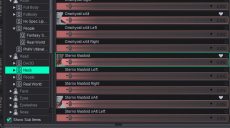
I tried what you said but the group i made dissapeared after i saved closed and opened the file again. Imaybe im not understanding how to create a "top level group". I would go into edit mode right click go to the set dropdown and do select property group. first image is what it was by defualt then the second was the group i tried to create for it that disspeared after i saved and came back.
What did you save as? A Scene, Scene Subset, or a Character or Persona Preset used to load a figure should al retain changes - I just did a quick test with a Scene and it worked. If you want to have the change apply to a newly loaded item from the content library then, as DrunkMonkeyProductions said, you need to save the asset files (using an explicit save command or Save Modifies Assets: just be aware that if the basic properties are part of a content product any update will replace them, and if you installed through Daz Studio the chnages won't take effect at all. I would use a new Character/Person preset or a Scene subset as a safer option, use that to load the item and you will get your modifications (and then you can aply character, shaping, materials presets as desired) but it won't be affected if there is an update to the underlying product.
im sorry man I dont think i understand this, I saved the the modifier asset then what do i do?
edit: If you could guve me indented or numbered steps of specifically what i need to do that would be helpful cause im really dumb and dont get what is suppose to happen after i save it as a subset or modifier asset. im still in the file after i do that and when i open a new one the stuff is gone even if i save as a modiofier asset and they dont show up in presets where it got sabed.|
edit edit: I made my new property group set the properties to it, I madfe the group so its right under the characher 8.1 female in paramaters, and when i save the subset and load it my group get shuffled into the character actor hiarchy and a bunch of the morphs are missing from the group. I dont know what im doing
edit edit edit: I tried saving it as a character preset and loading it in a new scene and i had the same problem.
edit edit edit edit: I dont see my modifier asset anywhere after i saved it, it said it went to the my library but its not there