Converting Poser to DAZ Studio
 Deecey
Posts: 200
Deecey
Posts: 200
I've tried to find more recent discussions about how to convert Poser weight-mapped content to DAZ Studio.
Here, I've added the Poser 14 runtime library to DAZ Studio, under "Poser Formats." I loaded LaFemme 2 and she came in fine, including the materials. (I've removed the mats to make it "post friendly."
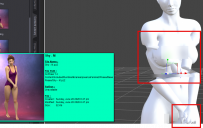
Everything looked fine, but when I applied a pose, things went south. The arms and finger went wild, and some of the body parts were rotated beyond the limits. I tried other poses, and QuasimotoHunchback appeared before my eyes. 8-)
Is there something I'm supposed to do to the figure or to the poses after they are imported?
My apologies if the image breaks TOS, I tried to make it as modest as I could while showing the problem areas.

Daz 3D is part of 
Connect
DAZ Productions, Inc.
7533 S Center View Ct #4664
West Jordan, UT 84084
Licensing Agreement | Terms of Service | Privacy Policy | EULA
© 2026 Daz Productions Inc. All Rights Reserved.
Comments
Actually it seems to be related to the pose pack itself. All of the poses in this set turn out funky. Poses in other sets load in fine.
So ... the question is, how would I fix the funky ones so that they work correctly?
Forget trying to load Poser WM rigging as DS can't see or use it.
I figured that much, I was wondering if there was an easy way to re-rig it without adding the weight maps, only the bones.
Figure > Skinning > Poser Traditional. Forgot about that one. 8-)