PP2 file added into scenes but not visible in viewport
 interes48
Posts: 0
interes48
Posts: 0
Hello all,
I am new to DAZ3D, and I encountered a problem. So I had a 3rd party mod (not starting with IM) installed into my "My Library" folder.
DAZ3D 4.24 can read it and load the mod (they are pp2 files), and I can see them on my scene tab.
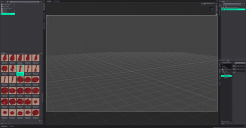
However! the problem is that although the scene tab reads them correctly, they are not visible in my viewport. I am sure I have them as visible and not invisible.
I am trying hard to find a solution but can't. I tried restarting DAZ3D but that didn't help.
Attached a screenshot, would appreciate any help.
Thanks!

Daz 3D is part of 
Connect
DAZ Productions, Inc.
7533 S Center View Ct #4664
West Jordan, UT 84084
Licensing Agreement | Terms of Service | Privacy Policy | EULA
© 2026 Daz Productions Inc. All Rights Reserved.
Comments
It's really tiny, and you are way too far zoomed out.
With the object selected in the scene tab, CTRL+F(Frame) to get closer to the object. You can also use the viewport tool(looks like a broken box with a + in the middle) to do the same thing.
Also, there are no compatible material presets included in this protduct(FInks Blood FX), and the MT5 files won't even show up in studio.
You can change the file extensions from MT5 to PZ2 and then use them, but they're not going to look like blood in studio.
You'll either need to manuall change material settings, or use a preset pack like Easy liquid shadre and presets for iray.
I can't give you a recommendation for 3delight, since i haven't used that render engine in a while, and unless you're using 4.24.0.3, or earlier, it's not even an option.
The blood props are just there...but only too small. You can select the prop and press Ctrl + F to zoom in ~
Edit: The props have iray shaders inluded in the product ~
Thanks to both of you,
I realized what the problem was. The installation itself was not completed.. I missed the poser components and obj components.
After sucessfully installing those two missing parts, I can see the blood now.