Tips for creating attractive Genesis 9 Female characters from all angles?
 hayaidemon
Posts: 0
hayaidemon
Posts: 0
Hi everyone,
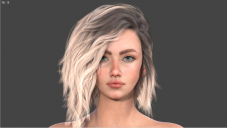
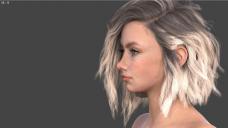
I’ve been working with Genesis 9 lately(I am new to Daz but working lots of hour lately) and I’ve run into a bit of a puzzle. When I create male characters, I'm really happy with the results and they turn out looking great. However, I’m having a very hard time getting a good-looking female character.
No matter how much editing I do, the female faces just don't look right to me. Sometimes the front view seems okay, but when I rotate the camera to the profile, the overall look falls apart.
I'm sharing two viewport screenshots to show you what I mean (image 1 & 2)—one from the front and one from the profile. To be honest, this is the absolute best result I’ve managed to achieve so far; my other attempts didn't really work out at all. I'm posting this specific one because while the front view looks acceptable to me, the profile view still feels completely off and unnatural.
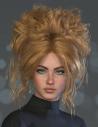
For context, I’m trying to achieve a natural, balanced look like the Genesis 9 model featured in SWAM's Athina Hair promo images(images 3 & 4) (Link: https://www.daz3d.com/swams-athina-hair-for-genesis-9 ). That character looks beautiful and natural from every single angle.
Since I don't face this issue with male characters, I’m wondering what I might be missing when it comes to female proportions. Any general advice, thoughts, or workflows on how to get a natural-looking female character from all angles would be amazing.
Thank you so much!


Daz 3D is part of 
Connect
DAZ Productions, Inc.
7533 S Center View Ct #4664
West Jordan, UT 84084
Licensing Agreement | Terms of Service | Privacy Policy | EULA
© 2026 Daz Productions Inc. All Rights Reserved.
Comments
Moved to Art Studio since it is a question about content use, rather than a technical Daz Studio application topic.
What are some examples of female faces you find attractive in profile view? If you can identify those, you're halfway to figuring out how to solve it.
Hi Gordig, as I mentioned in my post, images 3 and 4 from SWAM's promo, or in general photos I see from other promos, are exactly the examples of the attractive profile I'm trying to achieve.
To be honest, the screenshots of my model that I shared here are the absolute best results I've managed to get so far. All my other attempts with female characters looked completely unwatchable and didn't work out at all.
The main problem is that every time I fix the profile to match that look, it ruins the front view, and vice versa. It feels like a see-saw effect. I'm looking for a workflow or specific proportions that allow both angles to look good simultaneously without breaking each other.
The nose looks very long, I would try making it shorter in the vertical direction, also you might need to lower the eyes to compensate. Not sure how you would do that on G9 as I very rarely use it, but that's what seems 'off' to me.
something I did back in my geminis and Genesis 3 days, was to search for attractive female faces, and try to recreate what like.
nowadays I'm just lazy, and mix the heads like 30%,40% 30% of different heads. Then I used morphing dials to adjust to my liking.
only difference to what dials would use on the model you posted I might add more of a nasolabial fold, and a bit more curve to the jaw
oh, and you can never have enough morphing dials
i think she looks cute, btw. if i were working on her, the lower mouth/chin and nose (base and bridge depth compared to eyes/cheek/brow) might be where i'd start tweaking her from what you currently have.
but i mostly wanted to suggest changing the viewport display to have at least two panels if you haven't already tried doing that, so that you can see the front and profile simultaneously. you'd have to set up a camera for at least one of the two viewport panels but that's always a help for me.
Yes, I mean to suggest this in my first reply. If you are sculpting with morphs you can probably close or collapse most pane groups (you can collapse a group by clicking on the tab of one of its active panes) to give you as large as possible a Viewport, then I would suggest the Window>Viewports>2 right, 1 Left mode with the two on the right set to Front and Left or Right views and the bigger View on the left set to Perspective (so you don't undo your camera moves if you undo a morph change). You can also cliick the dots in the middle of the dividier to shrink/restore a pane group that shares a pane well with the one you want:
came back to this because i'm actually messing with a female character right now and thought i might share my set up.
richard's suggestion of 2 right, 1 left is what i'm using. i use the biggest view for whatever angle i want to see best. perspective view for the front is most often the largest view i have, while camera 1 and camera 2 give me the other angles i want because i don't like the direct front/left/right from the camera cube options. hiding the camera cube in the smaller views also helps prevent moving those cameras by accident, and you can also hide the view controls but i very rarely use them so i tend to leave them. i'll swap out which view is the largest depending on what i want to be the main focus, so usually swapping perspective and camera 2.
key things i do:
To be honest, I had no idea about the multiple viewports! I’m testing them right now, and it makes creating faces so much easier. Thank you so much guys for the tip!
However, I'm not sure if that is the main issue, though it definitely helps. I’ve been experimenting with different female models, and even the smallest adjustments make the proportions look completely off—even though I have plenty of morph sliders. For instance, I find Victoria 9 incredibly difficult to mix with other models or to tweak without losing her realism. Is it just me? I don't rule out that I might just need more practice, but it's frustrating because I can easily create great-looking male models and faces.
I am still very new to Daz but eager to learn, so any advice is highly appreciated! I just find it really hard to create an attractive female face, which is strange since my male creations turn out exactly how I imagine them. At this point, I’m starting to wonder if this is just a 'Genesis 9 thing' and if I should switch back to Genesis 8 or 8.1.