Figure is not visible
 dorotheewittstock
Posts: 0
dorotheewittstock
Posts: 0
Hi there. I am quiete new on DAZ 3D and with no expirience in this Programm. I use it as Reference tool for Characterartworks.I just downloaded the latest version of DAZ §D. And the figures I load into the scene are nearly invisible. In wireframe setting I can see them. But no other as Smooth surface or so on.
Is it a bug? Or did I miss something in the settings? Please be Kind. I am a neewbe
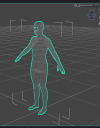
Screenshot 2026-08-01 221319_edited.png
746 x 953 - 236K
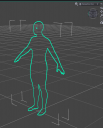
Screenshot 2026-08-01 221212_edited.png
745 x 923 - 136K

Daz 3D is part of 
Connect
DAZ Productions, Inc.
7533 S Center View Ct #4664
West Jordan, UT 84084
Licensing Agreement | Terms of Service | Privacy Policy | EULA
© 2026 Daz Productions Inc. All Rights Reserved.
Comments
What GPU(s) do you have? If you have more than one, which is drawing the UI (that is a driver setting, not a Daz Studio setting)?
What GPU(s) do you have? If you have more than one, which is drawing the UI (that is a driver setting, not a Daz Studio setting)?
Your second example is in Solid bounding box, not smooth or texture shaded, so you're not going to see anything other than the Bounding box.
In the upper right of what is called the "viewport" is this thingy:
That's your second example, in the first example it appears thus:
Find that thing and, using the left mouse button, click on the inverted equilateral triangle to the left of the thing that changes between your two screen shots. You will see a "pop-up-menu":
These are the various settings for how the viewport displays. I think you are using "Premium" DAZStudio so the menu might not be quite like that (I don't know, but I've never seen the cyan outline). Choose "filament", or, if you have a powerful computer "NVidia Iray".
It is a _very_ _very_ good idea to go through the tutorials, somewhere at the bottom left. They are quite entertaining in their way but they certainly give a very good introduction to the idiosyncracies of the DAZ Studio user interface; i.e. how we can use it.
You're using Daz Studio 6, with Darkside > Midnight style. For some reason you activated the tool of Region Navigator (clicked the tool on toolbar or pressed Alt Shift + N).
Then with different DrawStyle, esp. if you pressed Ctrl + 1 ~ 9, you would see different draw result in Viewport. Ctrl +3 is Wireframe drawstyle as what is shown in your 1st image, Ctrl + 2 is Solid Bounding Box shown in your 2nd image... If you press Ctrl + 9, you have Texture Shaded drawstyle which is the commonly-used one. (Press F3, then go to Viewport Drawstyles to get the list of shortcuts...)
However, the weird thing is that in your 2nd image, with Solid Bounding Box drawstyle, there's no box at all. So what is your GPU and GPU driver version ?
Edit: BTW, next time if you post an image when having issues, better capture a full screenshot, like the one attached, so that folks can have more info. before giving advices.