TurboMetaBot Metadata Browser
 TurboMetaBot
Posts: 1
TurboMetaBot
Posts: 1
in Freebies
Hello All,
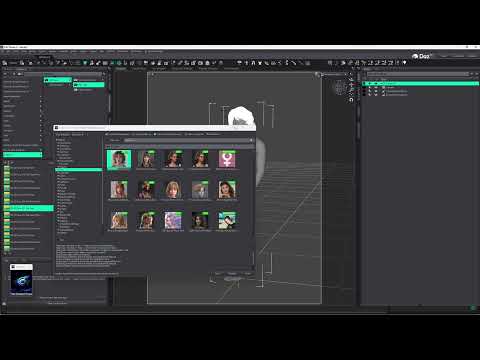
Looking for feedback on an open-source plugin I'm developing. It's basically a swiss army knife for browsing through smart content.
Beta is available at the gh page https://github.com/TurboMetaBot/turbometabot-metadata-browser
See it in action here:

Daz 3D is part of 
Connect
DAZ Productions, Inc.
7533 S Center View Ct #4664
West Jordan, UT 84084
Licensing Agreement | Terms of Service | Privacy Policy | EULA
© 2026 Daz Productions Inc. All Rights Reserved.
Comments
Thanks for this amazing addon. Cant believe it hasn't gotten that much attention. Works as it says. My only minor problem, I can't seem to see my figure in the figure list although it selected in the scene window. I tried editing the dsa as instructed but to no avail. Not sure if i actually pointed the correct location but when I executed the script, it loaded but I still didnt see anything show up. I'm presently not on my pc to share a screenshot of where I edited the script but I will sometime. I'm super excited to give the Author of this much need addon the props deserved. Thumbs up. Thank you for your time and effort.
Hi, thanks for the feed back.
So the figure list is seprate from what is selected, so what you have selected has no effect on the figure list. There are 2 parts to getting the figure list running properly. The first is editing the launcher script so that that it kows where the figure_filter_list.json file is. So the PB.FIGURE_LIST_JSON_PATH variable should be pointed to the figure_filter_list.json, as shown below.
// Full path to figure_filter_list.json (forward slashes), or leave empty and
// keep figure_filter_list.json beside this script, then set the path to this
// script's folder / the json file before relying on the figure-list filter.
// Example: "C:/Users/<you>/Documents/DAZ 3D/Studio/My Library/Scripts/turbometabot/figure_filter_list.json"
PB.FIGURE_LIST_JSON_PATH = "C:/Users/MyUserName/Documents/DAZ 3D/Studio/My Library/Scripts/turbometabot/figure_filter_list.json";
Once the script knows where the figure_filter_list.json file lives, then you need to edit the file to add whatever figures you want to add.
{
"figures": [
{ "label": "Genesis 9", "compatibilityBase": "/Genesis 9/Base" },
{ "label": "Genesis 8 Female", "compatibilityBase": "/Genesis 8/Female" },
{ "label": "Genesis 8.1 Female", "compatibilityBase": "/Genesis 8.1/Female" },
{ "label": "Genesis 8 Male", "compatibilityBase": "/Genesis 8/Male" },
{ "label": "Genesis 8.1 Male", "compatibilityBase": "/Genesis 8.1/Male" }
]
}
This should be pretty self explanitory, the label is what we actually show in the plugin, the compatibilityBase is the same compatibilityBase in Daz. If you need to figure out what a campatibilityBase should be, load the figure into a scene, make sure it is selected, then bring up the "Scene Identification" window (right-click on scene tab, go to "Edit"->"Scene Identfication") and the "Compatibility Base" shown there is what you would put in the json file.
Hope that help!
Thanks guys, you really made my day. Works like a charm. The issue was I added the Turbo MetaBot main folder to the main Daz script folder but the address I entered wasn't correct when I edited the dsa file. 100% recommended. Love your LOGO, expecially when its minimized. Makes my Daz interface look like the shaman brewing up a special render.
Okay, this is good. I still have not been able to have this work with my external DB, but unless that is down the road, I'm glad this has been created. Looks like DAZ is taking note and has released something similar now.
I would say that the only difficulty I saw was understanding how to get this installed. Took some trial and error, but a happy accident surprised me and I was able to get it running.
Looking forward to any updates that you do (hint, hint, external DB access).
mmkay.
New build here https://github.com/TurboMetaBot/turbometabot-metadata-browser/releases/tag/v1.0.5.2
I don't have your set-up, so I really was only able to smoke test using the loopback address. So, hopefully you don't mind being a guinea-pig.
There are new vars in the start-up:
// Optional remote CMS PostgreSQL for gallery scan/sort (Tier B SQL).
// Leave CMS_HOST empty to use Daz's own CMS connection (normal install).
// If CMS is on another machine, set CMS_HOST to that hostname/IP. Port, database,
// and user below are stock DAZ CMS values (ContentCluster listen port 17237).
// Only change those if your server differs. Password is often empty locally.
// Daz itself must already be using that same Content database.
PB.CMS_HOST = "";
PB.CMS_PORT = 17237;
PB.CMS_DATABASE = "Content";
PB.CMS_USER = "dzcms";
PB.CMS_PASSWORD = "";
PB.CMS_CONNECT_OPTIONS = "";
Assuming your remote server is using all the same DB settings as the default CMS install, you should only have to put in the host.
Please let me know how you get on. If this works without issue I'll merge it into the main branch.
As an aside, I'm curious what advantages your are seeing from running a remote db server. Is it noticably faster responce? I ask because on my list of potential improvements I see for this is possibly moving a lot of the functionality into a separate service that the that the plugin would connect to. Essentailly, just another way of delegating resources, but integrating remote DB into that definitely makes sense if it gives a noticable performance increase.
So does this mean I have to remove and reinstall everything?
Big shudders here
To answer your remote question, I am running on an external SSD 4tb drive since my meager 1Tb drive on my mini PC would never survive the data deluge. It has a small lag but loads pretty quickly. Additionally, I have a more powerful Laptop and it too has a storage limit but I've managed to install a lot on it's 4TB SSD drive. What I reall need is to be able to scan the additional external 6TB drive containing my downloaded items not installed by DM.
DAZ has always had this DB management issue, so much time consumed searching for externally purchased items I get nothing finished. The new Content Catalog is also a bust. I bought it in hopes of improvement, but there are several no's to using it, mainly, as far as I am understanding, it only reads from .zip DM installed items (?) not your already installed DAZ Catalog.
All the other stuff you included in you post shot way above my head. I'm for a simple 'here is where my stuff is, please create a simpler catalog manager' installation format... with an option to catalog said additional external databases too.
No, not everything, just replace the dll and dsa file. Edit the dsa file, put in your path to the json file in PB.FIGURE_LIST_JSON_PATH (same as before) then just change the PB.CMS_HOST to the host ip of your DB server. Restart Daz, and you shold be good to go.