Renaming files in smart content.
 Alric
Posts: 226
Alric
Posts: 226
I have been using Content Wizard to install 3rd party products with smart content. I have run into a few clothing packages created for multiple figures but the icon names don't tell you which figure the item is for. (see attached image) I would like to quickly rename the item in smart content adding, for example, "G8F" for genesis 8 female.
I can hunt down the icon image and add text to that to indicate the figure but I'm hoping for a quicker solution.
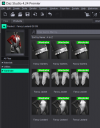
Screenshot 2026-07-27 181524.png
491 x 628 - 86K

Daz 3D is part of 
Connect
DAZ Productions, Inc.
7533 S Center View Ct #4664
West Jordan, UT 84084
Licensing Agreement | Terms of Service | Privacy Policy | EULA
© 2026 Daz Productions Inc. All Rights Reserved.
Comments
Smart Content doesn't support Rename, you have to go to the mapped folder in Content Library (right-click > Show Asset in > Conent Library > Mapped Folder), then right-click to Rename ~
That worked!
Thanks