Anyone familiar with why sometimes my 3080 doesnt want to work when my 3070 does?
 Schaaka
Posts: 165
Schaaka
Posts: 165
Anyone familiar with why sometimes my 3080 doesn’t want to work when my 3070 does?
I have a habit of keeping an eye on my video cards to see if they will work to render a scene, cause often times I overload a scene with unnecessary things and the vram cant handle it. So instead of having a surprise four hour render I look around to reduce pressure on the vram.
A 3080 should have more vram than a 3070, right? No reason under normal circumstances a 3080 should not function when a 3070 does?
Its not like the 3080 is dead or anything, sometimes it decides to work and sometimes it doesn’t on the same scene. Like for example I tried to render a scene, only the 3070 was using gpu. I canceled the render, took out everything in the scene except one thing, turned off the 3070 in the render options and rerendered. 3080 was working so I turned everything back on and the 3070 too, now the 3080 is working.
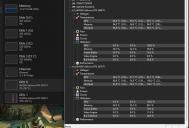
I loaded up a different cpu monitor because I thought the windows one was maybe not showing the correct info. Strangely enough I noticed, when the 3080 is using 0% gpu it is still producing high temperatures? I just dont get it.
Is there anyone out there that can help solve this mystery for me? Is there a setting in Daz or nvidia I need to adjust?
Thanks!

Daz 3D is part of 
Connect
DAZ Productions, Inc.
7533 S Center View Ct #4664
West Jordan, UT 84084
Licensing Agreement | Terms of Service | Privacy Policy | EULA
© 2026 Daz Productions Inc. All Rights Reserved.
Comments
Your 3070 is your primary GPU so it will be the default option for any program unless you specify otherwise.
Is the 3080 doing anything else that the 3070 isn't, when you are rendering? If something else is using memory on the 3080 it may run out for Iray while the 3070 keeps on going.
I went and set it as the default, good call. I didnt even know that was a thing.
I dont believe the 3080 is doing anything more than the 3070. I have 3 monitors, so i put 1 and 3 connected to the 3080 and 2 on the 3070 to alieveiate some work burden. Im not sure if thats a good idea or just slam all 3 in to the 3080.
What is a NV Link peer group size? I dunno if thats new or I just noticed it. It was defaulted to 0, should it be set to 2?
Personally I would run all three monitors on the 3070 and use the 3080 exclusively for Iray with the spare VRAM of the 3070 as backup.
Vram doesn't stack, unless using NVLink or NVSwitch, which neither of these cards support, so there's no "spare vram"
The only advantage of using these two card together would be a faster render, but the render would sill need to fit within the 8GB of the 3070.
It looks like your 3080 may be hitting a thermal limit, but even so it should still be working, just throttled back. Is there anything in the Studio log about the 3080?
I use GPU-Z as a monitor - I prefer the display over other items. Sample attached - an old screen shot I did to show real power usage during a render. FWIW, the only items running are a Studio Iray render and the various monitoring tools shown here. The 1080 TI is driving two 1920 X 1280 monitors in addition to rendering, and the only things plugged into the UPS that is being monitored are this system and a wifi router and the fiber to ethernet adapter for the router.
My GUESS - You could be power supply limited. How many watts is your power supply?