How to create or modify a grid?
 Drogo Nazhur
Posts: 1,354
Drogo Nazhur
Posts: 1,354
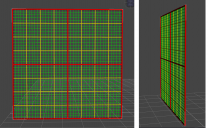
I purchased a grid prop from someone who no longer seems to be around so I can't get the modifications from him.The yellow squares are 1 foot by 1 foot. The red squares are 4 feet vt 4 feet. The little green squares are one fifth of an foot by one fifth of an foot.The colors and tranparency of these lines can be changed. The one fifth of a foot is not very useful. I would like to have the green lines represent one inch.and the red lines to be one foot.
Is there an easy way to modify what I have or an easy way to create what i'm looking for?

Daz 3D is part of 
Connect
DAZ Productions, Inc.
7533 S Center View Ct #4664
West Jordan, UT 84084
Licensing Agreement | Terms of Service | Privacy Policy | EULA
© 2026 Daz Productions Inc. All Rights Reserved.
Comments
You could do it in DS, othger than the need to enter metric equivalents for your values. But in DS or another application, make thirteen of the lines for one-inch separation, move the last to be one foot from the first, and use the application's align and distribute function to distribute centres with all thirteen selected.
Thank you. I never did anything like this in DS. How do I get started? Any links that I can read?
Use primitives and scale them (though with cylinders you can set the length and diameter in the creation dialogue, which should be all you need). Use Edit>Duplicate to copy the cylinder. Use the X or Z translation to move one to 30 cm (12", or use a conversion tool to get a more precise value)) then select the others. Window>Panes>Tabs>Align. For X axis click Distribute Centres, then click Apply. Use the Geometry Editor and the Tool settings pane to rename the surfaces. Rpeat with suitable values and names for the other intervals and orientation. Export and reimport OBJ using the same preset in the options dialogue to bake it to a single mesh.
thank you
Something like this?
There are quite a few ways you could do it.
One way could be to make a plane primitive and specify a 6ft square size (182.88cm exactly) and then create a square texture and draw lines on it at the correct intervals, having two or three opacity maps which make some of the lines transpatent when you don't want those.
A second way is to create a 1x1 facet plane primitive that's 1" square (2.54cm exactly), have a small square opacity map to hollow out the middle and array that 72 times in the X and Y directions using my linear array script. You could do the same with foot square (30.48cm exactly) 1x1 facet plane primitive and array that after applying an opacity map. Then save as a scene subset.
Hope this helps.
Regards,
Richard
Is the grid supposed to be mostly hollow? Why not make a 1 foot plane with 40 subdivisions and then in geometry editor, create three surfaces: 1 that's the perimeter, 1 that's the green line, and the last surface is the gaps. Set the base color of surface 1 to red, surface 2 to green, and set opacity to 0 on surface 3. Duplicate the resulting object and arrange in a 2x2 grid. Overlap as needed.
Yes. Message sent.
Do you have a link on how to get started with what you just said?
Sorry. No. My knowledge of geometry editor is just my own stumbling around in the dark.
If you just want a 3D scale - rather than know how to make one - then free ones are available.
Links, if I posted them, probably wouldn't survive, so instead search with your favourite engine for: "making a scale grid in daz studio" - there's a couple of ready made models will appear in the first ten results. One by SpyroRue, in particular, looks pretty great (I haven;t used it, but a few who also post here probably have?)
A yard-grid.
Beautiful! Exactly what I needed. Thank you so much!!