DAZ Iray viewport and render still showing objects even after being hidden?
 epicjared
Posts: 8
epicjared
Posts: 8
Need some help with Daz, kinda a big issue that is preventing me from being able to create scenes (let me know if this is not the right place)
I am using Daz 6 but this issue is with 4.24 and the beta version of DS6.
Why is my scene still showing the objects (and the lights from that object) even after I hide it?
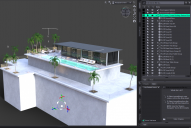
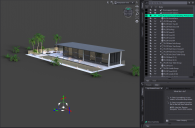
The first image is me loading Polish's Condo Rooftop into a brand new scene. I also have Iray viewport enabled. The second image is after I have the entirety of Polish's product. As you can see part of the set still remains shown.
Any thoughts on how to fix?
This is a huge issue for me because this means I cannot adjust any of the objects or lights. Polish often includes materials in their products that turn off all emissives. I first noticed this issue when I applied the Emissive OFF material but the lights remained. Only after I started hiding objects (until I finally hid the entire scene) did I realize that there were the remaining objects that were still emitting light.
It doesnt show up in non-Iray viewport items but ultimately if I render the issue is the same.

Daz 3D is part of 
Connect
DAZ Productions, Inc.
7533 S Center View Ct #4664
West Jordan, UT 84084
Licensing Agreement | Terms of Service | Privacy Policy | EULA
© 2026 Daz Productions Inc. All Rights Reserved.
Comments
I''ve seen this issue for the entire two years I've been using Daz. Switch to a different viewport style and go back to IRAY and these lost artifacts will go away.
Yeah, that's a longstanding issue in DS4.
I usually Ctrl + 9 then Ctrl + 0 ~
When you hide a group while rendering is active, it will often fail to hide the children of that group from the render. Swapping rendering modes or moving the group (I usually just increment one axis and then hit undo) both fix the issue, in my experience.