Is DIM install as well as Product > Install required?
 DGEbel
Posts: 37
DGEbel
Posts: 37
Even though I've used DIM to install products, I still have to go into the Product menu, select Available, and install the products. I thought maybe it was my paths, but here's the DIM and Studio (v6) directories. Is there somewhere else to look?
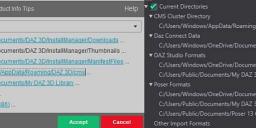
paths.jpg
1000 x 257 - 35K

Daz 3D is part of 
Connect
DAZ Productions, Inc.
7533 S Center View Ct #4664
West Jordan, UT 84084
Licensing Agreement | Terms of Service | Privacy Policy | EULA
© 2026 Daz Productions Inc. All Rights Reserved.
Comments
Where do the files end up after using DIM? If you right-click on the entry in Installed tab and select Show Installed files you should get an HTML files with clickable links. Check that oneDrive isn't moving them.
Huh. It IS installing them in OneDrive - which I really do not like. I don't need it filling up my limited OneDrive space :(
Is there some configuration point to fix this situation, ie so they go to my public folder like the rest of the files? Or else move them manually ( :-P ) and use a linked directory maybe?
OneDrive is the invention of the devil. It will override any settings with an update. Not to mention the secutiry issues regarding your data. My advice - eradicate it entirely from your PC.
You can change the path in DIM adanced settings > installation, but preferably get it away from the document folder.
After changing you can reinstall on the new path, or move your content (best if you then also update the manifest files, so DIM knows where the files are).
After that, change the path in Daz Studio.
That's what I thought, but it looks like it is set to the PUBLIC folder not mine. See attachment. It looks like C:\Users\Windows\OneDrive\Documents\DAZ 3D\Studio\My Daz Connect Library\data\cloud is where it's storing everything.
Would changing the "Content Updates" to "Install to currently selected path" fix this? Or is this a Daz 6 bug?
You're not wrong. Sometimes ya gotta deal with him though.
In DIM if you go to Advanced Settings > Installation you can define a new path set it as 'content path shortcut'.
In Daz Studio if you go to Edit > Preferences > Content > Content Directory Manager you can add, edit and remove libraries.
Not sure why, but the forum is not displaying my screenshots that I attach.
Anyway, DIM had only the Public doc folder, but Studio had the Daz Connect going to the Onedrive. I didn't want to touch the Daz Connect link but apparently I should have deleted that one too.
I'll have to reinstall all of that I guess. Risky just moving it over.
Thanks for the double-check!
Are you attaching or pasting? You can't paste screenshots into the forum. It looks like you can. But they won't be saved. Upload screenshots as attachments.