Question on changing DIM Package Archive Location
 joshua.r.fletcher
Posts: 104
joshua.r.fletcher
Posts: 104
I just installed another SSD as my Daz-dedicated drive is starting to approach getting full. I'm currently thinking to break it up as follows:
D:\ (current drive): Daz3d Library for Daz store items
E:\ (new drive): Daz Package archive (currently 1.3TB) and non-Daz-store item/my custom-built assets library.
I know how to tell Daz to add the new library fine, but if I moved the package library and thumbnails to the new drive, would my steps just be to:
1) Move the package library and thumbnails to the new drive
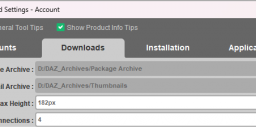
2) Change DIM downloads to the new drive location for package archive and thumbnails
Or is there anything else I need to do? Do I need to do anything with the CMS or Daz's postgres DB?

Daz 3D is part of 
Connect
DAZ Productions, Inc.
7533 S Center View Ct #4664
West Jordan, UT 84084
Licensing Agreement | Terms of Service | Privacy Policy | EULA
© 2026 Daz Productions Inc. All Rights Reserved.
Comments
That is essentially all you need to do. The download manifest does not have any path information, but it must be with the .zip file. The only problem is that you can only have one download folder active at a time, so the archived products won't show in DIM as Downloaded, but as Ready to Download or Installed, If you keep the download manifests in your D: drive, DIM will think that they have been downloaded, but deleted, a valid state of affairs. If you keep all your thumbnails in one place, DIM will also see them all, if you keep the download manifests all together.
Ya it worked fine.