How do I use "fpe-universal-horns" on certain G8.1 monsters?(Resolved)
 AsuCafe
Posts: 559
AsuCafe
Posts: 559
https://www.daz3d.com/fpe-universal-horns-for-genesis-81-male
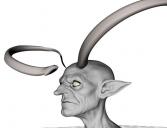
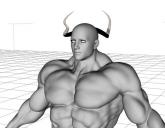
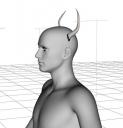
This horn can become severely deformed on certain body types, including giants, dwarves, goblins, and even on RAW ART's muscle transformation packs( https://www.daz3d.com/massive-morphs-for-genesis-8-male ).
How to fix it?
QDQQ1 (1).JPG
825 x 631 - 34K
QDQQ1 (2).JPG
775 x 600 - 50K
QQQQQ.JPG
520 x 542 - 32K
Post edited by AsuCafe on

Daz 3D is part of 
Connect
DAZ Productions, Inc.
7533 S Center View Ct #4664
West Jordan, UT 84084
Licensing Agreement | Terms of Service | Privacy Policy | EULA
© 2026 Daz Productions Inc. All Rights Reserved.
Comments
You want to fix Auto Follow FHM (Full Head Morph) on the horns by using external sofware e.g. Blender / ZBrush, or even Mesh Grabber in DS.
Like the example of using horns on a War Goblin:
1) Show Hidden Properties in Parameters pane, zero FHM > WarGoblinHD on the left horn. I roughly fixed it by using Mesh Grabber (screenshot 1)
2) Export the horn to OBJ with Base Resolution with the same Name of WarGoblinHD. Reset the FHM. Clear Delta with Mesh Grabber (screenshot 2)
3) Import OBJ file to update WarGoblinHD by using Morph Loader Pro. (screenshot 3)
Done ~ (screenshot 4) Then fix the horn on the right in the same way...
The horns will have different deformation on different characters, the principle is to firstly zero the Auto Follow FHM, then move the horns to the right position.
Finally, save Modified Assets of the fixed FHM properties.
Thank you for your reply. This is a little complicated for me; I'll have to find time to look into it.
Hi! A solution to this projection problem is shown in the promos:
Thank you! I didn't even think to go back and check the product page (maybe I instinctively ignored the complicated English instructions). This was very simple and useful. Thank you again!
Awesome, AsuCafe! Thank you for the support and I am glad you got it working! Yeah, I was very sad that the horns didn't work out of the box with many of the monsters. If I knew how to code, I would have added a solution that way. But yeah, I usually add info instructions and, failing that, my promos will also showcase a more visual solution :).
But this feedback has shown me that I should also add the promos in a PDF format and have an icon to launch it for more visual information. I'll keep that in mind for future products!