Expressions not visible in head, only in whole figure
 begun.empty_0u
Posts: 17
begun.empty_0u
Posts: 17
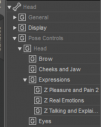
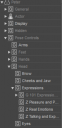
I've installed a product with expressions (https://www.daz3d.com/101-expression-library-with-dials-for-the-genesis-8-male), but the expressions aren't visible if I select a figure's head (in the firstscreenshot below). They show up in the whole figure, under Pose Control->...->Head->Expressions (in the second screenshot), but they're gray there, rather than white.
The matching product for G8F *does* show up when the head is selected, so I presume it's a metadata error of some sort?
Is there a way to fix this?

Daz 3D is part of 
Connect
DAZ Productions, Inc.
7533 S Center View Ct #4664
West Jordan, UT 84084
Licensing Agreement | Terms of Service | Privacy Policy | EULA
© 2026 Daz Productions Inc. All Rights Reserved.
Comments
Genesis, as opposed to previous figures, places all the morph data in the main body.
Morphs in sub-nodes, are "alias" dials.
The G8M version lacks these "alias" morphs, so they won't apear in the head.
Unfortunately, the only way to correct this porblem is to create your own Alias morphs.
This can be accomplished by using the "Property Hierarchy" pane, or by copying and editing the appropriate sections from the original DSF files and creating new dsfs.
Ah, thanks.
I wonder if I can take the files from the female version and mangle them with sed to make them work. I'll take a look.
Actually you can copy the alias files of G8F to the data folder of G8M, but you have to replace the modifier name, ID, as well as their file names / location in DSF files from G8F to G8M (by using batch edit with Notepad++). Then the alias files can work for G8M.
Then there're some unique modifiers only for G8M, you have to manually create aliases for them... by using Parameters pane > Edit Mode > Property Cloner...