[Solved] Dformers on one node automatically add their influence to nodes on other pieces of clothing
 Joe827
Posts: 272
Joe827
Posts: 272
I could really used your help with this. Last week, I reinstalled windows/daz studio 4.24.0.4 and I've somehow wound up with a very frustrating problem. When I load an existing scene or a character that I've saved as a subset, the clothing is badly distorted because dformers on one piece of clothing have added their influence to nodes on another and visa versa.
Scenario 1 - Existing Scene:
1) Clothing item A has 2 deformers on the hip node
2) Clothing item B has 3 deformers on the hip
3) Both clothing items are parented to the trunk node of Victoria 4.2. Both clothing items are fitted.
3) When I load the character, both clothing items are distorted.
4) I look at the deformer influences on the hip of A and I can see that the deformers from B are influencing the hip of A and visa versa
5) I removed the influences of B from A and visa versa and saved the scene
6) When I reload the scene, the same problem happens again.
Scenario 2 - New scene
1) Load victoria 4.2
2) Load a shirt that overlaps with the hip and parent it to the trunk node of victoria 4, but do not fit it yet.
3) Load a pair of pants. Parent them to the trunk of victoria 4 and fit them.
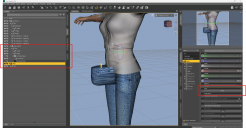
4) Add a deformer to the hip of the pants and drag the dformer handle forward. See attached image number 1
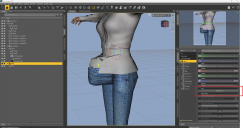
5) Now, when I fit the shirt, the influence of the dformer on the pants is suddenly added to the shirt. See attached image number 2
If the shirt and pants are NOT parented to victoria 4, this does not happen. So as a workaround, I've been removing the undesired influences, unparenting and resaving. Unfortunatley, it's been my practice for years to parent clothing to the figure for organization purposes and to make deleting figures/clothing from a scene easier. So I'm encountering this everywhere...
I did not have this problem until I reinstalled windows/Daz. Is there a fit setting I'm forgetting about that causes dformer influence automatically be added to matching node names? I don't know exactly which version of Daz I had before the reinstallation. It was 4.24, but I'm not sure if it was .0.3 or .0.4. I usually stay up to date, so I'm assuming it was .0.4. I did save a disk image prior to the reinstall. So it's possible I can reflash that to a spare drive if information from that is needed.
Again, I could really use some help with this one because it's extremely disruptive and the workaround is time consuming. Thank you very much.
Update: Also, in case it is relevant, I did not rinstall my content files. My content files are on a separate drive so after I reinstalled Daz, I just pointed it to that location.

Daz 3D is part of 
Connect
DAZ Productions, Inc.
7533 S Center View Ct #4664
West Jordan, UT 84084
Licensing Agreement | Terms of Service | Privacy Policy | EULA
© 2026 Daz Productions Inc. All Rights Reserved.
Comments
Does this happen if you hide the shirt while posing the jeans?
There is a setting to have dFormers applied to the figure automatically apply to items that are "fit to" the figure ("Auto-Magnetize" IIRC). That was useful for V4 because V4 includes magnets for joint corrections IIRC, and you typically wanted those to apply to the clothes too.
I don't remember it causing that kind of interference though.
Leana for the win! This fixes it: Edit->Preferences->Scene->Uncheck Auto-Magnetize. I feel so relieved right now. Thank you Leana!