Dforce in complex scenarios
 kyoreona
Posts: 222
kyoreona
Posts: 222
Hello everyone, I would like to inquire about a technical issue related to the DFORCE system in a complex scenario.
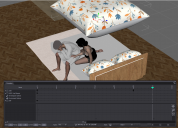
I want to create a scene in a family bedroom where the wife (G9F) is comforting the husband (G9M), with the quilt (UDB3 Duvet) draped over the wife.
There are two places where a DFORCE simulation needs to be conducted:
① The bathrobe worn by G9M (G9 Intimates Robe Genesis 9)
② UDB3 Duvet
Among them, ① is relatively simple. I used the timeline to set keyframes at frames 0 and 30. Using the method of "Animated(use timeline play range)", I have completed it.
The current issue is ② :How to make the UDB3 Duvet fall from the air (that is, in the position I have placed it in the picture), rest on the wife's body, and without altering the simulation result ① of the bathrobe on the G9M.


Daz 3D is part of 
Connect
DAZ Productions, Inc.
7533 S Center View Ct #4664
West Jordan, UT 84084
Licensing Agreement | Terms of Service | Privacy Policy | EULA
© 2026 Daz Productions Inc. All Rights Reserved.
Comments
Hello,
If the duvet has to interact with the man, select his bathrobe and in the parameters, look for the simulation menu and set Freeze Simulation to On: now the wardrobe won't simulated but other object can still interact with it.
A warning: Freeze Simulation doesn't protect against the effect of the Clear Simulation button, so if you need to reset the duvet, open the Simulation panel and click on the hamburger icon, then dForce and click on Clear all non-frozen objects, or select the Duvet and in the same menu, click on Clear selected objects.
If the duvet doesn't need to interact with the bathrobe, you can simply hide the bathrobe: invisible object won't be simulated.
I've found the easiest way to avoid this occurrence is to hide each dForce object. Unhide one and simulate it then hide it again. Move on to the next one, etc. Final adjustments can be made manually afterwards.
Thank you. However, when I was dealing with (2), the bathrobe and G9M in (1) also moved along with the time axis, which really bothered me.
Is there any way to completely secure the bathrobe and the G9M?
When the bathrobe is simulated and frozen, It will play the frozen simulation along the timeline. But it will only act as an collision object.
You can hide the bathrobe (and the character), then it won't be included in the simulation.
Looks great. Just the one collision I noticed where the male's right elbow is touching the knee. You could probably just do a bit of texture grafting to cover it though in an image editor.
Wife: "Don't worry, it happens to every guy." - would that be an accurate interpretation of the scene?