[Solved] How to delete a saved dimension preset?
 Joe827
Posts: 272
Joe827
Posts: 272
I saved a new dimension preset as an experiment, but I don't see how to delete what I saved. Thank you.
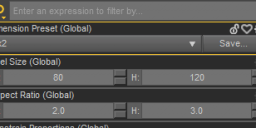
Dimension Preset 1.png
347 x 154 - 11K
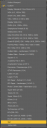
Dimension Preset 2.png
291 x 794 - 34K
Post edited by Joe827 on

Daz 3D is part of 
Connect
DAZ Productions, Inc.
7533 S Center View Ct #4664
West Jordan, UT 84084
Licensing Agreement | Terms of Service | Privacy Policy | EULA
© 2026 Daz Productions Inc. All Rights Reserved.
Comments
Drop down the list of Dimension Preset, there's a menu item named : Remove User Preset.
Delete the preset by clicking it...
Sorry, for not mentioning it. I'm using Daz 4.24. "Remove User Preset" is not present on mine.
Edit: From your screencap, you're using 4.24 as well. Interesting....
What style/layout is that you're using? Maybe that has something to do with why it's missing on mine...
I don't see a user preset in that list, they are usually separated from the built-in presets (which can't be deleted).
3x2 and 1920x1080 (the two at the bottom) are the two that I saved, and yes, for some reason, they're not separated from the rest like crosswind's.
Odd, what is the exact version number (from Help>About Daz Studio - it should be four numbers separated by dots).
I uninstalled before seeing your message, so I don't know. However, upon reinstallation using 4.24.0.4, everything looks as expected now. Sorry for wasting your time.
May have been an issue with one of the installed files (uninstall/reisntall isn't always a fix, but sometimes it is).