How do I remove DS6 Beta from DIM
 chris-2599934
Posts: 1,987
chris-2599934
Posts: 1,987
I've uninstalled the Daz 6 beta from my PC using DIM, so I just have the full fat DS 6 and DS 4.24 installed, but now I have the beta sitting in my "Ready to Download" tab.
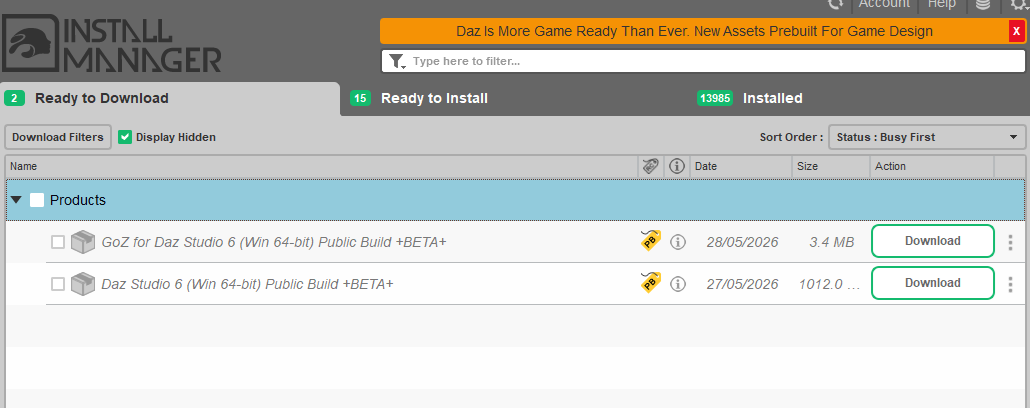
I've tried "hiding" them, but that just greys them out slightly, it still downloads them if I forget to uncheck the checkbox. How can I tell DIM that I do not want anything to do with this beta version of software that's now fully released?
dimbeta.png
1030 x 408 - 36K
Post edited by chris-2599934 on

Daz 3D is part of 
Connect
DAZ Productions, Inc.
7533 S Center View Ct #4664
West Jordan, UT 84084
Licensing Agreement | Terms of Service | Privacy Policy | EULA
© 2026 Daz Productions Inc. All Rights Reserved.
Comments
Have you tried clicking on the Download Filters button and unchecking "DAZ Studio 2025 (6.x)" under application tags? Not sure if that will do it as the application does also have the "Software" tag and the relevant oplatform tag.
EDIT: removing the above as I had re-read it and seen you want to keep normal DS6 but not the beta.
Alternatively can you not uncheck the "display hidden" box to avoid seeing the greyed out items?
Yes, hiding won't hide anything if Display Hidden is on.