I'm back(again)

Hey everyone,

Long time no see. So I'm getting back to using the program and umm..i dont remember how i set up the directory. Everything looks good, saving on the D-Drive on my PC but the cms is set on C-Drive and unfortunetly i dont have the drive space(250GB drive) to install the items. Now, i dont remmeber how i did it last time and everything was saved on the D-Drive. Once i get that sorted, i can start to render again and pratice.


thank you in advance
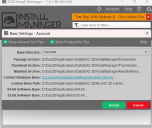
Screenshot 2026-06-13 040917.png
560 x 471 - 48K

Comments

  • SofaCitizenSofaCitizen Posts: 2,170

    The CMS (PostgreSQL database) is the thing that holds the meta-data that Daz Studio uses, not the actual asset files which take up the bulk of the space. You have your content base path on drive D so I think you should be good to go. 

    I think on my setup the CMS has hit around 3GB which is perhaps still a little significant on a 250GB drive but no-where near the amount that the actual content takes up on my Synology NAS.

  • UnKnownGamerUnKnownGamer Posts: 108

    SofaCitizen said:

    The CMS (PostgreSQL database) is the thing that holds the meta-data that Daz Studio uses, not the actual asset files which take up the bulk of the space. You have your content base path on drive D so I think you should be good to go. 

    I think on my setup the CMS has hit around 3GB which is perhaps still a little significant on a 250GB drive but no-where near the amount that the actual content takes up on my Synology NAS.

    I know its small but i didnt have much issuse with it since i was going to use my PC as a workstation but things got...a bit hard in my personal life that i turn to video games to keep myself sane. in that time, i forgot to upgrade my 2TB drive to a 4TB one and replace my 250GB with my current 2TB. I have over 1,000 items to download so i wasn't 100% sure if that was going to affect my 250GB drive.

  • UnKnownGamerUnKnownGamer Posts: 108
    edited June 13

    SofaCitizen said:

    The CMS (PostgreSQL database) is the thing that holds the meta-data that Daz Studio uses, not the actual asset files which take up the bulk of the space. You have your content base path on drive D so I think you should be good to go. 

    I think on my setup the CMS has hit around 3GB which is perhaps still a little significant on a 250GB drive but no-where near the amount that the actual content takes up on my Synology NAS.

    Hey there, sorry to bother you again but i do have an issue. Is there anything in the new version that would prevent items from not downloading? I know there are a few that have issues like mars (2of2) or rons film thing but for these, I dont understand.

    dit: added an image of one of the purchases

    Screenshot 2026-06-13 061512.png
    1292 x 321 - 51K
    Screenshot 2026-06-13 062421.png
    1148 x 381 - 343K
    Post edited by UnKnownGamer on
  • felisfelis Posts: 6,352

    If a download in DIM fails, it might be a server issue, where you should wait and try to do it later. If it is consistent, try to mention which products that have issues.

  • SofaCitizenSofaCitizen Posts: 2,170
    edited June 13

    Yeah, real life does have a tendancy to throw your plans on the ground and stomp on them sometimes :(

    I imagine it's possible to shift the CMS storage to the drive D but as I have never done that I wouldn't know the potential issues that might crop-up there. Hopefully someone else who has done that might cover that part. But I just wanted to point out that it might not be a deal-breaker for you to continue with it remaining on drive C.

    In general terms, I don't think there should be any issues relating to any software versions that would affect downloading. Sometimes the servers may get a little overloaded or whatever and you have to try again an hour later. But if it's loads of failures then it is likely to either be storage related (make sure you have enough space on drive D), permissions (make sure your user account has permissions to write to both the download folder and the Library folder - do not run Daz applications as the Administrator) or possibly a certificate issue (this was a problem a while ago but if you have not been around for a while it may be the cause). 

    To gather more information, click on the cog icon (top right of DIM) and you should see two log options right at the bottom. I don't remember which one that download failures go into but open both and scroll to the bottom to see more information which should hopefully point to what the issue is.


    EDIT: Just to add that Ron's stuff is usually Photoshop brushes - that should not be relevant to downloading but might fail on install if you have not configured a compatible Photoshop path for them to be installed into.

    Post edited by SofaCitizen on
  • WendyLuvsCatzWendyLuvsCatz Posts: 40,995

    when that happens to me, I just close DIM, open it again and try again

    sometimes more than once

  • UnKnownGamerUnKnownGamer Posts: 108
    edited June 14

    felis said:

    If a download in DIM fails, it might be a server issue, where you should wait and try to do it later. If it is consistent, try to mention which products that have issues.

    I'll have to check one last time tomorrow morning. I just tried a few times and it failed. heres the message i get on the logs: Network Error: 416 - Range Not Satisfiable : Error downloading https://sdn.daz3d.com/file/dazsdn/p/83/82683/zip/1628023096/IM00082683-01_202113HairTextureExpansion.zip?auth=1781404021-K6JtJd5CEyNXdfG83GStWZcliGGRFbxiwPNyUDCCUhE= - server replied: Range Not Satisfiable. Theres also a redirect request before this. I hope it works tomrrow before i post this in a different thread

    edit: heres the entire log of just 1 item that i just tried: 2026-06-13 19:41:04.206 [VERBOSE] :: Checking session ID validity...
    2026-06-13 19:41:04.489 [VERBOSE] :: Session ID valid
    2026-06-13 19:41:04.489 [VERBOSE] :: Requesting links as products: product_id - 78235
    2026-06-13 19:41:04.822 [VERBOSE] :: Begin processing remote package data...
    2026-06-13 19:41:04.822 [VERBOSE] :: Finished processing remote package data: Elapsed Time 0 min 0 sec 0 msec
    2026-06-13 19:41:04.822 [INFO] :: Remote Products: 1
    2026-06-13 19:41:04.822 [INFO] :: Remote Packages: 1
    2026-06-13 19:41:08.088 [VERBOSE] :: Checking session ID validity...
    2026-06-13 19:41:08.204 [VERBOSE] :: Session ID valid
    2026-06-13 19:41:08.204 [INFO] :: Requesting: 78235-1 : X-Fashion Autumn Winter Outfit for Genesis 8 Females
    2026-06-13 19:41:08.338 [VERBOSE] :: Redirected Request: 78235-1 : X-Fashion Autumn Winter Outfit for Genesis 8 Females
    2026-06-13 19:41:08.563 [WARNING] :: Network Error: 403 - Forbidden : Operation canceled
    2026-06-13 19:41:08.563 [WARNING] :: Network Error: 403 - Forbidden : cloudflare a0b5f95a6ad66b30-DFW : IM00078235-01_XFashionAutumnWinterOutfitforGenesis8Females.zip


    Post edited by UnKnownGamer on
  • felisfelis Posts: 6,352
    edited June 14

    Hmm.

    Range Not Satisfiable: I have no clue what that means

    Network error sounds like the server.

    It is both old products, and noone has mentioned any issues with them. I downloaded one of them years ago.

    If the failure is persistent you can try raise a ticket, or reporting it here https://www.daz3d.com/forums/discussion/758431/new-year-new-sales-thread-report-issues-here-4-reporting-only#latest

     then a mod hopefully can notify Daz..


    Post edited by felis on
  • frank0314frank0314 Posts: 14,883
    edited June 14

    UnKnownGamer said:

    felis said:

    If a download in DIM fails, it might be a server issue, where you should wait and try to do it later. If it is consistent, try to mention which products that have issues.

    I'll have to check one last time tomorrow morning. I just tried a few times and it failed. heres the message i get on the logs: Network Error: 416 - Range Not Satisfiable : Error downloading https://sdn.daz3d.com/file/dazsdn/p/83/82683/zip/1628023096/IM00082683-01_202113HairTextureExpansion.zip?auth=1781404021-K6JtJd5CEyNXdfG83GStWZcliGGRFbxiwPNyUDCCUhE= - server replied: Range Not Satisfiable. Theres also a redirect request before this. I hope it works tomrrow before i post this in a different thread

    edit: heres the entire log of just 1 item that i just tried: 2026-06-13 19:41:04.206 [VERBOSE] :: Checking session ID validity...
    2026-06-13 19:41:04.489 [VERBOSE] :: Session ID valid
    2026-06-13 19:41:04.489 [VERBOSE] :: Requesting links as products: product_id - 78235
    2026-06-13 19:41:04.822 [VERBOSE] :: Begin processing remote package data...
    2026-06-13 19:41:04.822 [VERBOSE] :: Finished processing remote package data: Elapsed Time 0 min 0 sec 0 msec
    2026-06-13 19:41:04.822 [INFO] :: Remote Products: 1
    2026-06-13 19:41:04.822 [INFO] :: Remote Packages: 1
    2026-06-13 19:41:08.088 [VERBOSE] :: Checking session ID validity...
    2026-06-13 19:41:08.204 [VERBOSE] :: Session ID valid
    2026-06-13 19:41:08.204 [INFO] :: Requesting: 78235-1 : X-Fashion Autumn Winter Outfit for Genesis 8 Females
    2026-06-13 19:41:08.338 [VERBOSE] :: Redirected Request: 78235-1 : X-Fashion Autumn Winter Outfit for Genesis 8 Females
    2026-06-13 19:41:08.563 [WARNING] :: Network Error: 403 - Forbidden : Operation canceled
    2026-06-13 19:41:08.563 [WARNING] :: Network Error: 403 - Forbidden : cloudflare a0b5f95a6ad66b30-DFW : IM00078235-01_XFashionAutumnWinterOutfitforGenesis8Females.zip

    You can keep posting to your original thread here so all the info is in one place so we don't have to look between 2 different threads for the same issue. Have you tried it again yet?

    Post edited by frank0314 on
  • UnKnownGamerUnKnownGamer Posts: 108

    frank0314 said:

    UnKnownGamer said:

    felis said:

    If a download in DIM fails, it might be a server issue, where you should wait and try to do it later. If it is consistent, try to mention which products that have issues.

    I'll have to check one last time tomorrow morning. I just tried a few times and it failed. heres the message i get on the logs: Network Error: 416 - Range Not Satisfiable : Error downloading https://sdn.daz3d.com/file/dazsdn/p/83/82683/zip/1628023096/IM00082683-01_202113HairTextureExpansion.zip?auth=1781404021-K6JtJd5CEyNXdfG83GStWZcliGGRFbxiwPNyUDCCUhE= - server replied: Range Not Satisfiable. Theres also a redirect request before this. I hope it works tomrrow before i post this in a different thread

    edit: heres the entire log of just 1 item that i just tried: 2026-06-13 19:41:04.206 [VERBOSE] :: Checking session ID validity...
    2026-06-13 19:41:04.489 [VERBOSE] :: Session ID valid
    2026-06-13 19:41:04.489 [VERBOSE] :: Requesting links as products: product_id - 78235
    2026-06-13 19:41:04.822 [VERBOSE] :: Begin processing remote package data...
    2026-06-13 19:41:04.822 [VERBOSE] :: Finished processing remote package data: Elapsed Time 0 min 0 sec 0 msec
    2026-06-13 19:41:04.822 [INFO] :: Remote Products: 1
    2026-06-13 19:41:04.822 [INFO] :: Remote Packages: 1
    2026-06-13 19:41:08.088 [VERBOSE] :: Checking session ID validity...
    2026-06-13 19:41:08.204 [VERBOSE] :: Session ID valid
    2026-06-13 19:41:08.204 [INFO] :: Requesting: 78235-1 : X-Fashion Autumn Winter Outfit for Genesis 8 Females
    2026-06-13 19:41:08.338 [VERBOSE] :: Redirected Request: 78235-1 : X-Fashion Autumn Winter Outfit for Genesis 8 Females
    2026-06-13 19:41:08.563 [WARNING] :: Network Error: 403 - Forbidden : Operation canceled
    2026-06-13 19:41:08.563 [WARNING] :: Network Error: 403 - Forbidden : cloudflare a0b5f95a6ad66b30-DFW : IM00078235-01_XFashionAutumnWinterOutfitforGenesis8Females.zip

    You can keep posting to your original thread here so all the info is in one place so we don't have to look between 2 different threads for the same issue. Have you tried it again yet?

    im at work. When I first posted this, I waited until I got up and tried it again. Same error. I'll will try again once I'm home. If the issues continues, I don't know what else to do.

  • UnKnownGamerUnKnownGamer Posts: 108

    felis said:

    Hmm.

    Range Not Satisfiable: I have no clue what that means

    Network error sounds like the server.

    It is both old products, and noone has mentioned any issues with them. I downloaded one of them years ago.

    If the failure is persistent you can try raise a ticket, or reporting it here https://www.daz3d.com/forums/discussion/758431/new-year-new-sales-thread-report-issues-here-4-reporting-only#latest

     then a mod hopefully can notify Daz..

    I don't know how old they were but I purchased them back in 2023-2024. I'll have to look when exactly. I'm just guessing here. 

  • WendyLuvsCatzWendyLuvsCatz Posts: 40,995
    edited June 14

    try downloading them manually into the folder DIM uses (downloads by default)

    then opening DIM

    I suspect it's a download issue, something interupting it

    in my case was a 5G phone tower they keep fixing that's in line of sight of my 5G router and the 4G it resorts to timing out

    could be at any point, maybe not even local or something like your antivirus  flagging DAZ as not a trusted site

    I know I had a lot of trouble with Windows not liking DAZ installers for example in the past and have only recently stopped it deleting PostGreSQL

    Carrara gets flagged and deleted by Windows too if I don't add it to trusted programs 

    after one update last year, it deleted the exe file in the middle of a render!

    Post edited by WendyLuvsCatz on
  • UnKnownGamerUnKnownGamer Posts: 108

    frank0314 said:

    UnKnownGamer said:

    felis said:

    If a download in DIM fails, it might be a server issue, where you should wait and try to do it later. If it is consistent, try to mention which products that have issues.

    I'll have to check one last time tomorrow morning. I just tried a few times and it failed. heres the message i get on the logs: Network Error: 416 - Range Not Satisfiable : Error downloading https://sdn.daz3d.com/file/dazsdn/p/83/82683/zip/1628023096/IM00082683-01_202113HairTextureExpansion.zip?auth=1781404021-K6JtJd5CEyNXdfG83GStWZcliGGRFbxiwPNyUDCCUhE= - server replied: Range Not Satisfiable. Theres also a redirect request before this. I hope it works tomrrow before i post this in a different thread

    edit: heres the entire log of just 1 item that i just tried: 2026-06-13 19:41:04.206 [VERBOSE] :: Checking session ID validity...
    2026-06-13 19:41:04.489 [VERBOSE] :: Session ID valid
    2026-06-13 19:41:04.489 [VERBOSE] :: Requesting links as products: product_id - 78235
    2026-06-13 19:41:04.822 [VERBOSE] :: Begin processing remote package data...
    2026-06-13 19:41:04.822 [VERBOSE] :: Finished processing remote package data: Elapsed Time 0 min 0 sec 0 msec
    2026-06-13 19:41:04.822 [INFO] :: Remote Products: 1
    2026-06-13 19:41:04.822 [INFO] :: Remote Packages: 1
    2026-06-13 19:41:08.088 [VERBOSE] :: Checking session ID validity...
    2026-06-13 19:41:08.204 [VERBOSE] :: Session ID valid
    2026-06-13 19:41:08.204 [INFO] :: Requesting: 78235-1 : X-Fashion Autumn Winter Outfit for Genesis 8 Females
    2026-06-13 19:41:08.338 [VERBOSE] :: Redirected Request: 78235-1 : X-Fashion Autumn Winter Outfit for Genesis 8 Females
    2026-06-13 19:41:08.563 [WARNING] :: Network Error: 403 - Forbidden : Operation canceled
    2026-06-13 19:41:08.563 [WARNING] :: Network Error: 403 - Forbidden : cloudflare a0b5f95a6ad66b30-DFW : IM00078235-01_XFashionAutumnWinterOutfitforGenesis8Females.zip

    You can keep posting to your original thread here so all the info is in one place so we don't have to look between 2 different threads for the same issue. Have you tried it again yet?

    https://streamable.com/rjp75j link to the video i recorded to show

  • UnKnownGamerUnKnownGamer Posts: 108

    WendyLuvsCatz said:

    try downloading them manually into the folder DIM uses (downloads by default)

    then opening DIM

    I suspect it's a download issue, something interupting it

    in my case was a 5G phone tower they keep fixing that's in line of sight of my 5G router and the 4G it resorts to timing out

    could be at any point, maybe not even local or something like your antivirus  flagging DAZ as not a trusted site

    I know I had a lot of trouble with Windows not liking DAZ installers for example in the past and have only recently stopped it deleting PostGreSQL

    Carrara gets flagged and deleted by Windows too if I don't add it to trusted programs 

    after one update last year, it deleted the exe file in the middle of a render!

    i didnt have issues with the 1060 i had, some are hidden becuase they dont work or are out of date as you said, they're free so i dont mind but these, i paid for. Ive never manually downloaded something from the Daz store. Can you provide steps on how to do it? Maybe that can help.

  • WendyLuvsCatzWendyLuvsCatz Posts: 40,995

    it should just be an option in your download 

  • UnKnownGamerUnKnownGamer Posts: 108

    WendyLuvsCatz said:

    it should just be an option in your download 

    do you mean solo download, from the DIM installer? i've tried that and nothing. I thought you meant by a manual download through the daz store.

  • WendyLuvsCatzWendyLuvsCatz Posts: 40,995
    edited June 14

    it's from the store but I am unsure how to link it for you from my account as we don't necessarily own the same products 

    I don't own a single one of the things on your screenshot to test for example 

    it should just be an option from your order or clicking on the product in your DAZ product library

    for example my last purchase, the zip file

    it will download that with another file, dsx or something if I recall that helps DIM install it

    IMG_2473.png
    1536 x 2048 - 369K
    Post edited by WendyLuvsCatz on
  • felisfelis Posts: 6,352
    edited June 14

    To manual download, go into your product library, find the product and there should be a manual download.

    That is very many products with 'retry'. Are you succesfully downloading some products?

    You do have sufficient space where you are downloading?

    Post edited by felis on
Sign In or Register to comment.

